
What Is an All-in-One Course Platform, and Do You Need One?
Discover how an all-in-one course platform simplifies your business by combining course hosting, payments, and community tools into one efficient solution.
By the Hopper team

An all-in-one course platform is a single piece of software that combines course hosting, community spaces, payments, and a storefront so you can build, sell, and manage your business without stitching together separate tools. If you're a coach or creator tired of paying four different vendors for four pieces of one job, this is the efficient path. Hopper is one credible option built specifically for this problem, combining a community hub, content library, async coaching, and a built-in storefront under one flat price.
The math is simple: every extra tool is another login, another monthly charge, and another place your member data can get stuck. Coaches running a paid community plus content plus some kind of program usually hit a point where the "just add another app" approach stops making sense.
Here's a quick gut check on timing:
- Choose an all-in-one platform now if you're already paying for three or more tools (course host, community app, checkout page, email tool) or if you're launching fresh and want to avoid the stitched-together mess entirely.
- Wait, or migrate carefully, if you have deep custom integrations you'd lose, or you're mid-launch and don't have two weeks to spare on a switch.
Key Takeaways
An all-in-one course platform earns its cost when it replaces three or more separate tools without capping your growth or your community size.
| Point | Details |
|---|---|
| Definition matters | An all-in-one course platform combines courses, community, payments, and a storefront in one login. |
| Watch transaction fees | A 5% fee at high member counts can cost more monthly than a flat-rate subscription. |
| Native apps aren't guaranteed | Several platforms gate iOS and Android access behind premium tiers; confirm this before signing. |
| Plan migration in phases | Small moves take one to two weeks; large ones with years of community history can take sixteen or more. |
| Hopper consolidates the stack | Hopper offers multi-hub accounts, native apps, and loyalty pricing at $58 (Base) or $108 (Pro) a month. |
Table of Contents
- Should You Use an All-in-One Course Platform Instead of Separate Tools?
- How Much Does an All-in-One Course Platform Really Cost?
- What Should You Check Before Migrating to a New Platform?
- How Do You Choose the Right All-in-One Course Platform?
- Which Setup Fits Your Type of Creator Business?
- Why Hopper Solves the Consolidation Problem Coaches Actually Have
- Should You Consolidate to One Platform, or Stay Best-of-Breed?
- Ready to Stop Paying for Four Tools That Do One Job?
- Sources
- FAQ
Should You Use an All-in-One Course Platform Instead of Separate Tools?
Most vendor pages list the same seven or eight features in a different order. Knowing what's real versus what's just a checkbox on a features page will save you from picking based on a pretty screenshot.
Course authoring: the part everyone gets right, mostly
Every serious platform lets you build modules and lessons with video, audio, PDFs, and text. The differences show up in the details: does drip scheduling exist, or is everything unlocked at once? Can you gate a lesson behind a quiz score? Does the quiz engine support more than multiple choice? A lot of "course builders" are really just file folders with a paywall stapled on. Ask to see the lesson editor before you commit, not just the sales demo.
Community: spaces, threads, and whether people actually show up
This is where the gap between platforms gets wide. A real community feature means spaces organized by topic, threaded discussions, reactions, and some form of moderation tools that don't require you to babysit every comment. Native video posting matters more than it sounds. Text-only communities go quiet fast; video and voice notes keep them alive.

The native mobile app question deserves its own paragraph, because it's where a lot of coaches get burned. Several well-known platforms treat the branded app as a premium feature, gated behind their top-tier pricing. If your members are checking a coaching app from their phone between errands, and most are, a platform that includes iOS and Android access at every tier changes how much your community actually engages versus how much it exists on paper.
Website, landing pages, and your storefront
A course platform without a decent public-facing page is asking you to run a second website just to sell what the first one hosts. That's exactly the "link-in-bio plus course host plus checkout" stack that creators have been assembling for years, usually a Stan Store or Linktree bolted onto a Kajabi or Teachable account. Look for:
- A landing page that lists every product you sell, not just one course at a time.
- Basic on-page SEO controls (titles, meta descriptions, custom URLs).
- A checkout flow that doesn't bounce buyers to a third-party page mid-purchase.
Live sessions and synchronous programs
If any part of your offer includes a live call, a cohort kickoff, or office hours, you need built-in webinar or live-session support, plus a replay library that doesn't expire. Cohort-based courses live or die on this. A platform that treats "live" as an afterthought will cost you a separate Zoom subscription and a manual replay upload process every single week.
Assessments, completion tracking, and certificates
Certificates matter more for compliance-driven training (fitness certifications, professional development) than for a mindset coaching program, but progress tracking matters for everyone. You want to see, at a glance, who started a module and never finished it.
Marketing tools and the integrations that keep money moving
Email sequences, coupon codes, and affiliate tracking used to require three separate tools bolted onto your course host. A genuinely integrated platform handles cart-abandonment emails, welcome sequences, and basic segmentation natively. Coupons and affiliate links should not require a developer to set up.
APIs, webhooks, and the plumbing nobody talks about until it breaks
You'll eventually want your platform to talk to something else, a CRM, an analytics dashboard, a Zapier automation that tags new members in your email tool. Webhook support and a documented API are the difference between "this connects to my existing systems" and "I'm manually exporting CSV files every Monday." Ask specifically whether webhooks fire in real time or on a delay, because that delay is where automated workflows quietly fail.
This checklist of course builder, community, storefront, live sessions, assessments, and integrations is close to universal across vendor marketing pages, which is exactly why it's worth judging each item on substance rather than the label alone.
How Much Does an All-in-One Course Platform Really Cost?
The sticker price on a pricing page rarely tells you what you'll actually pay in year two. Three variables do more to determine your real cost than the advertised monthly rate: transaction fees, contact or member caps, and whether growth triggers a forced tier upgrade.
Here's how the common billing models break down:
- Flat-tier pricing. You pay a fixed monthly rate for a defined feature set, and usually a contact or member cap that forces an upgrade once you cross it.
- Per-contact pricing. Your bill rises automatically as your email list or member count grows, even if your revenue hasn't grown with it.
- Percent transaction fees. The platform takes a cut of every sale on top of your subscription, often 1% to 5%, which adds up fast at volume.
- Marketplace revenue splits. Common on platforms like Udemy, where the platform takes a meaningful cut in exchange for discovery traffic, a different tradeoff than a creator-owned storefront.
Run the math before you sign anything. At 10,000 members, a percentage fee can dwarf the subscription price entirely, while a flat-fee platform's cost barely moves. This is the break-even math every creator should run before comparing "starting at $X/month" numbers across vendors.
Pro Tip: Ask every vendor for their fee structure in writing, including whether the transaction percentage drops as you move up their pricing tiers. A verbal "it's pretty low" answer is not a number you can build a business plan around.
Long-term costs hide in three places: what happens to your bill as your list grows, whether the platform charges more to unlock the native app, and whether it rewards long-term members with better pricing or just charges everyone the same rate forever. Loyalty pricing, where members pay less the longer they stay, is genuinely rare in this market. Most platforms have zero incentive built in for retention beyond your own effort.
Watch for opaque pricing traps: annual-only discounts that lock you in before you've tested the platform, "starting at" prices that assume the cheapest tier with the fewest features, and contact caps that only reveal themselves once you're migrating your list and discover you're already over the limit.
What Should You Check Before Migrating to a New Platform?
Migration is the single biggest reason creators stay stuck on a platform they've outgrown. The fear of losing data is usually bigger than the actual risk, but only if you plan the move.
Start by requesting five specific exports from your current vendor:
- Student and enrollment records, including purchase history and access levels.
- Media files, ideally as source files, not platform-compressed versions.
- Certificates and completion data, if your program issues them.
- Webhook and integration configurations, so your automations don't silently break.
- Community content, though this is the one most likely to cause problems.
Community threads, comment history, and some proprietary quiz formats rarely export cleanly. Most platforms weren't built assuming you'd leave, so the export tools for social content are an afterthought at best. This is where a vendor's migration support team matters more than their marketing copy. Ask directly whether they've handled a move from your specific current platform before, and ask for a reference.
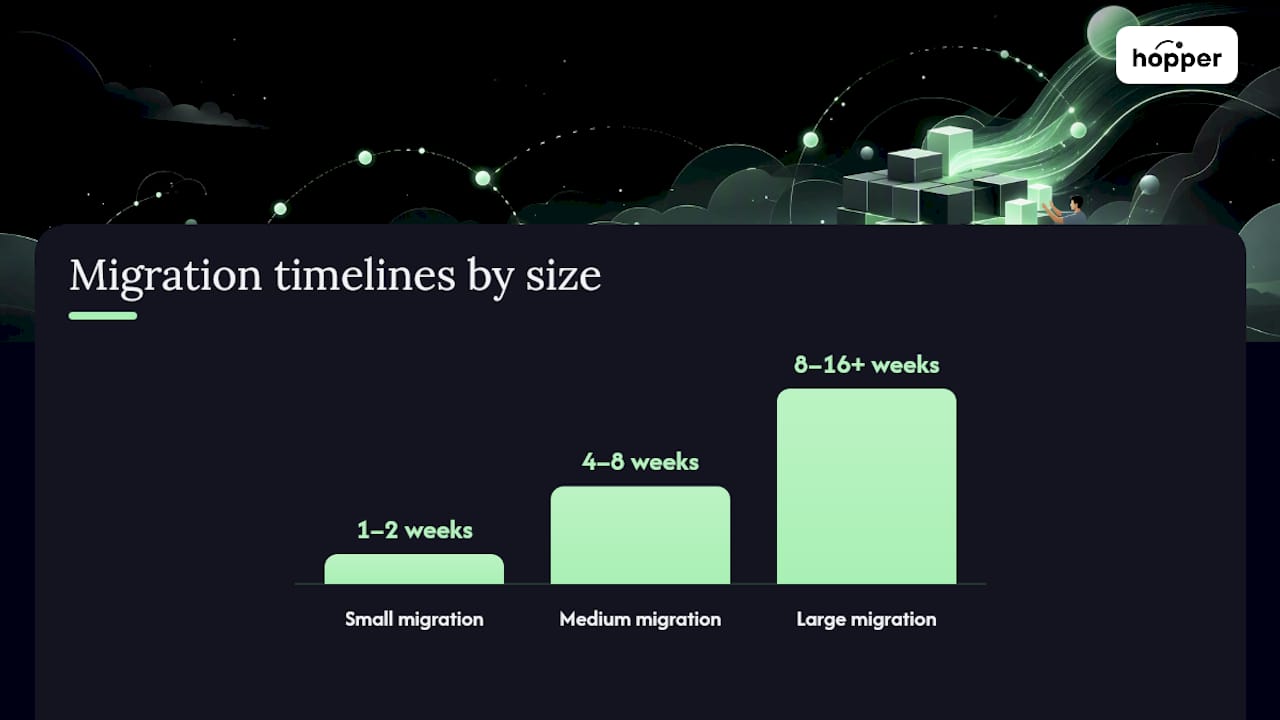
Rough timelines, based on typical migration scope:
- Small migration (under 100 students, one course): one to two weeks.
- Medium migration (a few hundred students, multiple products, some community history): four to eight weeks.
- Large migration (thousands of members, multiple offers, years of community threads): eight to sixteen weeks or more.
Before you commit, ask the receiving vendor these questions directly: Do you have a dedicated migration team, or am I following a self-serve guide? What's your track record moving accounts off the platform I'm currently using? What happens to my SEO and existing URLs? Is there a service-level agreement for migration support, or is it best-effort? A vendor that answers vaguely, or pushes you toward a help article instead of a real conversation, is telling you something about the support you'll get after you've paid.
How Do You Choose the Right All-in-One Course Platform?
Start with your business model, not the feature list. An evergreen course, a cohort program, a membership community, and a coaching practice each lean on different capabilities, and the "best" platform is the one that matches your actual delivery format.
- Evergreen courses need strong drip scheduling, automated email sequences, and a checkout flow that converts without your involvement.
- Cohort-based courses need reliable live-session tools, cohort-specific spaces, and a way to track who's actually completing assigned work.
- Membership communities need active discussion spaces, a content library that doesn't feel buried, and pricing that doesn't punish you for growing.
- Coaching practices need private client workspaces and some form of async communication that doesn't require a scheduled call every time.
Once you know your model, run this evaluation checklist:
- Scalability: does the pricing structure punish growth, or does the platform get cheaper per member as you scale?
- Native apps: is iOS and Android access included at your tier, or gated behind an upgrade?
- Exportability: can you get your data out easily if you ever need to leave?
- Payment and payout flow: how fast do you actually receive funds, and what's the real transaction fee after discounts?
- Support: is there a human to talk to, or only a help center?
When you're on a sales call, ask pointed questions: "What's your transaction fee at my current volume, and does it change as I grow?" "Can I run more than one community or brand under a single account?" "What's your migration support process, step by step?" Vague answers, or a rep who redirects to a features page instead of answering directly, are red flags worth taking seriously.
Prioritize what you need now over what sounds impressive later. A robust API integration you won't use for a year can wait. Transaction fees eating your margin today cannot.
Which Setup Fits Your Type of Creator Business?
Seeing how the same platform serves different business models makes the decision concrete rather than theoretical.
- The single-creator membership. One coach, one content library, async coaching for members who message questions between sessions instead of booking calls. The core need here is a content library that feels organized and a way to answer members without living in your inbox.
- The cohort-based course. A defined start date, live sessions, assigned homework, and a private space for that cohort to bond before the group disbands. The platform needs to support scheduled events and track who's actually doing the work, not just who logged in.
- The multi-hub operator. Someone running a fitness brand and a separate business coaching offer under one roof, wanting both audiences kept distinct without paying for two separate platform subscriptions. This is where most tools force you into an awkward workaround, or a second account entirely.
- The high-volume operator. A six or seven-figure coach with thousands of members who has outgrown the pricing tier they started on and is now watching contact caps and per-seat costs eat into margin every time the business grows.
Each of these maps to a different priority order on the checklist above, which is exactly why the "best platform" question rarely has one answer.
Why Hopper Solves the Consolidation Problem Coaches Actually Have
Hopper was built around the specific complaint most coaches voice once they've hit six figures: the tools work, but the stack costs too much and none of it feels like one place. Here's what that looks like in practice.
- Multi-hub accounts. Run unlimited hubs for different businesses under a single account and plan, something Skool style single-community platforms don't allow.
- Native iOS and Android apps included at the flat price, not gated behind a premium tier.
- Unlimited members, moderators, and products on every hub, with no contact caps forcing a surprise upgrade.
- Loyalty pricing, where members pay less the longer they stay, a retention incentive rarely offered elsewhere in this market.
- Migration support for creators switching from platforms like Kajabi, according to Hopper's own product page.
Pricing is straightforward: Base runs $58 a month with a 1% transaction fee, and Pro runs $108 a month with 0% transaction fees, according to Hopper's published plans.
One creator, Daniel Lim, reported cutting roughly $6,000 a year in software costs after consolidating his course, community, and checkout tools onto Hopper, according to a publisher case study on comparing course platforms.
That number isn't abstract. It's what happens when you stop paying separately for a course host, a community app, and a checkout page, and start paying once. Hopper's own account of its migration work also points to three coaches who've already moved their businesses off Kajabi, drawn by a cleaner interface and flat pricing instead of rising per-tier costs. Reader testimonials and further detail live on Hopper's users page.
Should You Consolidate to One Platform, or Stay Best-of-Breed?
Consolidation is the right long-term play once your tool bill starts outpacing your actual need for specialized features. If you're paying for a course host, a community app, a checkout tool, and a link-in-bio page, and none of them talk to each other, you're not buying flexibility. You're buying friction and calling it choice.
Best-of-breed still makes sense in narrower cases: if your business runs on a genuinely custom workflow, a bespoke certification system tied to a regulatory body, or integrations so specific that no consolidated platform will match them, stitching tools together might still be the right call. That's a smaller slice of the market than most "just use separate tools" advice assumes.
For most coaches and creators, though, the tool-sprawl pain shows up quietly. It's the fourth login of the morning, the fifth monthly charge, the moment you realize your community members and your paying students live in two places that don't sync. Revenue and team size matter less here than friction. A solo coach at $3,000 a month in revenue can feel this pain just as sharply as a seven-figure operator with a team of three.
The practical next step is simple: total up what you're paying across your current stack, including transaction fees, and compare it against a single flat-rate platform. If the number surprises you, that's your answer.
Ready to Stop Paying for Four Tools That Do One Job?
If you've read this far, you've probably already counted up your own stack: a course host, a community app, a checkout tool, maybe a link-in-bio page, each billing separately and none of them syncing your member data.

What makes it fit the reader who just finished this guide is the combination most competitors split across tiers: native iOS and Android apps included from day one, unlimited members and products with no contact caps, and loyalty pricing that rewards members for staying instead of charging everyone the same rate forever. If you're running more than one brand, Hopper's multi-hub structure lets you manage each under one account instead of paying for separate subscriptions.
Migration support is built in, not an afterthought bolted onto a help article. Coaches who've moved off Kajabi describe the process as far less painful than they expected, according to Hopper's own migration case studies. If your current stack is costing you more than it's saving you, visit Hopper's product and pricing page and see what a single flat rate actually gets you.
Sources
For context on how the broader learning market operates outside the creator-coach space, Coursera's tiered consumer and enterprise products show how large platforms segment pricing by audience. edX, launched by Harvard and MIT, illustrates the institutional end of online learning, useful contrast if you're weighing brand control against academic scale.
FAQ
What Is the Best Platform for Courses?
The best platform depends on whether you need courses alone or courses plus community and payments together. For coaches consolidating multiple tools, an all-in-one platform like Hopper, priced from $58 a month, typically costs less than running separate course, community, and checkout tools.
What Are the Top Learning Management Systems?
Large institutional platforms like Coursera and edX dominate the academic and enterprise training space, while creator-focused all-in-one platforms serve coaches and independent educators who want direct monetization and brand control instead of marketplace discovery.
Is There a Good Free Course Platform?
Most genuinely capable platforms charge a monthly fee once you add community features, live sessions, or a storefront, since hosting video and processing payments carries real cost. Free tiers usually cap members or features tightly enough that they work only for testing, not running a real business.
How Much Should an All-in-One Course Platform Cost?
The real cost comparison has to include those fees, not just the advertised monthly rate.
How Long Does It Take to Migrate to a New Course Platform?
A small migration with under 100 students typically takes one to two weeks, while a large migration involving thousands of members and years of community history can take sixteen weeks or more. Vendors with dedicated migration support, rather than self-serve export tools, generally move faster.
Recommended
On our list and want off? .