
7 Step Evidence Based Playbook for Educators: Asynchronous Teaching
A research-backed, implementation-first playbook for educators: seven course-design steps, 5–7 minute video guidance, checklists for social presence and...
By the Hopper team

Asynchronous teaching delivers instruction and materials that students access on their own schedule, separated from any live meeting. It fits best when content is stable, audiences span time zones or caregiving and work schedules, and the goal is scale without sacrificing quality. The trade-off is real: students need stronger self-regulation and instructors need to design for connection deliberately, but with the right scaffolding, outcomes match synchronous formats.
TL;DR:
- Well-designed asynchronous courses with structured activities and peer roles can maintain engagement comparable to live formats.
- Short, focused videos of 5 to 7 minutes with clear objectives and transcripts significantly improve student watch-through rates and accessibility.
- Building scaffolds like rubrics, checklists, and routine feedback loops reduces instructor workload and supports student self-regulation effectively.
- Cultivating social presence through brief instructor videos, peer moderation, and small discussion groups helps mitigate isolation in asynchronous learning.
- Tracking weekly login, participation, and video engagement offers better insights into course effectiveness than final grades alone.
Table of Contents
- What Is Asynchronous Teaching, Exactly?
- Asynchronous vs Synchronous: How to Decide
- Benefits and Challenges, Backed by Evidence
- Practical Course-Design Strategies: A Step-by-Step Playbook
- Building Social Presence Without a Live Classroom
- Assessment and Feedback That Scale
- Technical and Media Best Practices
- A Short Checklist for Recording Better Video
- What Successful Asynchronous Courses Actually Look Like
- Getting Instructors Ready to Teach Asynchronously
- Measuring Whether It's Actually Working
- How Students Can Succeed in an Asynchronous Course
- The Real Trade-Off Nobody Talks About Enough
- Where Hopper Fits Into Your Asynchronous Course Design
- Sources
- FAQ
What Is Asynchronous Teaching, Exactly?
Asynchronous teaching means students engage with content, assignments, and discussions on their own timeline rather than gathering with an instructor in real time. No Zoom call, no fixed class period. A recorded lecture posted Monday might get watched Tuesday morning by one student and Thursday night by another, and both are still "in class."
That definition often gets flattened into "self-paced," which is a mistake. Cohort-based asynchronous courses still have a group moving through the same material during the same week, with discussion boards, peer feedback, and deadlines. They just don't require anyone to log in at 2:00 PM on a Tuesday. Fully self-paced models drop even that shared timeline, letting learners start and finish whenever they want. Bichronous models blend the two, pairing asynchronous content delivery with occasional live sessions for Q&A or community building.
The common formats instructional designers work with include:
- Cohort-based asynchronous: shared weekly deadlines, group discussions, no live meetings.
- Fully self-paced: individual start and end dates, common in professional training and certificate programs.
- Bichronous/blended: asynchronous core content plus scheduled but optional live touchpoints.
- Flipped asynchronous: pre-recorded content consumed independently, with any live time reserved for application, not lecture.
The misconception worth killing early: asynchronous does not mean unstructured. The University of Michigan's teaching guidance frames this well, treating asynchronous design as a structural problem, not just a scheduling one. Durable content and recurring feedback loops are what make it work, not the absence of a class time.
Asynchronous vs Synchronous: How to Decide
Choosing between asynchronous and synchronous teaching, or blending the two, comes down to four practical axes: content stability, audience constraints, equity of access, and cognitive load.
Content that changes rarely (foundational concepts, procedural walkthroughs, theory) records well and holds up across semesters. Content that depends on spontaneous debate, live troubleshooting, or reading a room in real time loses something when it's asynchronous. A statistics proof survives being recorded. A Socratic seminar on a contested ethical question mostly does not.
Audience matters just as much as content. A cohort of working adults across four time zones will not benefit from a mandatory 10:00 AM live session. A group of on-campus undergraduates in the same dorm might actually want it.
Here's a rough task-to-mode map that instructional designers can use as a starting point:
- Lecture-style content delivery → asynchronous (recorded, chunked).
- Skill practice with instant troubleshooting → synchronous or bichronous office hours.
- Peer debate or collaborative problem-solving → synchronous when feasible, or structured asynchronous discussion with staggered deadlines.
- Assessment and reflection → asynchronous, almost always.
- Community building and onboarding → bichronous, mixing a live kickoff with ongoing asynchronous spaces.
Comparative reviews increasingly point toward the blend rather than a strict either/or. Research on synchronous and asynchronous online learning recommends bichronous designs specifically because mode choice should track the task, the audience, and equity considerations, not a blanket institutional policy. If your students have unreliable internet or rotating shift work, asynchronous-first with optional synchronous support beats mandatory live attendance every time.
Benefits and Challenges, Backed by Evidence
The flexibility argument for asynchronous teaching is well established, but the evidence on outcomes is what should carry the most weight in a curriculum decision.
Meta-analyses and randomized trials show asynchronous and synchronous learning produce largely equivalent learning outcomes. Students in well-designed asynchronous courses learn the material about as well as students in live formats, though the comparative research also notes asynchronous learners often report slightly lower intrinsic motivation and need more self-discipline to keep pace.
By the numbers: One 2024 study recorded satisfaction ratings of 4.6 out of 5 for synchronous teaching versus 4.53 out of 5 for asynchronous. The gap is small, and it shows up in perceived experience more than measured learning.
The benefits that make asynchronous worth the design investment:
- Flexibility for students juggling work, caregiving, or health constraints.
- Revisitability, since a recorded explanation can be replayed until it clicks, unlike a live lecture.
- Scalability, letting one well-built module serve a cohort of 30 or 3,000 without added live-facilitation hours.
- Accessibility gains, particularly for neurodiverse students and those with disabilities who benefit from self-paced review, a point University of Washington's teaching guidance highlights directly.
The challenges are equally concrete: students without strong self-regulation skills fall behind faster, isolation creeps in without deliberate community design, and feedback loops that would be instant in a live classroom become delayed by default. None of that is a reason to avoid asynchronous teaching. It's a reason to design for it.
Practical Course-Design Strategies: A Step-by-Step Playbook
Building an asynchronous course that actually works is less about tools and more about sequencing. Here's a playbook that holds up across disciplines.
-
Start from outcomes, not content dumps. Write the three or four things a student should be able to do by the end of the module, then build activities that require doing those things, not just watching them explained.
-
Set weekly mini-deadlines even in fully asynchronous courses. A single end-of-term deadline invites procrastination. Breaking a module into weekly checkpoints (watch, respond, submit) gives students a rhythm without requiring a live meeting.
-
Chunk everything. Break a 40-minute lecture into five 6 to 8-minute segments, each tied to one idea. Pair each segment with a short task: a two-question check, a one-sentence reflection, a small application problem. This keeps students actively processing instead of passively scrolling.
-
Design interaction on purpose, not by default. A discussion board prompt that says "share your thoughts" produces thin, disconnected posts. A prompt that assigns roles (one student summarizes, another challenges an assumption, a third connects it to a prior module) produces something closer to real dialogue. Iowa State's Center for Excellence in Learning and Teaching recommends structured discussion rules and guided notes as tested, practical tactics rather than open-ended prompts.
-
Front-load low-stakes tasks. The first week should have something small and quick, not the heaviest assignment of the term. Early wins build the habit of logging in and engaging before the stakes go up.
-
Build in scaffolds for self-regulation. Rubrics that spell out exactly what "good" looks like, checklists students can tick off before submitting, and a simple analytics dashboard that flags who hasn't logged in for a week all reduce the burden asynchronous formats put on student discipline. Harvard Business Impact Education's guidance is explicit that explicit norms and analytics monitoring are what keep engagement from quietly collapsing.
-
Protect your own workload from the start. Asynchronous courses can create a steady drip of messages and posts that never stops, unlike a class that ends when the bell rings. Selective grading (deep feedback on some submissions, checklist-level feedback on others), peer moderation of discussion boards, and rotating student roles all cut down the hours you'd otherwise spend responding to everything yourself.
Pro Tip: Batch your asynchronous feedback into two or three set windows a week instead of responding as messages arrive. Students adjust to a predictable rhythm fast, and you avoid the trap of being "on call" for a class that never technically meets.
Building Social Presence Without a Live Classroom
Isolation is the most common complaint about asynchronous courses, and it's almost always a design gap rather than an inherent flaw of the format.

Instructor presence has to be manufactured deliberately when there's no shared class time. A short weekly video announcement (60 to 90 seconds, filmed on a phone, no production value required) does more for a sense of connection than a beautifully polished but impersonal module intro. Posting a model response in the discussion board, one that shows what depth and tone you're looking for, sets a bar students can see rather than guess at.
Peer-led structures fill the rest of the gap:
- Rotating discussion moderators who open threads and keep conversation moving, spreading the responsibility instead of leaving every post unanswered until the instructor shows up.
- Assigned initial-post responsibilities, staggered across the week, so students on tight schedules still get in early rather than posting into an already-buried thread.
- Small, persistent discussion pods of four to six students who stay together across the term, building familiarity instead of meeting strangers in every new thread.
Harvard's teaching guidance frames this as intentional social-presence design: scaffolds, peer roles, and structured check-ins, not hope that connection happens on its own. It rarely does without a nudge.
Assessment and Feedback That Scale
Feedback is where asynchronous courses either build trust or lose it. Delayed, generic responses tell students nobody's paying attention. The fix isn't more hours. It's better structure.
Frequent, low-stakes checks (a two-question quiz after each video, a short application problem after each reading) catch confusion early instead of letting it compound until the midterm. These are quick to grade and quick for students to complete, which keeps the feedback loop tight even without live class time.
Peer review handles the volume problem when structured well:
- Clear rubrics that spell out exactly what reviewers should look for, so feedback doesn't collapse into vague praise.
- Small review groups of two or three, rotated periodically, to prevent one student from always grading the same peer.
- Instructor spot-checks on a sample of peer reviews each week, catching quality problems before they spread.
Learning management system analytics do the triage work a live classroom does automatically. When you can see a student hasn't logged in for ten days or failed two consecutive checks, that's your cue to reach out, not wait for a final grade to reveal the problem. Prioritizing outreach by what the data actually flags, rather than trying to personally track every student, is what keeps feedback timely at scale.
Technical and Media Best Practices
Video length is not a minor production detail. It's one of the most consistently cited levers in asynchronous course design.
The 5 to 7 minute rule: Research-backed guidance from Penn State's teaching resources recommends keeping video segments in the 5 to 7 minute range, since students watch a meaningfully higher percentage of shorter clips than long-form recorded lectures.
Beyond length, a few technical habits separate courses that work from ones that quietly lose students:
- Captions and transcripts on every video, which support accessibility and also let students skim for a specific point instead of rewatching the whole clip.
- Low-bandwidth alternatives, like an audio-only download or a text summary, for students without reliable high-speed internet.
- Single-source content libraries rather than files scattered across email attachments, shared drives, and three different apps.
- Completion tracking built into the platform, so both student and instructor can see progress without a manual spreadsheet.
None of this requires a production studio. It requires consistency, and a platform that doesn't make consistency harder than it needs to be.
A Short Checklist for Recording Better Video
Every clip should map to exactly one learning objective. If you catch yourself covering three ideas in one video, that's a sign to split it into three.
A tight production checklist:
- One objective per clip. State it in the first ten seconds.
- Visuals that match the narration, not decorative slides that compete with what you're saying.
- A reflective prompt at the end, even a single sentence, that asks students to apply or connect the idea before moving on.
- Timestamps in the description, so a student revisiting the video can jump straight to the section they need.
- A transcript attached, both for accessibility and for students who process text faster than audio.
Penn State's asynchronous teaching guidance confirms the pattern: shorter, focused segments consistently produce higher watch-through rates than dense, multi-topic recordings. The fix is almost always to cut, not to add.
What Successful Asynchronous Courses Actually Look Like
A mid-size university history department rebuilt its introductory survey course around weekly modules: one 6-minute framing video, a primary-source reading, a structured discussion with assigned roles, and a low-stakes quiz. No live sessions were required. Completion rates held steady across three semesters, and the department reported feedback turnaround improved once instructors moved to a fixed twice-weekly grading window instead of responding to submissions as they came in.
A professional certificate program in project management runs entirely self-paced, with cohort touchpoints limited to a single live kickoff call and an asynchronous peer-review checkpoint at the midpoint. Students span more than a dozen time zones. The design leans hard on rotating discussion moderators, which solved the early problem of threads sitting unanswered for days.
A community college composition course combined short instructor video feedback (recorded, not written) with peer-review rubrics for every draft. Students reported the video feedback felt more personal than written comments, even though it took the instructor roughly the same time to produce.
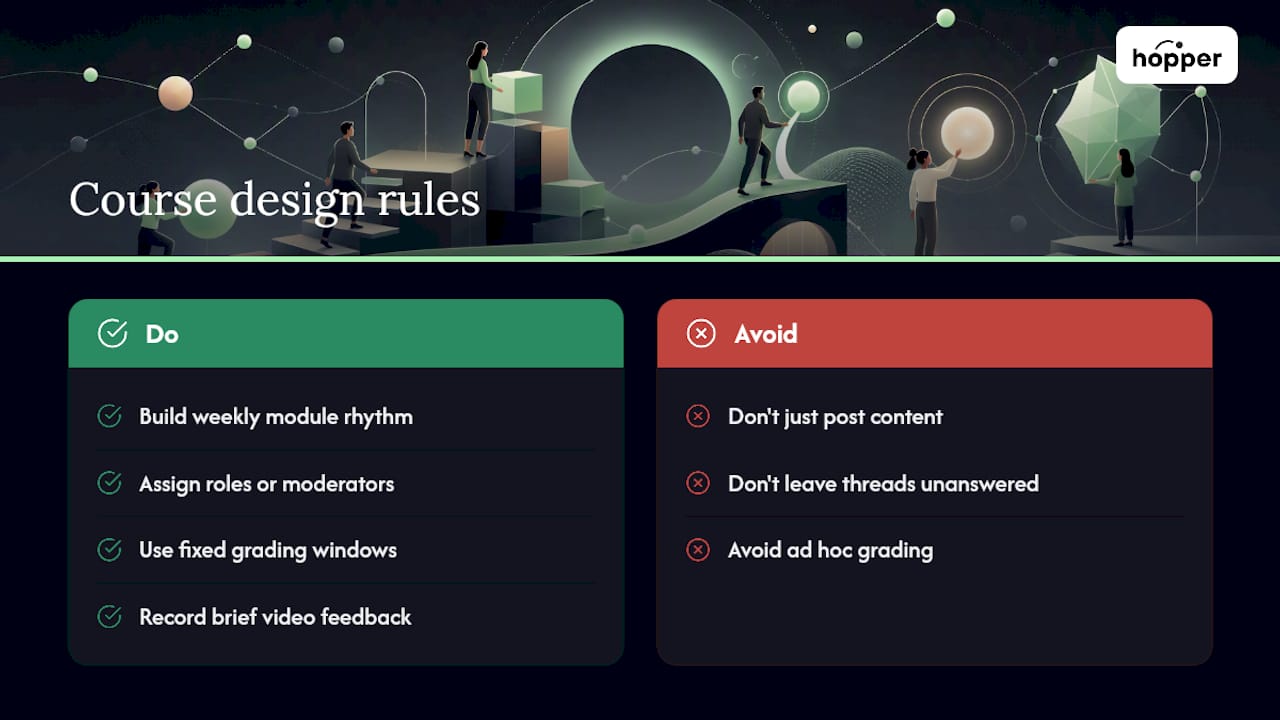
What connects these examples isn't the subject matter. It's that each one treated structure as the point. Weekly rhythm, assigned roles, and a fixed feedback cadence did more to sustain engagement than any single tool or platform choice. The common failure mode, by contrast, is a course that posts content and calls it done, with no mechanism pulling students back in between deadlines.
Getting Instructors Ready to Teach Asynchronously
Moving from a live classroom to an asynchronous format is a design skill, not a technology skill, and most instructor training gets that backwards.
The instructors who struggle most aren't the ones unfamiliar with recording software. They're the ones who try to replicate a live lecture on camera, talking for 45 minutes straight because that's the habit they know. Training should start with scripting and chunking, not with the record button.
A practical onboarding sequence for instructional designers supporting faculty:
- Start with a paired redesign, not a solo project. Have a newer instructor rebuild one module alongside someone who's already run an asynchronous course successfully.
- Provide templates, not blank pages. A discussion prompt template, a rubric template, and a video script template cut the intimidation factor dramatically.
- Run a short peer-observation cycle, where instructors review each other's first modules before launch, the same way a colleague might sit in on a live class.
- Set workload expectations explicitly. New instructors consistently underestimate how much asynchronous discussion moderation takes if it's not scaffolded with peer roles from day one.
Ongoing support matters more than the initial training session. A standing office hour for instructional design questions, a shared library of example modules, and a simple analytics dashboard showing where students in their course are struggling all keep instructors improving after launch instead of freezing the course design the moment it goes live.
Measuring Whether It's Actually Working
The honest answer is that grades alone won't tell you much. Asynchronous and synchronous formats produce comparable outcomes on average, so a passing grade doesn't confirm the design is working. Better signals are consistency and early warning.
Track weekly login and completion patterns rather than waiting for a final exam. A student who's active every week but bombs the final tells a different story than one who disappears in week three. Discussion post quality, not just quantity, matters too. A rubric that scores depth and response-to-peers, not just word count, catches the difference between real engagement and box-checking.
Video watch-through rates are one of the more underused metrics available in most learning management systems. If students consistently drop off at the same point in a video, that's a design signal, not a motivation problem. Cut or restructure that section.
Student surveys still matter, but ask specific questions rather than a generic satisfaction score: was feedback timely, did discussion prompts feel worth responding to, was the pacing manageable. Combine that qualitative signal with the login and completion data, and you get a picture that a single grade distribution never will.
How Students Can Succeed in an Asynchronous Course
Students new to asynchronous formats often assume flexible means optional, and that assumption is what gets them into trouble by week four.
The habits that separate students who thrive from students who fall behind:
- Block calendar time for the course, even without a scheduled class period. Treat the block like a real appointment, not a "whenever I get to it" task.
- Do the first week's small tasks immediately, since early momentum predicts whether the habit sticks for the rest of the term.
- Engage in discussions early in the week, not the night before the deadline, so there's actually a conversation to join.
- Use video controls deliberately. Slow down dense sections, speed through review material, and rewatch anything unclear instead of pushing forward confused.
- Reach out before falling behind, not after. Instructors in well-designed asynchronous courses are watching analytics and want the early message, not the week-twelve apology.
Asynchronous classes aren't inherently harder than live ones. They demand more initiative up front and reward it heavily across the term.
The Real Trade-Off Nobody Talks About Enough
Most conversations about asynchronous teaching focus on the flexibility win and treat the self-regulation problem as a footnote. That's backward. The flexibility is almost free once a module is built. The self-regulation and community gap is where courses actually fail, and it's the part instructors consistently underinvest in during their first term teaching asynchronously.
The upfront design cost is real. Building scaffolds, rubrics, and discussion structures takes longer than recording a lecture and posting it. But that investment pays off precisely because it lowers the marginal effort of every future term, especially once peer roles and rotating moderation take over work that would otherwise fall entirely on the instructor.
The surprise most new asynchronous instructors report isn't the recording or the platform. It's how much time discussion moderation eats up if you don't build in structure from day one, and how much lighter that load gets once you do.
— Cedrik
Where Hopper Fits Into Your Asynchronous Course Design
Everything covered so far, chunked content, structured discussion, async coaching, and analytics-driven outreach, needs a place to actually live. Most educators end up stitching together a course host, a separate community tool, and a checkout page just to cover those needs, paying three subscriptions and managing three logins for one course.

Hopper consolidates that stack into one hub: a content library for your chunked video lessons, Discussions for structured peer threads and rotating moderator roles, and Async Sessions for one-on-one or small-group coaching that doesn't require a live call. Every hub includes unlimited members, moderators, and products, so a growing cohort never hits a contact cap the way it might elsewhere. Members access everything through a native iOS and Android app at no extra tier, and loyalty pricing means students who stick with a program over time pay less, which reinforces exactly the consistency this article argues matters most.
Base runs on a subscription model with additional transaction fees; Pro offers a higher-priced tier with no transaction fees for instructors running higher volume. If your current course stack feels like three tools wearing a trench coat, see how Hopper's platform maps to your next asynchronous module before you rebuild it again from scratch.
Sources
- PubMed entry: comparative studies of learning modalities (2024)
- The evaluation of synchronous and asynchronous online learning: student experience, learning outcomes, and cognitive load (PMC)
- Teaching Asynchronously Online | Harvard Business Impact Education
- Best practices for asynchronous learning (Penn State / teaching guidance summary via University of Michigan site)
FAQ
What Is the Difference Between Asynchronous and Synchronous Teaching?
Synchronous teaching happens in real time, with students and instructors present simultaneously, while asynchronous teaching lets students engage with content and assignments on their own schedule. Research shows both produce comparable learning outcomes, though asynchronous formats demand more self-regulation from students.
What Are Some Examples of Asynchronous Learning?
Common examples include recorded video lectures with follow-up quizzes, structured discussion boards with assigned peer roles, self-paced certificate modules, and async coaching sessions where feedback happens on a delay rather than live. Platforms like Hopper support this last format directly through dedicated async coaching spaces.
What Are the Disadvantages of Asynchronous Classes?
The main drawbacks are weaker built-in social presence, delayed feedback compared to live discussion, and a heavier reliance on student self-discipline to keep pace without a fixed class time. Deliberate design, structured discussion prompts, peer moderation, and analytics-based outreach, addresses most of these gaps.
Are Online Asynchronous Classes Hard?
Asynchronous classes aren't harder in terms of content difficulty, but they demand more initiative since there's no fixed class period forcing engagement. Students who block dedicated time and engage early in each week's activities tend to perform comparably to students in live formats.
Recommended
On our list and want off? .