
Migrate Without Rebuilding: Best Platform for Life Coaches
See why Hopper replaces four tools for life coaches: community, content, async coaching, and checkout. Plans start at $58/month; migration from $588.
By the Hopper team
Hopper is the best platform for most life coaches because it puts community, content, async coaching, and a storefront under one flat price instead of four separate bills. It ships with native iOS and Android apps and no member caps, so it fits solo coaches and growing teams alike. The exception is a coach bound by heavy compliance rules or a strictly in-person practice, where a specialized or local tool may fit better.
TL;DR:
- Hopper offers unlimited hubs, members, and products for $58 per month with a 1% transaction fee, making it cost-effective for scaling coaches.
- Its platform consolidates community, content, asynchronous coaching, and e-commerce into one app, reducing tool sprawl and related expenses.
- Migration support from platforms like Kajabi or Circle is available starting at $588, and coaches report saving thousands annually by switching.
- Features like native mobile apps, multiple hub support, and customizable branding suit growing and multi-coach teams better than solo beginners.
- Key comparison factors include transaction fees, member caps, data export options, support quality, and flexibility for business growth stages.
Table of Contents
- What Should the Best Platform for Life Coaches Actually Do?
- What Should You Compare Before Choosing a Platform?
- How Do You Decide Which Platform Fits Your Stage?
- What Does Migrating to a New Coaching Platform Involve?
- How Do You Compare Platform Costs the Right Way?
- How Secure Is Client Data on a Coaching Platform?
- Who Actually Benefits Most From Each Type of Platform?
- How Much Can You Customize Branding and the Client Experience?
- What Do Reviews and Reputation Actually Tell You?
- What Should You Know About Cancellation and Refunds?
- Why Consolidation Is Winning the Coaching Software Argument
- Ready to See Hopper in Action?
- Sources
- FAQ
What Should the Best Platform for Life Coaches Actually Do?
A coaching platform earns its keep by handling four jobs at once: delivering your program content, hosting client conversation, processing payments, and giving you a way to talk to clients between sessions without scheduling another call. Most software does one or two of these well and forces you to bolt on the rest.
Hopper organizes its whole product around a single unit called a hub, a self-contained space for one coaching business. Inside a hub you get Discussions (a community feed with spaces, threads, reactions, and native video), a Library for unlimited video, audio, and live replays that you can sell individually or bundle into a membership, Async Sessions for asynchronous coaching, and a public landing page that shows every product you sell in one spot.
Here's how those pieces map to the actual work of running a coaching practice:
- Async Sessions cut down live call load. A client can send a voice note or written check-in between sessions instead of booking another 30 minutes on your calendar, which matters if you coach more than a handful of clients weekly.
- The storefront replaces your link-in-bio tool. Instead of routing people through Stan Store or Linktree, your Hopper landing page sells the program, the community, and the one-off session in the same place someone lands to learn about you.
- Unlimited hubs support side businesses. A mindset coach running a paid membership and a separate cohort-based program can operate both under one account, where a platform like Skool caps you at one community per account.
- Native mobile apps come standard. Members get an iOS or Android app at either pricing tier, not gated behind a top-level plan the way several competitors structure theirs.
Pricing runs two ways. A base plan costs $58 per month with a 1% transaction fee on sales made through the platform. Members, moderators, and products are unlimited on both tiers.
One documented case: a coach named Daniel Lim consolidated his existing stack onto Hopper and cut roughly $6,000 a year in software costs. Three other coaches have moved their businesses off Kajabi onto Hopper without rebuilding their programs from scratch, according to Hopper's own comparison of what legacy platforms don't advertise. That migration detail matters more than it sounds. Most coaches don't switch platforms because they're curious. They switch because a tool sprawl finally got expensive enough to fix.
What Should You Compare Before Choosing a Platform?
Every vendor pitch sounds similar until you get specific. Use this checklist against any platform you're evaluating, including Hopper, before you commit.
Feature checklist:
- Scheduling and calendar sync for live sessions
- Client CRM and session notes storage
- Async coaching tools for between-session contact
- Community spaces with moderation controls
- A content library that handles video, audio, and downloadable material
- A built-in storefront and checkout, not a redirect to a third-party cart
- Reporting or outcomes tracking so you can show clients their progress
Operational checklist:
- Transaction fees on sales, and whether they drop as you move up a tier
- Member or contact caps that force an upgrade once you grow
- A native mobile app, not just a mobile-responsive browser page
- Multi-hub or multi-community support if you run more than one offer
- Data export and portability in case you switch again later
- Integrations with your email tool, webinar software, and video call provider
Service checklist:
- Migration support, ideally hands-on rather than a help article
- Trial or demo length, and whether it requires a credit card upfront
- Onboarding resources: templates, setup calls, documentation
- An active user community or published case studies you can actually read
Capterra's coaching software shortlist shows how consistently these categories show up across vendor listings, which tells you they're not arbitrary. Reviewers consistently flag the same gaps: hidden fees, weak mobile experience, and clunky data export when they try to leave.
Pro Tip: Ask a vendor to show you their data export function during the demo, not just describe it. If they hesitate or say it requires a support ticket, that's a preview of what leaving will feel like later.
How Do You Decide Which Platform Fits Your Stage?
The right platform depends less on your coaching niche and more on where your business sits right now.
New coaches should weigh cost and simplicity above everything else. You don't need advanced reporting or five community spaces when you have twelve clients. Look for a flat monthly price with no member cap that punishes early growth.
Growing coaches running a paid community or a cohort program need to weigh community and content features harder than raw price. This is where a discussion feed, native video replies, and a real content library start mattering more than they did at twelve clients.
High-volume coaches running six or seven figures a year need to focus on scale limits and migration support above all else. If you're already on Kajabi or Circle and considering a move, the question isn't whether the new platform has features. It's whether you can move without rebuilding your entire program from zero.
Ask any vendor these ten questions before you sign up:
- Is there a free trial or live demo, and how long does it run?
- Do you offer migration assistance, or am I doing it myself?
- What's your transaction fee, and does it change by tier?
- Is there a cap on members, contacts, or products?
- Is the mobile app included at every pricing tier?
- Can I export my client data and content if I leave?
- Do you offer white-labeling or custom branding?
- What's your typical support response time?
- Do you support asynchronous coaching, not just live calls?
- Do you offer loyalty pricing or discounts for long-term members?
Watch for these red flags: no export option, per-member fees that scale against you as you grow, pricing pages that hide the real total cost until checkout, and no native app when your clients expect one.
What Does Migrating to a New Coaching Platform Involve?
Moving platforms feels riskier than it usually is, provided you follow a sequence instead of trying to move everything at once.
- Audit your current stack. List every product, member, and payment method living across your existing tools.
- Export your data. Pull client lists, content files, and video links before you touch anything else.
- Map products and members to the new structure. Decide how your programs and community spaces translate into the new platform's hubs or spaces.
- Run a pilot import. Move a small segment of content and a handful of test members first.
- Test payments end to end. Run a real transaction before your full client base depends on it.
- Soft launch to a small group. Let a subset of clients use the new platform for a week or two.
- Cut over fully. Retire the old tools once the pilot group confirms everything works.
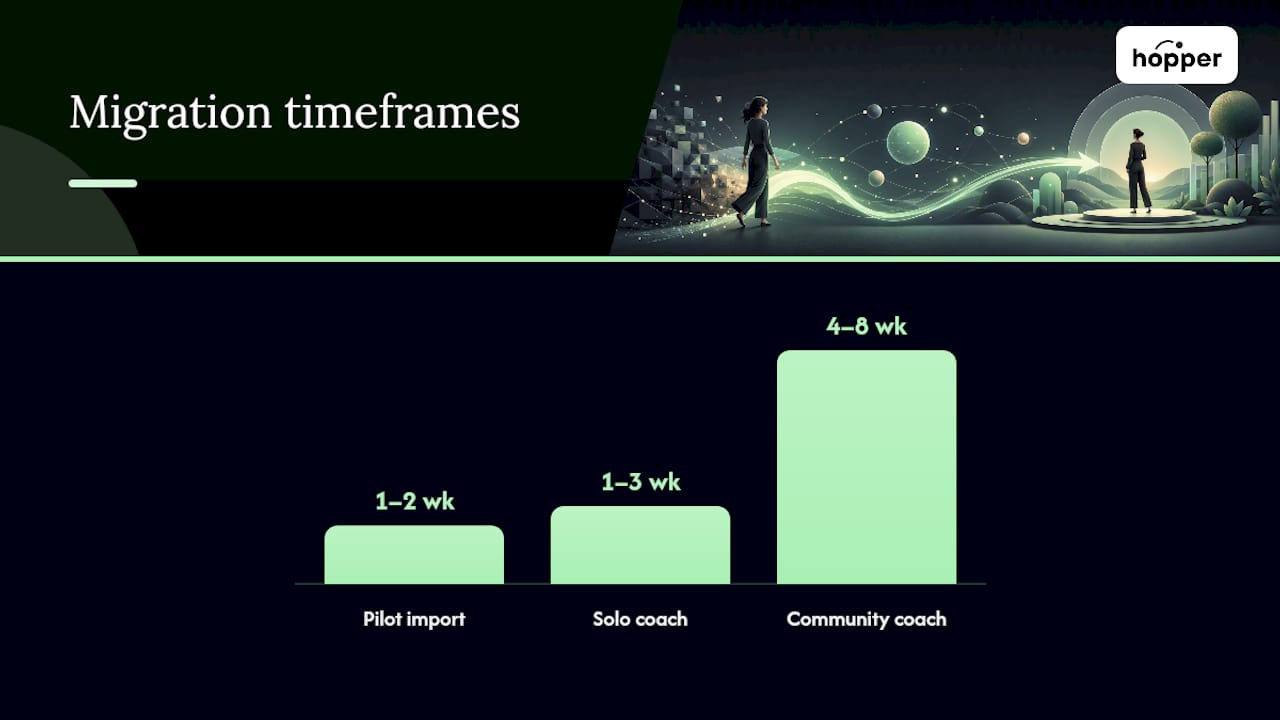
A solo coach with one offer and a few hundred contacts can typically finish this in one to three weeks. A coach running a community with cohort programs and multiple content tiers should plan for four to eight weeks, and it helps to have someone handling the technical side, someone watching finances, and someone responsible for content separately rather than one person doing all three.
The most common pitfalls: broken video links after export, permission mistakes that lock moderators out of spaces they should control, email deliverability issues when you switch your sending domain, and billing proration errors that overcharge or undercharge returning members mid cycle. Catch these in the pilot phase, not after full cutover. Hopper's migration service handles course and payment migrations directly, starting from $588 one time, which is often cheaper than the staff hours a DIY migration eats up.
How Do You Compare Platform Costs the Right Way?
Sticker price is the least useful number on a pricing page. The real comparison is total annual cost: subscription plus transaction fees plus any migration fee, run against your actual sales volume.
| Cost factor | What to check | Why it matters |
|---|---|---|
| Base subscription | Monthly or annual price | Fixed cost regardless of sales |
| Transaction fee | Percentage per sale | Scales with revenue, easy to underestimate |
| Member or contact caps | Price to unlock more | Forces upgrades as you grow |
| Add-on features | Cost for automation, branding, or extra seats | Often not included in the advertised price |
| Migration or setup fee | One-time cost to move | Rarely mentioned upfront |
Here's a worked example. A solo coach selling one $200 program to roughly ten people a month on Hopper Base pays $58 a month plus 1% of $2,000 in sales, or $20, for a total of $78 monthly.
GetApp's vendor review pages note that pricing detail is often the first thing coaches feel misled by after signing up, usually because the fee structure wasn't obvious until the first invoice. Run the math before you commit, not after.
How Secure Is Client Data on a Coaching Platform?
Client session notes are sensitive by nature, often touching health, relationships, and finances. Before trusting any platform with that information, confirm it offers encryption both in transit and at rest, role-based access so only the right people see client records, regular backups, and a privacy policy you can actually read without a law degree.
On your end, a few habits reduce risk regardless of which platform you choose:
- Keep session notes factual and minimal; avoid recording detail you don't need for the coaching relationship itself
- Use signed consent forms before recording calls or storing sensitive disclosures
- Separate especially sensitive records from your general note system
- Back up your own data independently, even when the platform backs up its side
- Route payments through an established processor rather than a homegrown checkout
Ask any vendor for a written link to their security documentation and a direct answer on data export and deletion policies. A vendor that stalls on that question is telling you something.
Who Actually Benefits Most From Each Type of Platform?
Solopreneur coaches running one offer and a modest client list benefit most from simplicity: one login, one price, no team permissions to manage. A platform with a low monthly floor and no per-member penalty fits this stage best.
Multi-coach teams, like a business coaching practice with two or three coaches sharing a client base, need role-based permissions and shared content libraries more than raw scale. The ability to run separate hubs or spaces per coach while sharing back-end infrastructure saves real administrative time.
High-volume operators running six or seven figures a year, often with hundreds or thousands of members, hit the limits of tiered platforms fastest. Contact caps that force a $400 monthly plan just to add fifty more members become expensive quickly, which is exactly the pressure that's pushed established coaches off Kajabi and Circle toward flatter pricing structures with unlimited members built in from the base tier.
Fitness coaches, business coaches, and mindset coaches all show up across these three categories in roughly similar proportions. The deciding factor isn't the coaching niche. It's the size and shape of the business behind it.
How Much Can You Customize Branding and the Client Experience?
Your platform is often the first thing a prospective client sees, before they ever speak to you. A generic, unbranded interface undercuts the trust you're trying to build.
Look for the ability to customize your landing page with your own name, logo, and program descriptions rather than a template every other coach on the platform shares. Hopper's public landing page inside each hub shows every published product in one place, styled around your brand rather than a shared marketplace look.
Client experience customization goes beyond visuals. Can you control what a new member sees first? Can you gate content so a client only accesses what they've paid for? Can you rename spaces and features to match your program's language rather than generic platform terminology? These small details compound. A client who feels like they're inside your program, not inside someone else's software, engages more consistently over time.
What Do Reviews and Reputation Actually Tell You?
Review aggregators like Capterra and SoftwareAdvice are a reasonable starting point for cross-checking platform claims against what real users report, particularly around onboarding friction and whether support responds quickly when something breaks.
Read reviews for patterns, not individual complaints. A single one-star review about a payment glitch tells you little. Ten reviews mentioning the same missing export feature or the same slow support ticket queue tells you a lot. Pay attention to review dates too. Software changes fast, and a platform's reputation from two years ago may not reflect its current state.
Testimonials on a vendor's own site carry less weight than third-party reviews, but they're still worth reading for specifics: did the coach mention a concrete outcome, like cost savings or time saved, or just vague praise? Concrete numbers and named use cases are harder to fake convincingly than general enthusiasm.
What Should You Know About Cancellation and Refunds?
Cancellation terms rarely get attention during the sales conversation, and that's exactly when you should ask about them. A monthly subscription should let you cancel without a lock-in contract; annual plans often carry different rules, so read the fine print on proration if you cancel mid-year.
Refund policies vary more than most coaches expect. Some platforms refund unused months on annual plans, others don't. Ask directly whether a refund applies to the platform fee, the migration fee, or neither, and get the answer in writing before you sign anything. If a vendor's cancellation policy isn't published clearly on their pricing page, treat that as a red flag on the same level as hidden transaction fees.
Why Consolidation Is Winning the Coaching Software Argument
The pitch for stitching together five specialized tools always sounds reasonable in isolation. Each tool does its one job well. But five separate logins, five separate bills, and five separate places a client might get confused adds up to a worse experience for the person you're actually trying to serve.
Flat pricing and native mobile apps aren't luxuries anymore. They're table stakes for a member base that expects a coaching program to feel as smooth as any consumer app they use daily. Loyalty pricing, where members pay less the longer they stay, is a small mechanic that rewards exactly the retention every coach is chasing.
If you're weighing a switch, don't migrate your whole business overnight. Trial the platform on one pilot cohort first, confirm the workflow holds up, then move the rest.
— Cedrik
Ready to See Hopper in Action?
Hopper replaces the four-tool stack most coaches assemble by accident: a course host, a community app, a checkout page, and a link-in-bio tool, each billing separately and gating features behind higher tiers.

This platform offers unlimited hubs, members, and products at a flat rate starting with a base plan at $58 per month, or a pro plan at $108 per month with zero transaction fees, plus a native iOS and Android app included at either tier. Before booking a demo, pull together a rough inventory: how many products you sell, roughly how many members you have, and a sample of the content you'd need to move over. That gives the team a real starting point instead of a guessing game.
If you're currently on Kajabi, Circle, or a similar stack, Hopper's migration service handles course and payment migration starting from $588 one time, and three coaches have already made that move without rebuilding their programs from scratch. Visit Hopper to explore plans, or browse what current users say about running their coaching business on it before you request a demo.
Sources
- Statista — Digital health: health & wellness coaching outlook (worldwide)
- Capterra — Coaching software shortlist
- GetApp — SimplyCoach profile
FAQ
Can I Use ChatGPT as a Life Coach?
ChatGPT can help you brainstorm session structures, draft client communications, or reflect on coaching frameworks, but it isn't a substitute for a trained coach's judgment, accountability, or relationship with a client. Platforms like Hopper are built to house the actual coaching relationship, including async check-ins, rather than replace the coach delivering it.
Is There High Demand for Life Coaches?
Yes. Market projections point to sustained growth in digital health and wellness coaching worldwide, a category that includes life coaching, according to Statista. That growth is part of why tool sprawl has become such a costly problem, since more coaches are running bigger client bases across more disconnected software.
What Is the Best App for Life Coaches?
The best app for most life coaches is one that combines community, content delivery, async coaching, and payment processing without forcing you onto multiple subscriptions. Hopper covers all four in one hub with a native iOS and Android app included at both the $58 per month Base tier and the $108 per month Pro tier, according to Hopper.
What Is the Average Fee for a Life Coach?
Coaching fees vary widely by niche, experience, and format, and no single average applies globally or across specialties. What's more consistent is the cost of the software behind the business: a coach consolidating multiple tools onto one flat-rate platform like Hopper has reported saving roughly $6,000 a year compared to a stitched-together stack, according to Hopper's own comparison data.
Recommended
On our list and want off? .