
Coaches: Circle.so Alternatives That Stop Revenue Share and Save $3,600
Coaches' decision guide to Circle.so alternatives. Learn the true annual cost math, avoid hidden revenue-share fees, and migrate without rebuilding your...
By the Hopper team

The strongest Circle.so alternative for most coaches and creators is an all-in-one platform that folds community, courses, and checkout into one flat price, because it removes the two costs that quietly drain a growing business: transaction fees on every sale and the labor of stitching four tools together. Hopper is built exactly for that job. The exception is a creator who only needs a bare-bones chat room, or an enterprise team that needs SSO and SOC 2 compliance out of the box.
TL;DR:
- All-in-one platforms like Hopper eliminate transaction fees and tool sprawl, offering flat-rate pricing that can significantly reduce costs for growing creators.
- Platform selection depends on your focus: community and content combined, video courses, enterprise needs, or simple chat without monetization.
- Key features to evaluate include discussion structure, native content hosting, payment transparency, mobile app inclusion, and integrations; specific answers impact your operational workload.
- Calculating true costs requires factoring in revenue share, payment fees, member caps, and team seats, often revealing higher expenses than initial prices suggest.
- Migration planning should cover data, subscriptions, and URLs with clear timelines and support details, as quality support significantly influences smooth transitions.
Table of Contents
- What to Weigh Before You Switch Platforms
- The Platform Features That Actually Decide Fit
- How Do Circle.so Alternatives Actually Price Out?
- How Do You Migrate Off Circle.so Without Losing Everything?
- When Do You Actually Need Enterprise-Level Features?
- A Step-by-Step Framework for Picking Your Replacement
- What Migration Actually Looks Like in Practice
- Does Support Quality Actually Differ Between Platforms?
- How Secure Is Your Member Data on These Platforms?
- How Much Can You Customize Your Community's Look?
- Why the Comparison Games Usually Miss the Point
- Ready to Move Off Circle.so? Here's the Simple Version
- Sources
- FAQ
What to Weigh Before You Switch Platforms
Every roundup of Circle.so alternatives eventually collapses into the same four tensions. Get clear on where you sit on each one before you read a single pricing page, because the "best" platform changes depending on the answer.
- Discussion depth vs. course features. Discord and Slack-style tools win on real-time chat but offer nothing for drip content or graded lessons. Course-first platforms flip that: strong content libraries, thinner discussion tools.
- Flat pricing vs. percent fees. Some platforms charge one monthly number and stop there. Others add a cut of every member payment, which only shows up once you are actually making sales.
- Branded app vs. web-only access. A native iOS and Android app under your own name is standard on some platforms and a paid upgrade on others.
- Hosted convenience vs. open-source control. A hosted platform means updates and uptime are someone else's job. Open-source or self-hosted tools give you more control and more maintenance.
Market breakdowns tend to sort Circle.so competitors into four buckets: creator-focused community tools, all-in-one platforms, free chat apps, and enterprise software, each with a different pricing logic attached.
Use this as a rough map for where your instinct should point:
- Best if you run a paid membership with content and community together: look at all-in-one platforms.
- Best if your business is 90% video courses: prioritize platforms built around video hosting and checkout.
- Best if you manage thousands of members across departments: enterprise software with compliance features.
- Best if you just want free-flowing chat with no monetization: a free chat tool is honestly enough.
The Platform Features That Actually Decide Fit
Feature lists look similar from a distance. They stop looking similar the moment you ask a vendor the follow-up question. Here is where to press.
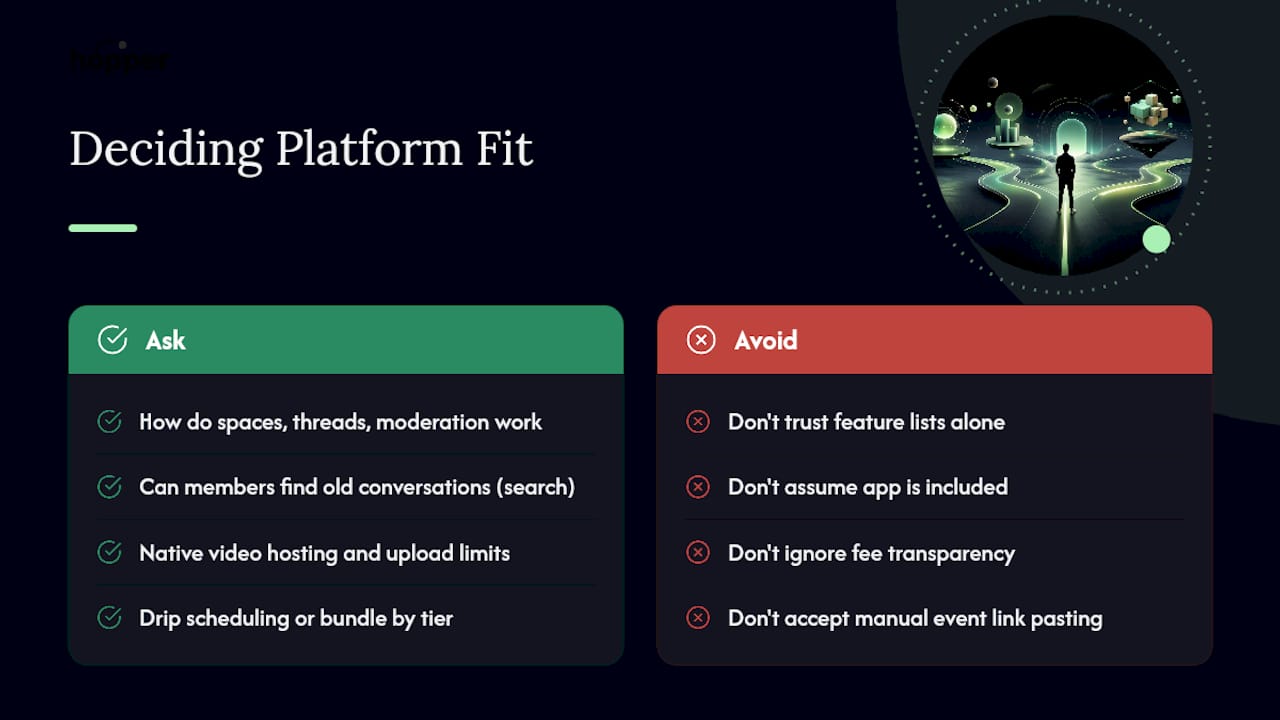
Discussion architecture. Ask how spaces, threads, and moderation actually work, not just whether they exist. Can members find old conversations through search, or does everything vanish into an endless feed? Who can moderate, and does that role require a paid seat?
Content library. Ask about upload limits, whether video is hosted natively or pulled from YouTube or Vimeo, and whether you can drip content on a schedule or bundle it into a membership tier. A platform that hosts video natively saves you a second subscription and a second login for members.
Events and live sessions. Native events with calendar sync matter more than most creators expect until they are manually pasting Zoom links into three group chats. Ask if replays are automatically saved to the content library or if you have to re-upload them yourself.
Payments and storefront. This is the one buried cost. Ask three questions: What percentage does the platform take? What does the payment processor take on top of that? Is checkout built in, or do you need a separate tool like a link-in-bio storefront? User sentiment on G2 shows fee transparency and mobile app quality are two of the most recurring complaints across community platforms, which tells you these are worth asking about directly rather than trusting the pricing page.
Mobile and apps. A native branded app is table stakes for member retention, but plenty of platforms gate it behind their top pricing tier. Ask specifically: is the app included at my price, or is it an upsell?
Member management. Ask about multi-hub support (can one account run more than one community or business), seat limits for your team, and whether single sign-on is available if you eventually need it.
Integrations and analytics. Confirm Zapier or webhook support exists before you assume it, and ask whether member data flows to Google Analytics or a similar tool. Enterprise-focused platforms tend to lead with integrations and analytics; creator-focused tools often treat them as an afterthought.
How Do Circle.so Alternatives Actually Price Out?
Sticker price is the least useful number on any pricing page. The number that matters is total annual cost, and that requires a formula most comparison articles skip:
- Start with the monthly platform fee.
- Add your average monthly member revenue multiplied by the platform's percentage cut, if it charges one.
- Add payment processor fees, typically around 2.9% plus a small fixed fee per transaction, regardless of platform.
- Multiply the monthly total by 12 for your real annual cost.
Run that formula and platforms that looked cheap on the homepage often stop looking cheap.
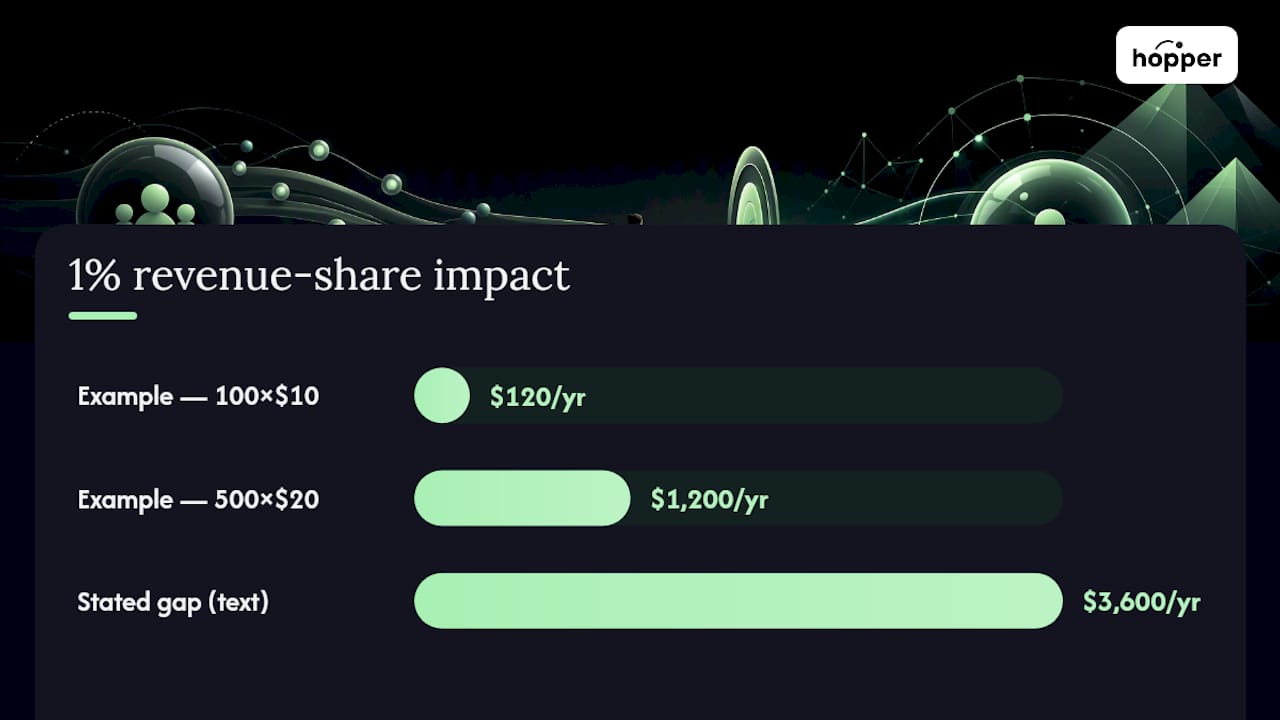
Example 1: a small paid cohort, 100 members at $10 a month. That is $1,000 in monthly member revenue.
Example 2: a mid-size membership, 500 members at $20 a month. That is $10,000 in monthly revenue. A 1% cut costs $100 a month, or $1,200 a year. The gap between those two numbers, $3,600 a year, is often bigger than the difference in the platforms' base subscription price.
Pro Tip: Ask every vendor for their exact percentage in writing before you sign up, and run both examples above against your own member count. A platform that looks $30 a month cheaper can cost hundreds more a year once revenue share kicks in.
Some of the more useful comparison guides now flag this directly: monthly starter prices can mislead buyers once percentage cuts are factored in, since certain all-in-one platforms skip the revenue share entirely while creator-focused community tools often do not.
Extra costs hide in four places specifically:
- Branded apps locked behind a top-tier plan, often adding $50 to $100 a month.
- Member caps that force an upgrade the moment you cross a threshold, sometimes mid-launch.
- Per-seat or team fees charged for every moderator or coach you add.
- Export limits that make it expensive or technically painful to leave later, which is its own hidden cost.
How Do You Migrate Off Circle.so Without Losing Everything?
A full migration inventory covers more ground than most creators expect. Before you commit to any new platform, list out everything that has to move: member records, active subscriptions, course structure and lesson order, uploaded video and audio files, discussion tags, and any saved event replays.
The real blockers are rarely the content itself. They are the systems underneath it:
- Payment processor ties. If your Stripe account is deeply linked to your current platform, moving subscriptions without interrupting billing takes real planning.
- File hosting. Large video libraries take time to transfer, and quality can degrade if the new platform recompresses everything.
- URL structure. If members or search engines have bookmarked specific course URLs, redirects matter.
- Single sign-on. If you use SSO anywhere in your stack, confirm the new platform supports it before migration day.
Before hiring any migration vendor, ask these questions and get answers in writing: What exactly gets migrated automatically versus manually? Will active subscriptions continue billing without interruption? What is the timeline, and what happens if something breaks mid-move? Vendor migration promises are common across the industry, but the actual effort almost always depends on payment processor ties and media hosting, so get specifics rather than a blanket "yes, we handle everything."
Timelines vary by size. A small community under 200 members with a handful of courses typically moves in a week or two. A mid-size membership with several hundred members and an established content library takes closer to three to four weeks. A large, high-volume business with multiple products and years of content history should plan for six weeks or more, with a dedicated migration point of contact.
When Do You Actually Need Enterprise-Level Features?
"Unlimited" means different things on different pricing pages, and the fine print is where the differences live. Some platforms cap you at a fixed number of members or products even on their top plan, then call the next tier "unlimited" with a straight face. Always ask what number "unlimited" replaces.
Most solo coaches and small teams do not need enterprise features. You need them when specific triggers show up in your business:
- Single sign-on becomes necessary once you are onboarding through a company or school system rather than individual signups.
- SOC 2 compliance matters if you are selling to organizations with procurement requirements, not individual creators.
- API access matters once you need custom data flows between your community and internal tools.
- Data residency requirements show up almost exclusively with corporate or government clients, rarely with consumer coaching businesses.
Enterprise-focused platforms build around exactly these needs, which is why they trade simplicity for depth. If you are running one brand with a few hundred members, that depth is often wasted overhead.
Team seats and multi-hub support matter earlier than most creators expect. If you run two businesses, a fitness brand and a separate mindset coaching program, check whether your platform lets you manage both under one account or forces you into two separate subscriptions. That single question can double your effective cost overnight.
The cost breakpoint for enterprise pricing usually shows up once you are managing thousands of members across multiple departments or brands with dedicated compliance requirements, not before.
A Step-by-Step Framework for Picking Your Replacement
Stop comparing feature lists line by line. Run this instead.
- Name your primary job-to-be-done. Are you selling a course, running a paid community, coaching one-on-one, or some combination of all three? Write the honest answer down before you look at a single vendor site.
- List your non-negotiables. Common ones: native mobile app included at your price tier, 0% or near-zero revenue share, no hard member cap, multi-hub support if you run more than one brand.
- Run three quick vetting checks. Calculate true annual cost using the formula above. Ask for a sample migration timeline specific to your content size. Sign up for a free trial and actually test the member experience on mobile, not just desktop.
- Set a pilot plan with exit criteria. Move a small segment of your community first if possible, run it for 30 days, and decide in advance what "this is working" looks like: engagement holding steady, no drop in renewal rate, no support complaints about the new app.
That order matters. Most creators start with feature comparisons and end up locked into a platform that fits their old business, not the one they are building.
What Migration Actually Looks Like in Practice
Hopper's own claims are worth stating plainly, because plenty of vendors promise painless migration and few show their work. Hopper positions itself around a flat rate that replaces a stitched-together stack, a native iOS and Android app included at every tier rather than gated behind an upsell, and unlimited members, hubs, and products with no contact caps.
One coach, Daniel Lim, consolidated his course platform, community tool, and storefront onto a single account and cut roughly $6,000 a year in stacked subscription costs by doing it.
That number matters less than the pattern behind it: most tool-sprawl savings come from eliminating overlapping subscriptions, not from any single platform being dramatically cheaper on paper.
When you evaluate any migration offer, including Hopper's, ask these questions directly: What is included in the migration fee versus billed as extra? Will my existing Stripe account and active subscriptions transfer without a billing gap? What is the realistic timeline for a library my size, and who is my point of contact if something goes wrong mid-move? A vendor that answers specifically, rather than with a blanket reassurance, is the one worth trusting with years of content and an active paying membership.
Does Support Quality Actually Differ Between Platforms?
Support quality is one of the most underweighted factors in platform decisions, and one of the most consequential once something breaks during a live launch. A billing glitch during a cohort enrollment window is not a "submit a ticket and wait" problem. It is a revenue problem.
Ask any vendor, including the one you are currently using, what their actual response time commitment is, not their marketing copy about "world-class support." Is support email-only, or is there live chat? Is there a dedicated migration contact during onboarding, or do you get routed through a general queue like every other ticket?
Review platforms consistently surface support responsiveness as a differentiator between community tools, often more than any single feature does. A platform can have every feature you need and still fail you the day support goes quiet during a product launch.
Test this before you commit, not after. Send a real support question during your free trial and time the response. If it takes three days to hear back from a sales rep before you have even paid, that is a preview of what happens after you have paid.
For coaches running a paid membership, support responsiveness during migration week specifically deserves its own question to any vendor: who handles issues in the first 48 hours after cutover, and is that person reachable in real time or only through a ticket queue?
How Secure Is Your Member Data on These Platforms?
Security questions get skipped in most Circle.so alternative roundups, which is a mistake given how much personal and payment data a community platform holds. Members hand over email addresses, payment details, and often personal context in coaching threads. That data needs real protection, not a vague privacy policy nobody reads.
Ask any platform you are evaluating three specific things: how member payment data is handled (ideally through a PCI-compliant processor rather than storing card details directly), whether data is encrypted both in transit and at rest, and what their breach notification policy actually says.
For most solo coaches and small teams, standard encryption and a PCI-compliant payment processor cover the real risk. You do not need SOC 2 compliance to run a fitness coaching community with 300 members. You do need it if you are selling to corporate clients with procurement requirements attached to their contracts.
Privacy controls matter just as much as breach protection. Confirm whether members can control what parts of their profile are visible to other members, whether you as the owner can export or delete member data on request, and whether the platform is transparent about what member data it uses internally versus shares with third parties.
One practical test: ask the vendor directly whether they have had a public security incident, and if so, how they handled disclosure. A platform that answers this plainly is one you can trust with sensitive member conversations.
How Much Can You Customize Your Community's Look?
Branding flexibility ranges enormously across platforms, and it is easy to underestimate how much this affects member trust. A community that looks like a generic template feels like a rented space. A community that looks like your brand feels like a home.
The baseline questions to ask: Can you set a custom domain so members never see the platform's own branding in the URL? Can you customize colors, fonts, and layout beyond swapping a logo? Is your branded mobile app actually branded, with your name and icon on it, or does it just wrap the platform's own app with your logo pasted on top?
That last distinction matters more than it sounds. Some platforms offer a "branded app" that is really just a shared app with your community as one option inside it. A true native app under your own name, discoverable in the App Store and Google Play under your business, is a different product entirely and usually costs more.
Landing pages deserve the same scrutiny. Can you build a public page that showcases your community and every product you sell, so a new visitor can join or buy without bouncing to a separate website? Platforms that treat this as a built-in feature save you from stitching together a separate link-in-bio tool on top of everything else.
Customization ceiling matters most for creators building a long-term brand rather than a one-off cohort. If you plan to run this business for years, ask how much visual and structural control you actually get before you are locked into someone else's design decisions.
Why the Comparison Games Usually Miss the Point
The instinct to build a spreadsheet comparing every Circle.so alternative feature by feature is understandable and mostly wrong. Feature parity across these platforms is closer than the marketing suggests. What actually separates a good decision from a costly one is the math you do after the trial ends, not the feature list you read before it starts.
Conventional advice tells you to compare discussion tools, course players, and event calendars side by side. That advice undersells the two variables that quietly determine your real cost and your real workload: the percentage cut on your revenue, and how much manual rebuilding a migration actually demands once you are past the vendor's sales pitch.
Prioritize the total annual cost calculation before anything else, and get a specific migration timeline in writing before you sign a year-long contract. A platform with slightly fewer bells and whistles but a flat, transparent price and a real migration plan will serve most coaches better than one with more features and a fee structure that punishes you for growing.
— Cedrik
Ready to Move Off Circle.so? Here's the Simple Version
Hopper replaces the stack most coaches end up building by accident: a course host, a community tool, a checkout page, and a link-in-bio tool, each billing separately. Instead, one hub covers Discussions, a Library for your video and audio content, Async Sessions for coaching, and a public landing page where members join or buy in one place.

Consider Hopper first if you are running a paid membership plus content and want one flat bill instead of four. Hopper Base runs $58 a month with a 1% transaction fee, and Hopper Pro runs $108 a month with 0% transaction fees, both including the native iOS and Android app with no upsell required, at Hopper. If migration is the thing holding you back, course and payment migrations start at a one-off fee designed for creators moving off Kajabi or Circle without rebuilding their business from scratch. Start a trial, run the numbers from your own member count, and see what a flat, transparent bill actually looks like for your business.
Sources
The pricing structures and category breakdowns referenced throughout this guide come from a small set of sources worth reading directly if you want to go deeper.
Circle Competitors in 2026: 8 Alternatives, Sorted by Fit informed the market categories (creator platforms, all-in-ones, free chat tools, enterprise software) and the pricing-transparency comparisons used throughout the pricing section.
Circle.so Alternatives: 10 Powerful Community Platforms for Brands supported the enterprise-feature guidance, particularly around SSO, integrations, and compliance needs for larger organizations.
Top 10 Circle.so Alternatives for Community Building supported the migration caveats and the video-first creator recommendations.
Circle reviews on G2 informed the notes on recurring user complaints around fee transparency and mobile app quality.
- Circle Competitors in 2026: 8 Alternatives, Sorted by Fit
- Circle.so Alternatives: 10 Powerful Community Platforms for Brands
- Top 10 Circle.so Alternatives for Community Building
- Circle reviews on G2
FAQ
Who Is Circle's Biggest Competitor?
There is no single dominant competitor. Circle sits alongside creator-focused tools like Mighty Networks, all-in-one platforms like Hopper and Kajabi, and enterprise software from companies like Bettermode, and each targets a different buyer rather than competing head-to-head on identical features.
How Much Is Circle.so per Month?
Circle prices by tier and adds per-seat costs as your team grows, which means the actual monthly bill depends heavily on your member count and team size rather than one flat number. By comparison, Hopper Base runs $58 a month and Hopper Pro runs $108 a month, both flat regardless of team size, listed at Hopper.
How Does Circle.so Make Money?
Circle earns revenue through tiered monthly subscriptions plus additional per-seat charges as a team scales, layered on top of standard payment processing fees. This tiered-plus-per-seat model is common across creator platforms and is one reason total annual cost often runs higher than the advertised starting price suggests.
What Are the Best Circle Communities to Join?
That depends entirely on what you are looking for. There is no universal best fit list. Instead, judge any specific Circle community by its engagement level, moderation quality, and whether its content matches your actual goals, the same criteria worth applying to any paid community regardless of platform.
Is There a Cheaper Alternative to Circle.so With No Revenue Share?
Yes. Several all-in-one platforms skip revenue share entirely or charge a minimal percentage rather than a flat cut on every sale. Hopper charges 1% on its Base plan and 0% on Pro, both detailed at Hopper, compared to tiered pricing models that add per-seat costs as you scale.
Recommended
On our list and want off? .