
Own Your Course Content Library: Free Migration Support for Creators
Launch an owner controlled course content library: migrate your catalog free, consolidate tools, and publish with Hopper migration support.
By the Hopper team
A course content library is the collection of videos, audio, PDFs, and live replays a creator hosts and sells inside their own hub, not a marketplace of pre-built training. The right approach is a single, outcome-focused library organized into modules with active learning elements, plus a gated community only when your product depends on ongoing interaction. This guide covers how to structure it, what formats belong in it, how to launch it, and what migrating your existing content actually involves.
TL;DR:
- A well-structured library uses 3 to 7 modules per pillar, each with 3 to 6 lessons focused on specific ideas to boost completion rates.
- Active elements like quizzes or assignments should accompany lessons to enhance engagement and reinforce learning outcomes.
- Video lessons should be concise, around ten minutes, with varying formats such as worksheets and discussions within each module.
- Only add a community if ongoing interaction is essential to your product's value, and keep it simple with gated access and seeded content.
- Migration to a platform like Hopper is straightforward, with free support, and it consolidates hosting, selling, and community features into one tool with no contact caps.
Table of Contents
- What Is a Course Content Library, and Who Is This For?
- How Should You Structure a Course Content Library?
- Which Content Formats Actually Belong in Your Library?
- Should You Add a Community to Your Course Content Library?
- How Do You Implement a Content Library on Any Platform?
- What Should You Know About Pricing and Migration?
- What's the Fastest Path to Publishing Your First Library?
- Why Ownership Beats Tool Sprawl for Long-Term Creators
- Hopper Gives You One Place to Host, Sell, and Grow Your Library
- Sources
- FAQ
What Is a Course Content Library, and Who Is This For?
A course content library, in the sense that matters to you, is the set of teaching assets you personally own and control: recorded lessons, worksheets, audio files, live call replays, all stored and sold from your own hub. It is not a subscription database of licensed courses that an L&D team buys off the shelf for employee training. That is a different product for a different buyer.
This distinction matters because most searches for "course content library" mix the two, and the advice does not transfer. You are not managing compliance training for a workforce. You are building a digital course library that consolidates what you already teach, so members can find it, buy it, and stay engaged with it.
Done well, this solves three problems at once. It stops the sprawl of loose Google Drive links and YouTube unlisted videos. It gives you a real storefront for individual products or bundled memberships. And it becomes the first thing a new member sees, which shapes whether they stick around past month one.
How Should You Structure a Course Content Library?
Structure decides whether your library feels like a curriculum or a junk drawer. Start with 4 to 8 top-level pillars, the big outcome areas your members care about, and give each one 5 to 15 subtopics underneath. Fewer pillars than that and everything feels crammed together; more, and members can't find anything without a search bar doing all the work.
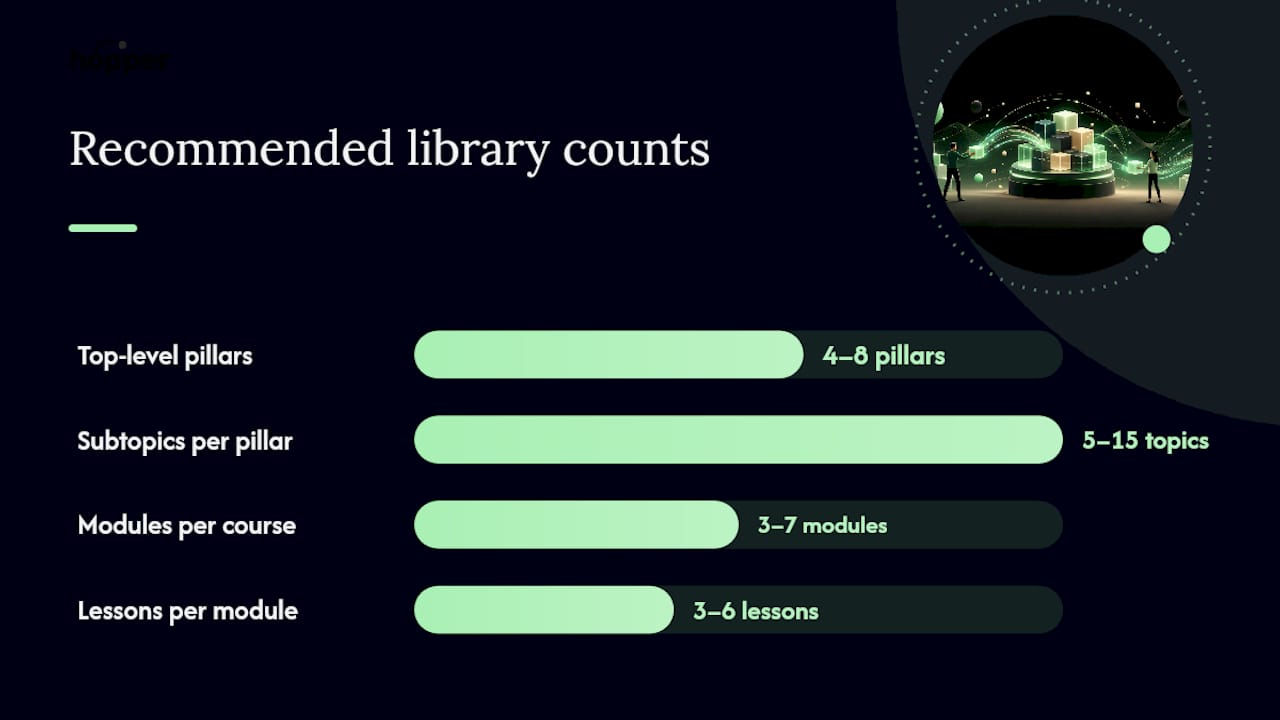
Inside each pillar, build modules and lessons using a pattern that instructional designers have tested for years. A solid course typically runs 3 to 7 modules, each with 3 to 6 lessons, and each lesson covers exactly one idea, according to Systeme. Cram two ideas into one lesson and completion rates drop, because members lose the thread of what they're supposed to walk away with.
The lesson itself should follow a three-part rhythm:
- Intake: a video, article, or audio piece capped at roughly ten minutes, since attention drops sharply past that mark
- Processing: a short quiz, reflection prompt, or discussion post that makes the member do something with what they just consumed
- Demonstration: an assignment or project that proves the idea stuck
This pattern is not decoration. Systeme.io's framework research ties it directly to higher engagement, and it maps cleanly to backward design: decide the outcome you want a member to demonstrate first, then work backward to the intake material that gets them there.
Pro Tip: Write your module titles as outcomes, not topics. "Build Your First Sales Funnel" beats "Sales Funnels 101" because it tells the member what changes for them, not just what they'll read.
Which Content Formats Actually Belong in Your Library?
Format should follow the job the content needs to do, not habit. Video demonstrates a process. Text serves as a reference members return to later. Quizzes force retrieval, which cements memory better than rereading. Worksheets convert passive watching into practice.
A few rules keep this from becoming a mess:
- Keep video lessons short and focused; longer topics get split into two lessons rather than one bloated one
- Mix formats inside a single module so a video lesson is followed by a worksheet, not another video
- Reuse assets across pillars where the idea genuinely repeats, instead of rerecording the same explanation three times
- Add captions, transcripts, and descriptive alt text to every video and image, since accessibility gaps quietly shrink your audience without you noticing
None of this is about polish for its own sake. A worksheet without a video to introduce it feels disconnected. A video with no follow-up quiz gets watched once and forgotten.
Should You Add a Community to Your Course Content Library?
Add a community when your product sells ongoing interaction, a membership, a cohort, a coaching relationship. Skip it for a single, low-priced course that someone buys once and finishes alone. The moderation overhead of an active space usually outweighs the benefit unless the product itself depends on continued conversation, based on EDD's analysis of course communities.
If you decide to add one, keep the build simple, as explained in How AmmarAI Works:
- Launch with one space, not five sub-channels nobody has enough activity to fill
- Gate it to purchasers only, so it never feels like a public waiting room
- Automate the join flow so payment instantly grants access, with no manual approval lag
- Seed it yourself with a handful of starter threads and an FAQ post before real members ever see an empty room, a tactic EDD specifically recommends to avoid the dead-space problem
A native community, one that shares login and notifications with the course itself, tends to outperform a bolted-on third-party group chat. That's because discussion can be scoped to a specific lesson and tied directly into completion tracking, according to Cubite's research on built-in discussion forums. Required participation in a discussion thread can even feed into whether someone earns a certificate. A smaller, gated space with mobile notifications also tends to keep attention better than a large open group, since less noise means more signal, per BuddyNext's community research.
How Do You Implement a Content Library on Any Platform?
Every platform, regardless of brand, needs the same sequence run in the same order. Skip a step and you end up rebuilding metadata after launch, which nobody enjoys.
- Draft a full curriculum outline listing every module, lesson, format, and estimated duration before you record anything, a step systeme.io calls essential for avoiding rework later
- Prepare your assets in final file formats before upload, not mid-upload
- Set a clear thumbnail and title for every lesson so browsing the library doesn't feel like guessing
- Add metadata and tags so search and filtering actually work once the library grows past a dozen lessons
- Configure access controls: which tier or purchase unlocks which content, and whether it's a single product, a bundle, or part of a membership
Hopper was built around exactly this sequence. Products, whether individual lessons, bundled courses, or full memberships, sit inside one hub with a public landing page, unlimited products, and unlimited members on every plan. There's no contact cap forcing you to upgrade mid-launch. The library, community, async coaching, and storefront all live in the same space, with native iOS and Android apps included at the flat monthly price rather than gated behind a premium tier.
One creator reduced his annual tool costs significantly by consolidating multiple platforms onto a single flat-rate platform instead of paying separately for a course host, a community tool, and a checkout page.
What Should You Know About Pricing and Migration?
Watch three things when comparing platforms: contact caps that force upgrades as your list grows, transaction fees on every sale, and whether the mobile app costs extra.
If you're migrating existing content, run this sequence:
- Export your current assets, member list, and purchase history before canceling anything
- Preserve permalinks where you can, so old links and bookmarks don't break
- Retest your payment flow end to end before pointing real customers at it
- Import, then QA every module against your original curriculum outline
- Keep both platforms live briefly during cutover so nothing gets lost mid-transition
Three coaches have already made this exact move off Kajabi onto Hopper without rebuilding their catalog from scratch, using Hopper's free migration support.
What's the Fastest Path to Publishing Your First Library?
You don't need the whole catalog built before you launch. You need one module that proves the format works.
- Write a curriculum outline for one pillar and draft 3 to 5 lessons for the first module
- Build in at least one active element, a quiz or short assignment, not just video
- Upload, tag, set pricing and gating, and confirm mobile access works
- Automate your join flow and run a small soft launch with real members
- Watch activation, lesson completion, and first week engagement closely for the first month
Pro Tip: Don't wait for perfect production quality on lesson one. A clear outline with rough audio beats a polished lesson that took three months and delayed your entire launch.
Why Ownership Beats Tool Sprawl for Long-Term Creators
Owning your library instead of renting pieces of it across four subscriptions protects your member data and your margin at the same time. Every tool you add is another point of failure and another monthly charge. The tradeoff is real: ownership means you're responsible for your own metadata, onboarding, and moderation. But that operational discipline pays back every month in retained revenue nobody else is skimming.
— Cedrik
Hopper Gives You One Place to Host, Sell, and Grow Your Library
Hopper replaces the course host, community tool, and checkout page you'd otherwise stitch together, with transparent monthly pricing and no contact caps or additional mobile app fees.

Everything covered in this guide, the module structure, the gated community, the metadata setup, maps directly onto how a Hopper hub works: unlimited products, unlimited members, a public landing page, and native iOS and Android apps included on every plan. If you're currently paying for three or four separate tools to do what one hub can do, migration doesn't require rebuilding your catalog from scratch. Hopper's free migration support handles the heavy lifting, and creators moving off Kajabi have made the switch without losing their content or their members. Check out what current Hopper users say about the move, or start exploring Hopper's platform to see how your existing library would fit inside it.
Sources
- Systeme
- Online Course Community: Should You Add One? | EDD
- LMS With Built-In Discussion Forum: 2026 Guide | Cubite
FAQ
How Many Modules Should a Course Content Library Have?
Most courses perform best with 3 to 7 modules per pillar, each containing 3 to 6 lessons, according to systeme.io's structure research.
Do I Need a Community for My Course Library?
Only if your product sells ongoing interaction, like a membership or cohort. A single low-priced course usually doesn't need one, per EDD's analysis.
What File Formats Work Best in a Digital Course Library?
Video for demonstrations, text for reference material, quizzes for retention, and worksheets for hands-on practice, mixed within each module rather than repeated in one format.
Can I Migrate My Existing Content Into Hopper?
Yes. Hopper offers free migration support for exporting assets, members, and purchase history without rebuilding your catalog from scratch.
How Long Should Video Lessons Be?
Keep individual video lessons short and focused, splitting longer topics into two lessons instead of one long recording.
Recommended
On our list and want off? .