
Boost Course Revenue 10–30% With Checkout Order Bumps
Platform-agnostic playbook for course creators. Add a checkout order bump priced at 10–25% of your course to lift AOV 10–30% with tested copy, design, and...
By the Hopper team
A course order bump is a one-click checkbox offer shown before payment that lets a buyer add a relevant, low-cost digital product to their cart without leaving checkout. Done well, it lifts average order value by roughly 10 to 30 percent with acceptance rates in the 15 to 40 percent range. Use one, and make it something that actually helps the buyer finish what they just bought.
TL;DR:
- Effective order bumps are priced at 10 to 25 percent of the main course, with acceptance rates generally between 15 and 40 percent.
- The most successful offers are relevant, low-cost digital add-ons such as workbooks, templates, or quick-start checklists that help buyers achieve faster results.
- Placement between the order summary and payment fields, with clear copy following the relevance, reason, reward structure, boosts conversion and minimizes friction.
- Implementation typically takes a few hours to set up and a month to optimize through testing price points, copy framing, and placement.
- Legal disclosures must clearly explain the bump cost and policy, with unchecked checkboxes and transparent pricing to prevent chargebacks or complaints.
Table of Contents
- What Course Order Bumps Are (And Why They Beat Upsells)
- Why Use Order Bumps: Benchmarks, Pricing, and What to Track
- Order Bump Types That Actually Work for Courses
- Design and Copy Rules for Bumps That Convert
- How to Implement Order Bumps: A Platform-Agnostic Checklist
- Legal and Compliance Considerations for Course Bumps
- How Long It Takes to Set Up and Optimize an Order Bump
- How We Think About Order Bumps for Course Sellers
- Add Order Bumps Without Rebuilding Your Checkout
- Sources
- FAQ
What Course Order Bumps Are (And Why They Beat Upsells)
An order bump lives on the checkout page itself, usually as a checkbox sitting between the order summary and the payment field. The buyer sees your $197 course, then a small offer beneath it: a workbook, a template pack, a short bonus module. One click adds it. No new payment form, no redirect, no second decision screen.
That single detail is what separates a bump from an upsell. An upsell typically appears after the sale closes, on a new page, sometimes requiring the buyer to re-enter payment details or confirm a second charge. Every extra step is a chance for the buyer to close the tab and reconsider the whole purchase, not just the add-on. A bump asks for a yes while the buyer's guard is still down and their credit card is already out.
Course creators tend to underestimate how much that timing matters. Someone who just decided to buy your course is in a "yes" state of mind. Waiting until after checkout to offer something else means asking them to make a fresh decision from a colder start.
A few things make checkout-stage placement work so well:
- The buyer has already committed mentally; a bump asks for an extension of that decision, not a new one.
- No separate payment step means no added friction or cart abandonment risk.
- The offer sits next to a price they already accepted, which makes a smaller price feel easy to say yes to.
- It requires zero extra clicks beyond checking a box, so it doesn't slow down checkout completion.
Why Use Order Bumps: Benchmarks, Pricing, and What to Track
The case for order bumps isn't theoretical. They're one of the few checkout tactics with consistent, repeatable numbers behind them.
The benchmarks: Order bumps convert at roughly 15 to 40 percent depending on how relevant the offer is to the main purchase, and they lift average order value by about 10 to 30 percent. The best-performing bumps are priced at 10 to 25 percent of the main product's price.
For a $200 course, that pricing rule points you toward a bump somewhere between $20 and $50. Price it higher than that and acceptance drops fast, because the buyer starts treating it as a second purchase decision rather than a cheap add-on. Price it too low and you leave margin on the table without moving the needle on perceived value.
Three numbers matter more than any others once your bump is live:
- Attach rate. The percentage of buyers who check the bump box. Calculate it as bump purchases divided by total checkouts.
- Incremental revenue. Bump price multiplied by attach rate, multiplied by total checkouts, gives you the dollar lift per period.
- AOV shift. Compare average order value in weeks the bump ran against weeks it didn't, holding traffic sources roughly constant.
Ratio matters more than the raw dollar figure. A $15 bump on a $60 mini course and a $50 bump on a $200 flagship course sit at the same 25 percent mark, and both tend to perform similarly relative to their base price. Test the percentage across your catalog rather than picking one price and reusing it everywhere.
Order Bump Types That Actually Work for Courses
Not every add-on belongs at checkout. The ones that convert share a common trait: they help the buyer get a faster or clearer result from the thing they just bought, and they cost you almost nothing to deliver.
- Companion workbook or template pack. A printable workbook, worksheet set, or template pack tied directly to the course content is the single most reliable course bump. It has near-zero fulfillment cost since it's a file, not a physical good, and it feels like an obvious extension of what the buyer already decided to learn.
- Quick-start checklist or short video. Buyers of any course worry about the same thing right after purchase: where do I actually start? A one-page checklist or a five-minute "start here" video reduces that anxiety and speeds up their first win, which also lowers refund requests down the line.
- Priority coaching or a micro-session. A 15-minute async coaching add-on or priority feedback on an assignment works as a higher-ticket bump, usually the highest price in your bump lineup. Use this one selectively. It requires your time, so it doesn't share the near-zero cost advantage of a workbook, and it should only appear on higher-priced courses where a buyer already expects some personal touch.
- Bundled access to a related mini-course. If you have a smaller, adjacent course that naturally follows the one being purchased, offering it at a steep discount as a bump often outperforms trying to sell it separately later.
A bump becomes a poor fit fast when it strays from these patterns. Irrelevant offers (a nutrition guide bump on a marketing course) confuse buyers and tank attach rate. Anything requiring shipping adds cost, delay, and complexity that checkout-stage impulse buying can't tolerate. And pricing a bump too close to the main product's price turns a quick yes into a second full purchase decision, which is exactly the friction a bump is supposed to avoid.
Design and Copy Rules for Bumps That Convert
Most order bumps fail not because the offer is bad, but because the presentation asks too much of the buyer in a moment built for speed.
Start with the most important rule: run one bump, never several. Stacking multiple offers at checkout forces the buyer to evaluate options instead of making a quick yes/no call, and it noticeably drags down acceptance rates across the board. Pick your strongest offer and commit to it.
For copy, a simple three-part structure works better than clever headlines:
- Relevant — tie the offer directly to the course they're buying, by name if possible.
- Reason — give one line explaining why it helps them right now, not eventually.
- Reward — state the specific outcome or time saved, not just a feature list.
That structure fits in one or two lines. If your bump copy needs three sentences to explain, the offer itself is probably too complicated for a checkout impulse buy.
A few more details separate a high-converting bump card from one buyers scroll past:
- Show the price clearly, and where possible show it next to the discount or the main product's price for context.
- Include a small thumbnail image of the workbook, template, or bonus, since buyers respond better to something they can visualize.
- Place the bump after the order summary and before the payment field, where the buyer has already registered what they're buying and what it costs.
- Design the bump card mobile-first. A majority of course checkouts happen on phones, and a bump that requires horizontal scrolling or tiny checkboxes gets ignored.
- Keep contrast and tap targets accessible. A checkbox that's hard to tap on a small screen costs you conversions you'll never see in your analytics.
Pro Tip: Write your bump headline as if you're finishing the buyer's sentence. If the course is "Intro to Facebook Ads," a workbook bump headline like "Fill this out while you watch Module 1" outperforms generic copy like "Bonus Workbook Add-On" almost every time.
If you want more structural ideas for how to lay out small-ticket offers visually, resources on product page optimization cover similar principles around price framing and visual hierarchy that translate directly to bump card design.
How to Implement Order Bumps: A Platform-Agnostic Checklist
Getting a bump live doesn't require custom development on most modern checkout tools, but skipping steps is how creators end up with a bump nobody notices.
Follow this sequence the first time you set one up:
- Confirm your checkout supports bumps natively. Some hosted course platforms include built-in checkbox bump features, while others need a plugin or a different checkout tool entirely. Check this before building anything else.
- Create the bump product as its own item, priced at 10 to 25 percent of your main course.
- Write the offer using the Relevant, Reason, Reward structure, capped at two lines.
- Add a thumbnail image sized correctly for both desktop and mobile checkout views.
- Place the checkbox between the order summary and the payment field, then preview it on an actual phone, not just a browser window resized small.
- QA the full purchase flow once with the bump checked and once without, confirming both receipts and product delivery work correctly.
Once your single bump is stable, the next optimization most creators add is conditional logic. Dynamic bump rules let you show different offers depending on cart contents, exclude the bump entirely for repeat buyers who already own it, or trigger a different offer above a certain cart total. This is worth adding once your baseline bump has a few weeks of consistent data, not on day one.
For testing, focus on one variable at a time:
- Price: test two price points at least two weeks apart to control for traffic fluctuations.
- Copy: test headline framing (outcome-focused versus feature-focused) with an identical price and image.
- Placement: if your checkout tool allows it, test the bump appearing above versus below the order summary.
Track attach rate and incremental revenue weekly rather than relying on a single conversion percentage, since attach rate alone doesn't capture the actual dollar impact on your business.
Legal and Compliance Considerations for Course Bumps
Order bumps sit inside a real transaction, which means the usual rules around clear pricing and honest disclosure apply just as much as they do to your main course offer.
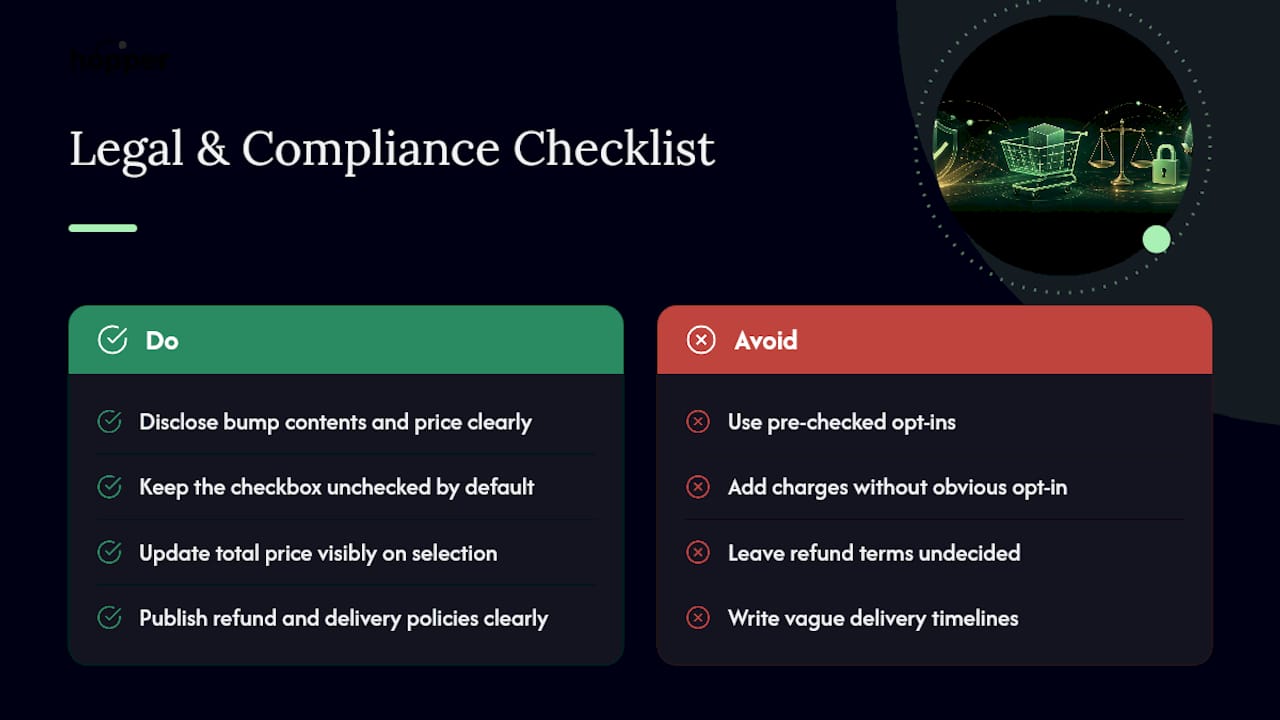
The core requirement is disclosure. The checkbox and its copy need to make clear, before the buyer clicks "buy," exactly what they're adding, what it costs, and that it's a separate item from the main course. Pre-checked boxes that add a charge without an obvious opt-in create both a poor buyer experience and a real risk of chargebacks or complaints. Keep the checkbox unchecked by default and make the total price update visibly the moment it's selected.
Refund policy is the second piece creators overlook. If your main course carries a 14 or 30-day refund window, decide upfront whether the bump follows the same policy or a different one, and state that clearly on the checkout page or in your terms. A buyer who refunds the course but keeps access to the bump workbook creates a support headache you can avoid entirely by writing the policy down before your first sale, not after your first complaint.
If your bump includes any coaching, live sessions, or done-with-you elements, be specific about delivery timelines and what happens if a session isn't used. Vague language here tends to generate more refund requests than the actual price of the bump ever justifies.
None of this requires a lawyer for most course creators, but it does require writing the policy down in plain language and putting it somewhere the buyer can see it before they check the box.
How Long It Takes to Set Up and Optimize an Order Bump
A single, well-scoped order bump is a same-week project for most course creators, not a multi-month build.
Creating the bump product, writing the copy, and adding the thumbnail typically takes a few hours if you already have workbook or template content ready to package. If you're checking out your platform's native support first, add a day or two to confirm the checkout tool handles checkbox bumps the way you expect, or to configure a plugin if it doesn't.
Getting the bump technically live, meaning the checkbox appears correctly and the purchase flow works on both desktop and mobile, usually happens within a day once the product and copy exist.
Optimization is the longer part, and it should be. Meaningful A/B test results need enough checkout volume to separate real signal from noise, which for most course creators means running a price or copy variant for at least two to four weeks before drawing conclusions. Trying to optimize after three days of data almost always leads to chasing noise instead of a real pattern.
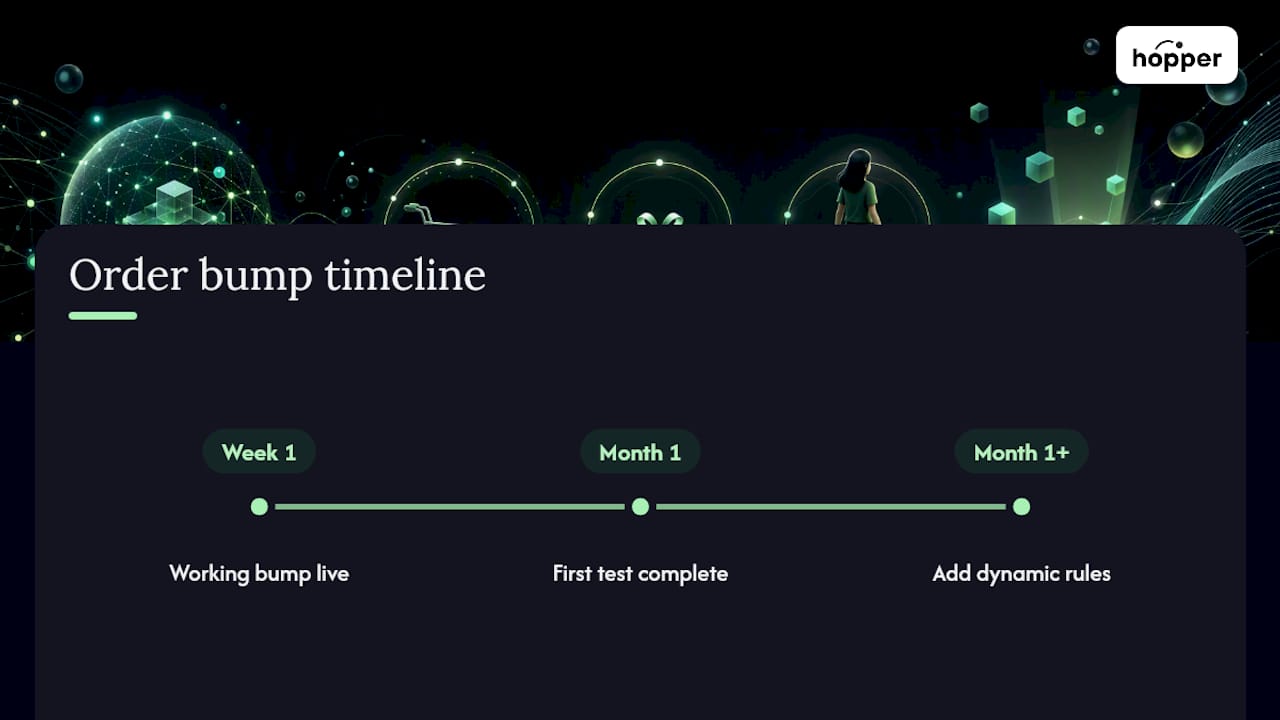
A realistic timeline looks like this: a working bump live within a week, a first round of price or copy testing complete within a month, and conditional or dynamic bump rules added only after that first bump has proven itself with stable attach-rate data.
How We Think About Order Bumps for Course Sellers
Most advice on order bumps treats them like a checkout hack, something to bolt onto whatever tool you're already using. We'd rather creators think of the bump as a natural extension of the product itself, not a separate marketing trick.
That's why the digital companion bump (a workbook, a template, a quick-start checklist) is the one we recommend starting with almost every time. It has no shipping cost, no delivery delay, and it reinforces the exact outcome the buyer already paid for.
Some all-in-one platforms support checkout-stage bumps natively, with unlimited products and members on every plan, so a creator testing their first bump can avoid stitching together multiple tools just to see whether one checkbox moves revenue. Test one bump, watch attach rate for two weeks, then decide what's next.
— Cedrik
Add Order Bumps Without Rebuilding Your Checkout
If you're running your course through a stack of separate tools, adding an order bump usually means finding out your checkout provider doesn't support one, or that it's gated behind a higher plan. Hopper's built-in storefront includes checkout-stage bumps as a standard feature, not an upsell of its own, with unlimited products and no contact caps to work around.

By combining a course library, community, and checkout in one hub, some platforms allow setting up a companion workbook bump in minutes rather than requiring a new subscription to a separate checkout plugin. If you're already selling through Kajabi, Circle, or another platform and want to see what moving over looks like, Hopper's free migration support handles the transfer without asking you to rebuild your course from scratch. Start by looking at your current checkout flow and mapping where a single, relevant bump would sit.
Sources
- WooCommerce Order Bump: Setup Guide + Best Practices 2026
- Order Bump: What It Is, Examples & How to Use One
- 12 Order Bump Examples That Can Boost Sales for Any Online Store
FAQ
What Does Order Bump Mean?
An order bump is a one-click checkout offer, usually a checkbox, that lets a buyer add a low-cost, related product to their purchase before completing payment.
What Is the Difference Between an Order Bump and an Upsell?
An order bump appears at checkout before payment and adds to the same transaction, while an upsell typically appears after the purchase on a separate page, often requiring a new payment confirmation.
Are Online Courses Still Profitable in 2026?
Online courses remain a viable revenue stream for creators who pair solid content with smart monetization tactics like order bumps, since even a modest 10 to 30 percent lift in average order value compounds meaningfully across hundreds of sales.
What Are Order Bumps in WooCommerce?
In WooCommerce, order bumps are typically added through a checkout-page plugin that displays a checkbox offer between the cart summary and payment fields, following the same 10 to 25 percent pricing rule that applies across platforms.
Can I Use More Than One Order Bump at Checkout?
You can, but best practice limits checkout to a single bump, since offering multiple choices forces buyers to evaluate options instead of making a quick decision, which lowers overall acceptance rates.
Recommended
On our list and want off? .