
The Fastest Way to Build and Sell Digital Product Bundles
Discover the quickest way to create and sell digital product bundles that deliver value and instant access. Boost your sales today!
By the Hopper team
The fastest way to sell digital product bundles is to build a focused, outcome-driven package and sell it from a single storefront that gives instant access. Not a mega-bundle stuffed with 1,000 files. One flagship item, two or three things that support it, and a landing page where a buyer can pay and download in under a minute.
Here's the starter checklist:
- Define the moment: who is this for, and what are they trying to finish this week?
- Assemble the contents: one flagship asset, two to three complementary pieces, a quick-start guide.
- Publish it in one place: a single landing page with instant access, not a scavenger hunt across five tools.
Shopify's Bundles documentation and the Payhip bundle guide both walk through this exact setup, and a real creator case study on bundling shows why it converts better than volume.
Key Takeaways
Digital product bundles sell best when they're built for one specific buyer's moment, priced for the outcome they deliver, and published on a single storefront with instant access.
| Point | Details |
|---|---|
| Curation beats volume | A tight, five-item bundle built around one outcome converts better than a 1,000-file mega pack. |
| Price for outcome, not file count | Anchor the price against separate component value, then discount 30% to 50% for the bundle. |
| Mockups drive conversion | Include one hero mockup plus several contextual previews showing the bundle in real use. |
| Match delivery to bundle type | Use zip downloads for one-time bundles, account access for bundles tied to memberships or courses. |
| Hopper fits ongoing bundles | Hopper pairs a storefront with a content library and community access for bundles meant to grow into memberships. |
Platform Docs and Practical How-Tos to Implement Bundles
For exact setup steps, consult Shopify's Bundles documentation for fixed and dynamic bundle configuration, Ecwid's bundle guide for kit-building and discount logic, and Payhip's bundle guide for the simplest low-infrastructure setup. For pricing psychology and micro-niche selection, the creator case study on bundling walks through real examples worth studying before you write your product page. Creator-economy operators like Naomi Lennon also offer useful perspective on positioning digital offers beyond the technical setup.
Table of Contents
- What Are Digital Product Bundles and Why Do They Work?
- How Do You Choose the Right Micro-Niche for a Bundle?
- How Should You Price and Package a Digital Bundle?
- Where Should You Sell Your Bundle and How Do You Deliver It?
- How Hopper Helps Creators Sell Curated Bundles
- Your Step-by-Step Launch Checklist
- What Legal Rules Apply to Digital Product Bundles?
- How Should You Handle Support and Refunds for Bundles?
- Why Curated Bundles Beat Big-Volume Bundles
- Get Your Bundle Selling Without Juggling Five Tools
- Sources
- FAQ
What Are Digital Product Bundles and Why Do They Work?
A digital product bundle is a set of two or more complementary digital goods sold together as a single offer, usually at a price lower than buying each piece separately. Ebooks, templates, video lessons, audio files, Canva mockups, and license files are the most common components, and they typically share a theme or solve one connected problem instead of being thrown together for volume.
Bundles work because they raise average order value while making the buying decision easier, not harder. Shopify's documentation on bundles points to exactly this: bundling increases order value, delivers curated value, and removes the friction of a buyer piecing together five separate purchases. Ecwid's bundle guide makes a similar case for pairing bundling with built-in discounting.
Here's the part most guides skip: bigger isn't better.
- A very large bundle sounds impressive but usually converts worse than a tight, small-item kit.
- Buyers don't want more files. They want a finished outcome, fast.
- Curated bundles signal expertise; oversized ones signal a dump of leftovers.
How Do You Choose the Right Micro-Niche for a Bundle?
The best bundles start with a moment, not a topic. A "moment" is a specific event, role, or deadline where someone needs a fast, complete answer: a new teacher prepping a classroom, a coach launching their first cohort, a bride assembling wedding signage the week before the big day. That specificity is what makes a bundle feel indispensable instead of optional.
A creator case study on bundle-building lays out a structure worth stealing:
- Pick one flagship asset that solves the core problem on its own.
- Add two or three complementary resources that extend or speed up that solution.
- Include a quick-start guide so the buyer knows exactly where to begin.
- Show mockups and previews so the bundle's value is visible before purchase, not just described.
Three archetypes that consistently work: a "First Week of School Kit" for new teachers, a "Cohort Launch Kit" for coaches running their first paid program, and a "DIY Wedding Signage Set" for couples on a budget. Each one names a specific person and a specific week, not a vague category.
Pro Tip: Mock up your bundle in its real-world context. A worksheet mockup on a classroom desk, or a template shown inside an actual coaching dashboard, does more to sell the bundle than another bullet list of contents ever will.

How Should You Price and Package a Digital Bundle?
Price for the outcome, not the file count. A bundle that saves someone eight hours of research and design work is worth more than a bundle with twice as many files and no clear result, because the buyer is paying for time saved, not storage space.
If three items are worth a certain total, a bundle price discounted by about one-third to one-half hits that sweet spot.
Packaging patterns that consistently perform:
- Single fixed bundle: one price, one set of contents, simplest to manage.
- Tiered bundles: a basic version and a premium version with bonus assets, letting buyers self-select their budget.
- Limited-time launch discount: a lower price for the first week, then the anchor price kicks in.
- BOGO or giveaway bundles: used sparingly, mostly for list-building rather than revenue.
Name the bundle by outcome, not inventory. "Classroom Launch Kit" sells. "47-File Teacher Bundle" does not, because it tells buyers what they're getting instead of what they'll achieve.
Where Should You Sell Your Bundle and How Do You Deliver It?
Your storefront needs five things at minimum: a single landing page, a clear content list, preview mockups, an instant-access checkout flow, and plainly stated licensing terms. Skip any one of these and you'll spend more time answering support emails than making sales.
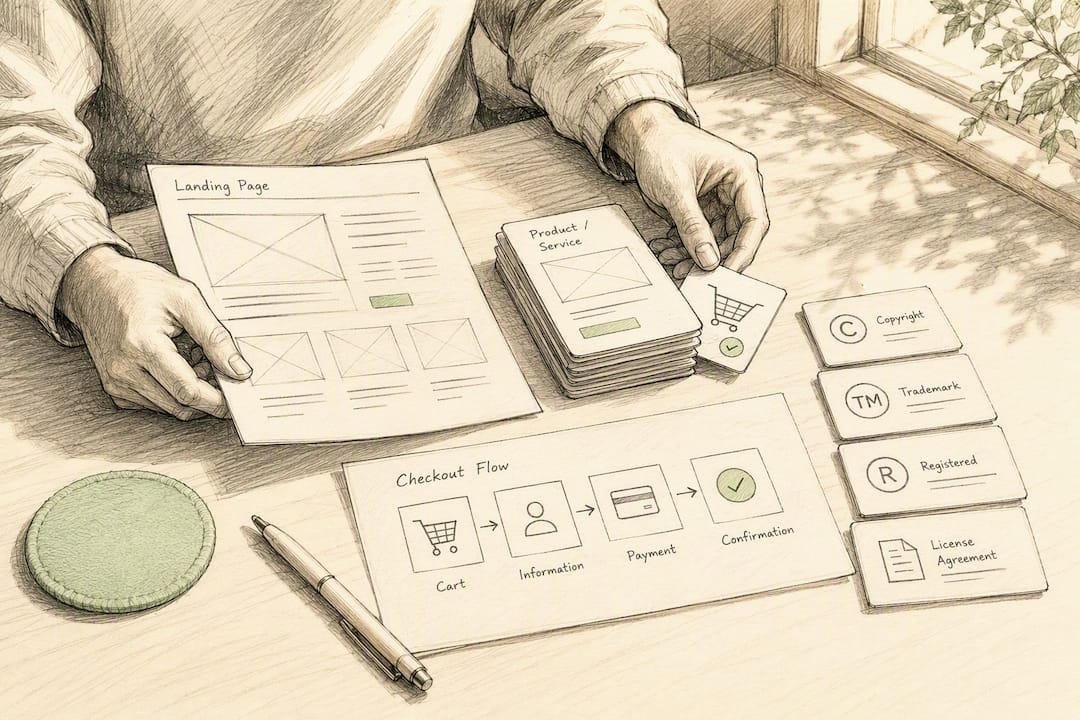
Platform choice matters here. Shopify's Bundles feature supports both fixed and dynamic bundles with component limits and automatic discount stacking. Ecwid offers product kits and customer-selectable bundles alongside coupon and BOGO tools. Payhip trims this down to a four-step flow: build the bundle, publish the listing, drive traffic, done, which suits creators who don't want to manage separate storefront infrastructure.
Delivery method affects the buyer experience long after checkout:
| Delivery Method | Best For | Trade-Off |
|---|---|---|
| Zip download | One-time, static bundles | No way to push updates or bonus content later |
| Gated library access | Bundles tied to ongoing content | Requires account infrastructure |
| Account-level product access | Bundles paired with courses or memberships | Highest setup effort, best long-term retention |
Track average order value and conversion rate from day one. Those two numbers tell you faster than anything else whether your pricing or your contents need work.
How Hopper Helps Creators Sell Curated Bundles
Hopper gives creators a built-in storefront, a flexible content library, and unlimited products in one hub, which matters the moment a bundle grows beyond a single zip file. If your bundle pairs a course with ongoing community access or ongoing coaching, that's exactly the case where account-level delivery beats a one-time download, and it's the case Hopper is built around.
What Hopper offers for bundle sellers specifically:
- A storefront and content library in the same hub, so bundles can include courses, downloads, and live replays without stitching together separate tools.
- Unlimited products and members, so a bundle strategy can expand without hitting a plan-based cap.
- Native iOS and Android apps included at the flat price, so buyers can access their bundle from a real app instead of a browser tab.
- Loyalty pricing, letting members who stay longer pay less, which supports bundles designed to lead into an ongoing membership.
Pro Tip: If your bundle is a one-time download with no follow-up, a lightweight storefront like Payhip may be all you need. If it's meant to grow into a membership or ongoing coaching relationship, account-based access matters more than the download itself.
Your Step-by-Step Launch Checklist
Here's the order that gets a bundle live without the usual scope creep:
- Define the micro-niche moment and the buyer you're solving for.
- Assemble one flagship asset plus two to three complementary resources.
- Create previews: a hero mockup and three to five contextual images.
- Price using the anchor-minus-discount formula.
- Set up your storefront with a single landing page and clear licensing.
- Configure delivery: zip, gated library, or account access.
- Launch with a short promo window and an email to your list.
A weekend is enough for a minimum viable bundle. A full week gets you a polished version with better mockups and a tighter landing page.
The bundles that convert aren't the ones with the most files. They're the ones built for one person, at one specific moment, with a result they can picture before they buy.
After launch, track conversion rate and average order value weekly, then iterate the contents based on what buyers actually ask about in support messages.
Pro Tip: Add one testimonial to your landing page within the first two weeks. Even a single line of social proof does more for conversion than another paragraph of feature descriptions.
What Legal Rules Apply to Digital Product Bundles?
Every asset in your bundle needs clear, documented licensing before it goes on sale. If you're bundling stock photos, fonts, templates, or third-party design elements, check that the original license permits resale or redistribution as part of a paid bundle, not just personal or single-project use.
Two license types confuse creators most: Personal Use Licenses, which typically forbid resale entirely, and Commercial Use Licenses, which usually allow resale only under specific conditions like attribution or unit caps. If any component of your bundle came from a marketplace like Creative Market, Envato, or a font foundry, read the resale terms line by line. A single mislicensed asset can get an entire bundle pulled.
For your own original content, decide upfront what rights you're granting buyers. Are they getting the file for personal use only, or can they use it commercially, edit it, or resell derivatives? State this plainly on the product page and inside the delivered files themselves, not buried in a terms-of-service page nobody reads.
Copyright ownership stays with you unless you explicitly transfer it, so most creators sell a license to use the work rather than the work itself. That distinction matters if a buyer later asks whether they can resell your templates as their own product. If you're bundling contributions from another creator or collaborator, get a written agreement clarifying who can sell what before the bundle goes live. Vague verbal arrangements are the most common source of bundle disputes after launch.
How Should You Handle Support and Refunds for Bundles?
Digital bundles need a refund policy that's visible before checkout, not discovered after a complaint. Because bundles combine multiple assets, ambiguity creeps in fast: does a refund apply to the whole bundle, or can a buyer request a partial refund for one disappointing component?
Most creators handle this by setting a single policy for the entire bundle rather than itemizing refund eligibility per file. A common approach: offer a refund window of 7 to 14 days for buyers who haven't downloaded the majority of the bundle's contents, and state clearly that access to digital files may limit refund eligibility once they've been opened or downloaded.
Support requests for bundles tend to cluster around three issues: broken download links, confusion about which files serve which purpose, and questions about commercial use rights. A short FAQ section on your product page, plus a quick-start guide inside the bundle itself, prevents most of these tickets before they're sent.
If your bundle is delivered through account-based access rather than a one-time download, support gets simpler over time. You can push a corrected file, add a missing asset, or update instructions without needing every past buyer to re-download a new zip. That's one reason creators scaling past their first few bundles often move toward library or membership-style delivery instead of static downloads.
Why Curated Bundles Beat Big-Volume Bundles
The evidence in this guide points one direction: specificity sells, volume doesn't. Bundles built for one buyer, at one moment, with a visible result, consistently outperform bundles built to look impressive on a sales page. That's not a hot take. It's what happens when you compare a "500+ Template Mega Pack" against a five-item kit built for a first-time coach launching a cohort next month.
The conventional advice, pile on more files to raise perceived value, gets the psychology backward. A buyer facing 500 files doesn't feel abundance. They feel lost, and lost buyers don't finish checkout. A buyer facing five files that map directly onto their next task feels relief, and relief converts.
Where I'd push back hardest on typical bundle advice: pricing shouldn't be an afterthought bolted on after the contents are decided. Price and packaging should be part of the same decision as what goes in the bundle, because a bundle priced for file count invites buyers to nitpick individual items, while a bundle priced for outcome invites them to compare it against the hours they'd otherwise spend doing it themselves.
If you take one thing from this guide, take this: build for a person, not a category. Everything else, pricing, platform, delivery, follows from that one choice.
— Cedrik
Get Your Bundle Selling Without Juggling Five Tools
Selling a bundle often means separately paying for a checkout tool, a place to host the files, and a way to keep buyers coming back for updates or ongoing access. Hopper collapses that into one hub: a built-in storefront, an unlimited content library, and community or coaching access if your bundle is meant to grow into something ongoing.

That matters most for creators bundling a course with a membership, a coaching relationship, or a content library that keeps expanding after launch. Instead of a zip file that goes stale, buyers get account-level access you can update anytime, and you get one dashboard instead of four logins. If your next bundle is meant to be the start of an ongoing relationship with buyers rather than a one-time download, set up your storefront on Hopper and publish your first bundle this week.
Sources
- How to sell product bundles with Ecwid
- Sell Bundle | Payhip
- Create a Digital Product Bundle That Sells Together
FAQ
What Are the Top Digital Products to Sell in a Bundle?
Ebooks, templates, video lessons, presets, and mockup packs are the most commonly bundled digital products, especially when they combine to solve one specific problem for one type of buyer.
What Is the Most Wanted Type of Digital Bundle Right Now?
Bundles tied to a specific outcome, like launch kits for new coaches or classroom-ready kits for teachers, tend to outperform generic template packs because buyers can immediately picture the result.
What Digital Products Are People Actually Buying?
Buyers gravitate toward bundles that save time on a task they're already trying to complete, such as templates paired with a quick-start guide, rather than large collections with no clear starting point.
Do I Need an LLC to Sell Digital Products?
Requirements vary by country and state, so there's no universal answer; many creators start as sole proprietors and consult a local accountant or attorney before scaling revenue significantly.
What Platform Should I Use to Sell My First Bundle?
For a simple one-time bundle, a lightweight tool like Payhip works well; for bundles tied to a course, membership, or ongoing content, an all-in-one platform like Hopper avoids juggling separate storefront and delivery tools.
Recommended
On our list and want off? .