
Creators: Presell 5–10 Seats to Sell Online Courses Before You Build
Presell a founder cohort to validate demand, deliver a minimum viable course, then run a full launch. Practical steps on presales, pricing, webinars, and...
By the Hopper team
The fastest way to sell a course is to validate and sell before you finish building it. Grow a warm list, pre-sell a founder cohort at a discounted price, then run a real launch once you have proof someone will pay. Platform choice matters, but it's a second-order decision. Get people to say yes with money first.
TL;DR:
- Pre-sell a course with a clear outcome before creating all content, aiming for five to ten paid founder sales within five days to validate demand.
- Use a simple pre-sell page that offers real access, outlines the outcome, and requires a credit card, rather than a vague landing page or "coming soon" sign-up.
- Develop a lean five-module course with a strong first win, including assignments, community support, and live interactions to maximize engagement and completion.
- Focus on selling through your email list, using targeted content and partnerships, rather than relying heavily on paid ads until your organic funnel is proven.
- Choose a platform based on your business size and needs, prioritizing quick setup, low costs for new creators, and scalability features like member caps and integrations.
Table of Contents
- How Do You Sell an Online Course Step by Step?
- How Do You Validate a Course Idea Before Building It?
- What Belongs in a Minimum Viable Course?
- How Should You Price an Online Course?
- What Makes a Course Sales Page Convert?
- How Do You Run a Webinar Launch That Converts?
- Which Marketing Channels Actually Sell Courses?
- How Do You Choose a Course Platform Without Overpaying?
- What Legal and Tax Rules Apply to Selling Courses Online?
- What Payment Processors Work Best for Course Sales?
- How Should You Handle Customer Support for a Course?
- How Often Should You Update an Online Course?
- What Tech Setup Do You Need to Sell a Course?
- Why Launching Before You're Ready Actually Works
- Where Hopper Fits Once You're Ready to Scale
- Sources
- FAQ
How Do You Sell an Online Course Step by Step?
Most people planning how to sell online courses reverse the order. They spend three months recording forty lessons, then wonder why nobody buys. Flip it. Here's the sequence that actually produces revenue, in the order it should happen.
- Pick one outcome. Not a topic, an outcome. "Learn Spanish" is a topic. "Order confidently in a restaurant in eight weeks" is an outcome. Give yourself a day, not a week, to nail this down.
- Validate with a pre-sell page. Before recording anything, put up a single page describing the outcome and the price, and ask for money. Give this three to five days of active outreach.
- Outline a minimum viable course. Five modules, one clear win per module. An afternoon of work, not a month.
- Record the first module only. Give founder buyers something to consume within a week of paying. That single module builds trust for everything after it.
- Publish and deliver weekly. Ship the rest of the modules on a schedule your founder cohort can see coming.
- Build the real sales page. Once you have a few buyers and some early feedback, turn the pre-sell page into a full page with proof.
- Run a proper launch. Webinar, challenge, or live cohort, aimed at your list, not the general public.
- Collect testimonials immediately. Ask every founder buyer for a specific result and a quote within 48 hours of their first win.
- Convert to evergreen. Once the live launch pattern works, automate the highest converting parts of it.
None of these steps requires more than a few days of focused work. The step people skip is the pre-sell, and it's the one that saves the other eight from being wasted effort.
Pro Tip: Set a hard deadline for step 2. Give yourself five business days to get your first paid buyer. If nobody bites in five days, the problem is almost always the outcome or the audience, not the price. Go back to step 1 before you touch step 3.
How Do You Validate a Course Idea Before Building It?
A pre-sell page is not a landing page with a "coming soon" banner. It's a real offer: here's the outcome, here's what's included, here's the price, here's when you'll get access. You're asking for a real credit card, not an email address.
Write it in four parts. State the transformation in one sentence. List what's inside, even if it's still a rough outline. Set a founder price, usually 40% to 60% off what you'll eventually charge, in exchange for early access and feedback. Give a delivery date you can actually hit, even if it's just "module one within seven days of purchase."
The honesty matters here. Promise a real timeline and a real first module, not a finished twelve week program you haven't built. Overpromising at this stage just moves the disappointment to week two instead of preventing it.
Who to ask first, in order:
- Your email list, even if it's small. Warm subscribers convert at a far higher rate than social followers or cold traffic, which is why this group goes first.
- Past clients or customers who already trust you for something adjacent.
- Members of communities you're already active in, where you're a known contributor rather than a stranger pitching.
- A short list of peers or referral partners who can forward your pre-sell page to their own audience.
A direct message works better than a public post at this stage. Something like: "I'm building a program on [outcome]. I'm opening five founder spots at [price] to get feedback before I raise the price. Want in?" Send it to fifteen or twenty people you already know, not a cold list.
The threshold that matters is 5 to 10 paid founder sales. Hit that range and you have a viable offer worth building out. Land at zero or two sales, and the issue usually isn't your price or your production quality, it's your outcome or your audience. Reframe the promise, try a different segment of your list, or pause and ask five people directly why they said no before you build anything else.
Pro Tip: Don't treat a "no" as a rejection of the course. Ask the person what stopped them. You'll usually hear one of three things: wrong time, wrong price, or wrong outcome. Only one of those three means you should change the product.
What Belongs in a Minimum Viable Course?
Once you've got founder buyers, the goal shifts from proving demand to delivering a fast, real result. A five-module structure does this better than a sprawling curriculum, and it's faster to build.
Module one has to deliver a genuine win inside the first sitting. This is the module that decides whether a student finishes the course or quietly stops opening it. If someone gets a real result in the first 30 to 45 minutes, they show up for module two. If module one is throat-clearing and background theory, most students never make it to module three. Structure the remaining four modules as a logical build toward the full outcome, each one closing with a specific, checkable task.
Production doesn't need to be elaborate. A smartphone camera and an entry-level dynamic microphone are enough for most first courses, and that combination is what many successful creators actually use to get a program out the door. Add captions or a transcript to every lesson. This isn't just an accessibility nicety, it also helps students who learn better by reading along, and it makes the content usable on a commute with the sound off.
What keeps students engaged after the recording is done:
- A short assignment at the end of every module, something they submit or post, not just "watch and reflect."
- A community space, even a simple one, where students can ask questions and see other people's progress.
- A scheduled office hours session, live or async, where you answer questions directly.
- Lifetime or extended replay access, so a student who falls behind in week two doesn't feel locked out by week four.
The assignment matters more than most creators expect. It's the difference between a course someone watches passively and one they actually do something with, and it's usually the source of your best testimonials later.
Keep the whole build lean. A five-module course with a strong first win and a place for students to ask questions will outperform a bloated forty-lesson library that took four months to finish and that nobody completes.
How Should You Price an Online Course?
Price by outcome, not by hour count. A 90-minute course that saves someone $10,000 in consulting fees is worth more than an eight-hour course that saves them an afternoon, and pricing should reflect that math, not the runtime.
Three general bands work for most creators. Low-ticket mini-courses, usually under $100, work as an entry point or a lead-generation tool that funds ad spend or builds a buyer list. Signature courses, typically in the $200 to $800 range, are the core offer for most solo creators, priced around a clear transformation. Premium cohorts or coach-backed programs, often $1,000 and up, add live access, feedback, or done-with-you support on top of the same core content.
Once you have a price, a few levers increase average order value without raising the sticker price:
- Payment plans that split a $600 course into three payments of $200 remove the "I can't afford it right now" objection.
- Bundles that pair a course with a template pack or a swipe file feel like more value without much extra production work.
- Order bumps at checkout, a small complementary offer for $20 to $50, add revenue with almost no extra effort since the buyer is already in a purchasing mindset.
- A post-purchase upsell, offered right after checkout, converts better than the same offer made days later by email.
Test your price the same way you tested the course itself: in stages. Start with the founder price to your warm list, raise it once you've sold through that cohort, and raise it again after you have testimonials to back the higher number. Most creators underprice their second launch out of habit rather than any evidence the lower price was necessary.
Pro Tip: Raise your price before you think you're ready. If your founder cohort sold out in under 48 hours, that's a signal you priced below the market, not a signal to keep the price where it is.
What Makes a Course Sales Page Convert?
A sales page isn't a brochure. It's a sequence of objections answered in order, and skipping a section usually means losing the reader right at the point that objection would have surfaced. Conversion gaps between low and high earning courses often come down to sales page quality and checkout experience rather than the course content itself.
A page that covers all twelve of the following sections in order rarely feels like it's missing something:
- Headline naming the specific outcome and timeframe.
- Subheadline that names who this is for and who it isn't.
- Problem agitation describing the cost of staying stuck.
- Vision of the outcome, painted concretely, not abstractly.
- Instructor credibility, kept short and specific.
- Curriculum breakdown by module, with the win each one delivers.
- Format and access details, including how long students keep it.
- Social proof, ideally with a specific result attached to each quote.
- Bonuses, framed as solving a leftover objection.
- Pricing and payment options, shown clearly, not buried.
- Guarantee, stated plainly with its actual terms.
- FAQ answering the five questions you get most by DM.
Checkout has to be fast on a phone, since a large share of course buyers click through from email or social on mobile. Guest checkout, autofilled payment fields, and a one-click post-purchase upsell all reduce the number of taps between "yes" and "paid." Every extra field or forced account creation is a place someone can talk themselves out of buying.
The fastest way to fix a weak sales page is to ask your first ten buyers what almost stopped them. Their objections, in their own words, become the next FAQ entry or the next line of proof you add above the price.
Pro Tip: Screen-record your checkout flow on your own phone before launch day. Time yourself from click to confirmation. If it take more than sixty seconds, something in that flow needs to go.
How Do You Run a Webinar Launch That Converts?
A live webinar launch still outperforms most other formats for a first cohort, because it lets you handle objections in real time instead of guessing at them in advance. The blueprint is straightforward: promote for five to seven days, teach one genuinely useful concept live, then pitch.
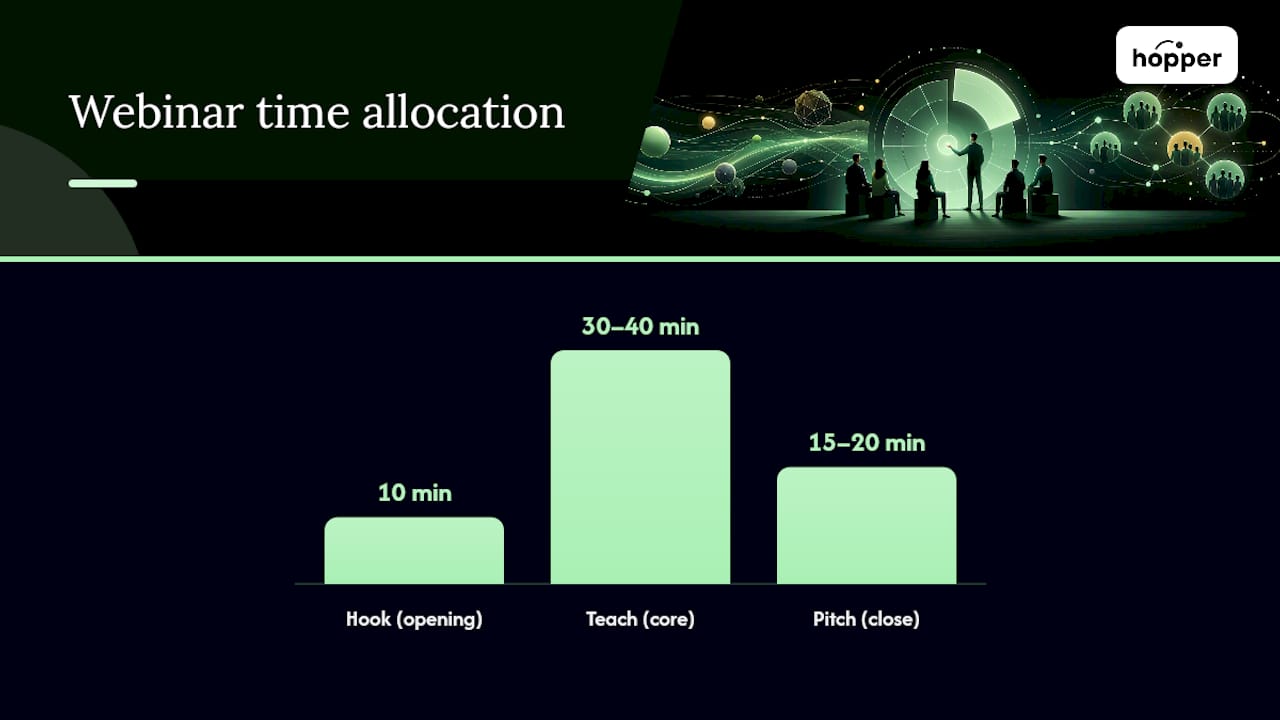
Structure the webinar itself in three parts. Spend the first ten minutes on a hook and a promise of what the session covers. Spend the middle 30 to 40 minutes teaching a real technique, something attendees could use even if they never buy anything. Spend the last 15 to 20 minutes on the pitch, framed as the next logical step after what you just taught, not a bolted-on sales pitch that feels disconnected from the content.
An email sequence around the webinar does most of the actual selling. A five to seven email arc works for most launches:
- Two to three emails before the webinar, building anticipation and reminding people to show up.
- One email immediately after, with the replay link and a recap of the offer.
- Two to three follow-up emails over the following four to five days, each handling a different objection: price, time, or "will this actually work for me."
- A final closing email on the last day, with a hard deadline stated plainly.
Conversion rates vary widely by niche and list warmth, so treat any number you see quoted elsewhere with caution. What's consistent is that a warm, engaged list converts far better than cold traffic, which is why the promotion phase matters as much as the pitch itself.
Once a live webinar launch has worked two or three times, record the best version and turn it into an evergreen funnel: a lead magnet feeds an automated email sequence, which drives to the recorded webinar, which drives to a shortened, automated version of the same email arc. Monitor show-up rate and email open rates weekly. If either one drops noticeably, the lead source feeding your list has usually shifted, not the offer itself.
Pro Tip: Keep your live pitch and your evergreen pitch word-for-word identical for the first month. If the evergreen version underperforms the live one by a wide margin, the gap is almost always the loss of real-time urgency, and you can rebuild some of that with a genuine cart-close deadline rather than a fake countdown timer.
Which Marketing Channels Actually Sell Courses?
Every channel you add should feed one thing: your email list. Selling online courses without an email list is possible, but it's slower and more expensive, because you're renting attention on someone else's platform instead of owning a direct line to a buyer.
Build the list with a lead magnet tied directly to the course outcome, not a generic freebie. A short mini-course or a five-day email challenge tends to attract better buyers than a static PDF checklist, because it demonstrates your teaching style before anyone pays. A smaller list of a few hundred genuinely engaged subscribers can outsell a much larger passive social following, so resist the urge to chase follower counts over open rates.
Content strategy works best organized around a small number of topic clusters that all point back to your core outcome. Pick three or four pillar topics, write pillar pages or videos on each, and route every piece of content back toward the same lead magnet. This keeps your content calendar focused instead of chasing whatever trend showed up that week.
Once the core funnel converts, layer in additional channels in this order:
- SEO and content, aimed at the specific questions your buyers already type into search, feeding the same lead magnet every time.
- Partnerships and affiliates, where someone with an adjacent audience promotes your course for a commission. This works best after you already have proof it converts, since partners want to see real numbers before they'll send their list.
- Paid ads, added last, once your organic funnel has a known conversion rate. Paid traffic amplifies a working funnel; it rarely fixes a broken one.
Measure ROI on any paid or partner channel by tracking cost per lead against your existing lead-to-buyer conversion rate, not by watching click volume alone. A channel that brings cheap leads who never convert is more expensive than one that brings fewer, better leads at a higher upfront cost.
How Do You Choose a Course Platform Without Overpaying?
Platform choice comes after validation, not before it, but once you're ready to scale it deserves real scrutiny. The wrong platform doesn't just cost more, it adds hours of admin work every month that a better setup would have handled automatically.
Run any platform against this checklist before committing:
- Setup time. Can you publish a course and a sales page in a day, or does it require a developer and a week of configuration?
- Payment handling. What's the transaction fee on top of the monthly cost, and does that fee apply to every plan or just the cheapest one?
- Content delivery. Does it handle video, community, and async coaching in one place, or will you need to bolt on separate tools?
- Mobile app access. Is a branded app included, or gated behind the most expensive tier?
- Member and product caps. Does the platform cap contacts, members, or products at a number you'll hit within a year?
- Migration support. If you already have students and content elsewhere, does the provider help move data, or leave you to rebuild from scratch?
A brand-new creator with fewer than a hundred students has different needs than someone running a six-figure program with a thousand active members. The starter creator should weigh setup speed and low fixed costs most heavily. The scaled creator should weigh member caps, transaction fees on volume, and whether the tool still feels fast at that size, since a platform that felt fine at fifty members can feel sluggish at five hundred. Stitching together a separate course host, community tool, checkout system, and link page is a common pattern, and it tends to create hidden costs and slower workflows as a business grows past its first few hundred students.
If you do migrate, treat it as a project with a checklist of its own: export your student list and their access history, confirm existing students can log into the new platform without re-purchasing, move your course files and preserve their structure, and redirect your old sales page and email links to the new checkout before you cancel the old subscription.
Pro Tip: Never cancel your old platform until at least one full billing cycle has passed on the new one with real students logging in successfully. Migrations fail quietly, usually in the login step, not the file transfer.
What Legal and Tax Rules Apply to Selling Courses Online?
Selling a course online means selling a product, and that comes with real obligations, not just a sales page and a checkout button. Rules vary by country, so treat the following as general orientation, not a substitute for advice specific to where you and your buyers are located.
Sales tax and VAT are the first thing to check. Many countries and several US states require digital product sellers to collect and remit tax once they cross a certain revenue or transaction threshold, and the threshold and rate depend on both your location and your buyer's location. A tax professional familiar with digital goods in your jurisdiction is worth the cost before your first launch, not after your tenth.
Data privacy rules matter the moment you collect an email address. If you have buyers in the European Union, GDPR governs how you store and use their data. If you have California buyers, the CCPA applies. Use a platform or email tool with clear consent and data deletion processes built in, and say plainly in your checkout what you collect and why.
Copyright covers two directions. Anything you use in your course, music, stock footage, quoted text, needs a proper license. And your own course content needs protection from being reshared or resold without permission, which is one reason to deliver content through a platform with access controls rather than a raw file download link.
Your sales page terms should state your refund policy, what a student receives, and how long they keep access. Vague terms create disputes; clear terms prevent most of them before they start.
What Payment Processors Work Best for Course Sales?
Most course sales run through a small handful of established processors: Stripe and PayPal are the two most widely accepted, and most course and community platforms integrate one or both directly rather than asking you to build a custom checkout from scratch.
Security comes largely built in when you use a mainstream processor. PCI compliance, the security standard for handling card data, is typically managed by the processor itself when you use their hosted checkout fields rather than building your own payment form. Avoid any setup that asks you to store card numbers yourself. That's a liability you don't need to take on when established processors already handle it.
A few setup details matter more than they first appear to. Confirm your payout schedule, since some processors hold funds for a rolling period on new accounts, which can catch a first-time seller off guard right after a launch. Confirm whether your processor supports the payment plans you want to offer, since not every provider splits payments the same way. And confirm that international cards are accepted if any part of your audience is outside your home country, since a decline rate that seems small can quietly cost you real sales during a launch window.
Fraud and chargebacks are rare for digital products priced under a few hundred dollars, but they do happen. Keep records of what a buyer received and when, since that documentation is what settles a dispute in your favor. A processor with built-in fraud screening reduces this risk further, and most major providers include some form of it by default.
How Should You Handle Customer Support for a Course?
Support for a course business is smaller in scope than support for a physical product, but it still needs a system, not just a personal inbox you check when you remember to.
Set expectations upfront. State your response time on the sales page and in your welcome email, something like "within one business day," and then hold yourself to it. A student who hears nothing for four days after asking a simple access question is a student who starts requesting a refund out of frustration rather than genuine dissatisfaction with the content.
Build a simple FAQ into the course itself, covering login issues, payment questions, and content access, so students can self-serve the questions that come up most often. This cuts your ticket volume more than almost anything else you can do, since the same three or four questions tend to repeat across every cohort.
Route different questions to different places. Content questions belong in a community space or comment thread, where other students benefit from seeing the answer. Billing and access issues belong in a private support channel, since those often involve personal account details. Mixing the two creates a cluttered space where the useful public answers get buried under one-off account fixes.
Treat early support tickets as product feedback, not just fires to put out. If five students ask the same question about module three, that's a sign module three needs a clearer explanation, not just a repeated answer copy-pasted five times.
How Often Should You Update an Online Course?
A course isn't a one-time file you upload and forget. Content ages, tools change, and a course that felt current at launch can feel stale within a year if nothing changes.
Set a review cadence rather than waiting for complaints to pile up. A light review every six months, checking for outdated screenshots, changed tools, or shifted best practices, catches most drift before it becomes a support ticket. A deeper refresh once a year, adding a new module or replacing weaker lessons, keeps the course competitive against newer alternatives in your space.
Student questions are your best source of update priorities. If the same confusion keeps surfacing around one module, that module needs a rewrite or a supplementary video, not just a repeated answer in the community. Track these patterns instead of relying on memory.
Communicate updates to existing students rather than updating silently. A short email or community post saying "module four just got a refresh with the current version of the tool" reinforces that the course is a living asset, not something they bought once and were abandoned with. This also gives you a natural, low-pressure touchpoint to ask for a fresh testimonial from a student who's already been through the material once.
Version your content internally, even informally, so you know what changed and when. This matters more once you have a team member helping with support, since they need to know whether a student's confusion is about the current version of a lesson or an outdated one they watched before an update.
What Tech Setup Do You Need to Sell a Course?
The minimum tech stack for selling a course covers four jobs: hosting the content, taking payment, communicating with students, and tracking who bought what. How many separate tools that takes depends entirely on the platform you choose.
Email integration is the piece most creators underestimate. Your course platform needs to talk to your email tool, so a purchase automatically triggers a welcome sequence and a tag that lets you segment buyers from browsers. If your course host and your email platform don't integrate directly, you're stuck manually exporting and importing lists, which turns into a chore that gets skipped the busier you get.
A CRM matters more as you scale past your first few hundred students, since that's the point where you need to track who's a customer, who's a past student worth re-engaging, and who's a lead that never converted. Some all-in-one platforms fold this into the same dashboard as your course content; others require a separate tool synced through an integration layer like Zapier, which adds another point of failure to monitor.
Checkout needs to sit close to your content delivery, ideally inside the same login a student already uses, rather than routing through a separate site that feels disconnected from the course itself. Every extra login or separate account a student has to manage is a small piece of friction that shows up later as a support ticket or a lapsed member who forgot they had access.
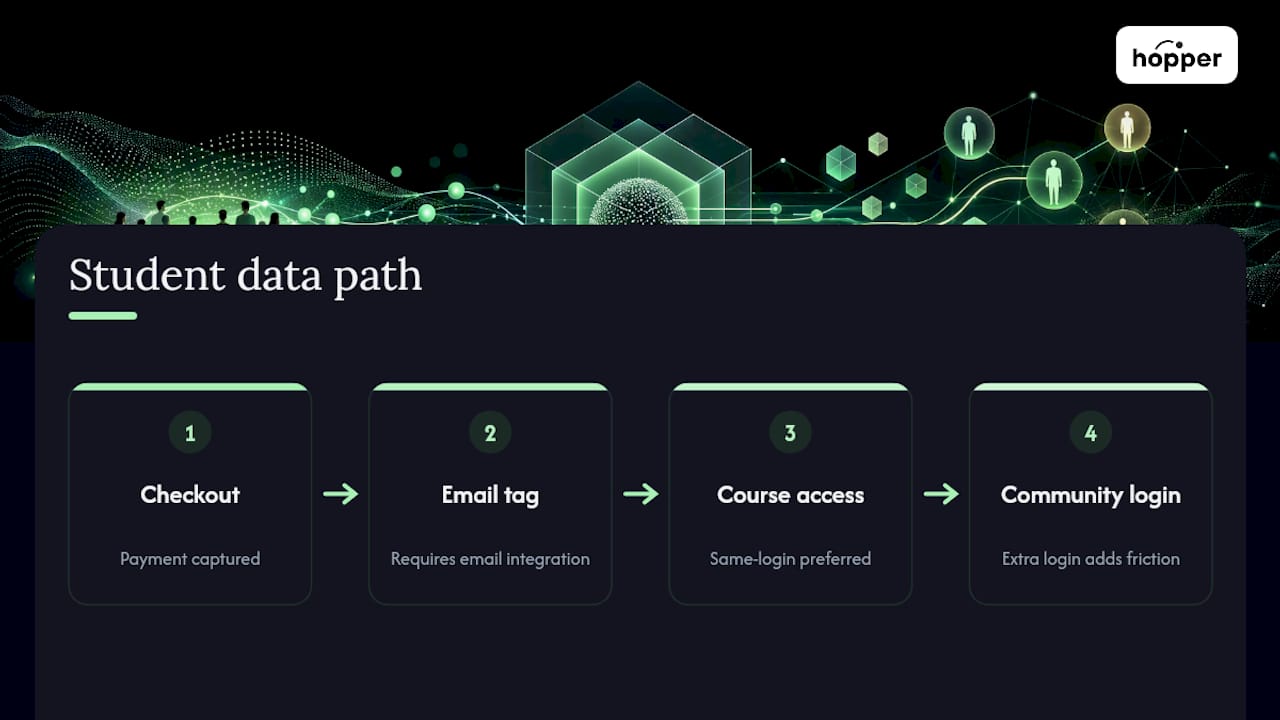
Before committing to a stack, map out where a single new student's data actually flows: checkout, to email tag, to course access, to community login. If that path requires more than two tools, you're likely paying for integration complexity you don't need.
Why Launching Before You're Ready Actually Works
Most advice about selling courses treats production quality as the bottleneck. It isn't. The real bottleneck is almost always the gap between finishing something and finding out whether anyone wanted it, and that gap gets longer, not shorter, the more polished you try to make the first version.
The uncomfortable part of pre-selling is that it forces you to ask for money before you feel ready, and that discomfort is doing real work. It tells you something a survey never will, because people say yes to surveys about things they'd never actually pay for.
What surprises most first-time creators is how little the early production quality actually matters to founder buyers. They're not paying for polish. They're paying for a specific outcome and a person who seems like they'll deliver it. The consolidation piece matters too, mostly because tool sprawl quietly taxes your time in ways that are easy to miss until you total up the hours spent logging into four different dashboards to run one launch.
— Cedrik
Where Hopper Fits Once You're Ready to Scale
Once you've validated an offer and run a launch, the tools you're using either support the next phase or slow it down.

Everything lives inside one hub: a Discussions feed for community, a Library for your modules and replays, Async Sessions for coaching on the Pro plan, and a public landing page where people join or buy in one place. Members, moderators, and products are unlimited on both plans, and you can run multiple hubs under one account if you ever launch a second offer. One creator cut significant software costs by consolidating their stack onto a single platform. Three coaches have already moved off Kajabi onto Hopper for the same reason: rising per-tier costs and contact caps that punished them for growing.
If you're currently paying for a separate course host, community platform, and link-in-bio tool, see how Hopper's migration support moves your existing students and content over without a rebuild, then explore the full platform to see whether a single flat price fits where your course business is headed next.
Sources
The claims and thresholds in this article draw on a handful of practitioner-focused sources worth reading directly if you want more detail on any single step.
- How to Create an Online Course: The Complete Step-by-Step Guide (2026)
- Systeme
- How to Sell Online Courses in 2026: 9 Steps from Idea to Revenue — SamCart
FAQ
How much money can you realistically make selling an online course?
Course income varies enormously by niche and list size, but pre-selling five to ten founder seats before you build anything gives you a real, early read on revenue potential rather than a guess.
Do you need a website to sell courses?
You don't need a full custom website. A single sales page and a checkout, whether built on a page builder or through an all-in-one platform like Hopper, is enough to sell your first cohort.
What's the best platform to sell courses on?
The right platform depends on your stage: new creators should prioritize fast setup and low fixed costs, while creators scaling past a few hundred students should weigh transaction fees, member caps, and consolidation.
How long does it take to create and sell a first course?
A validated minimum viable course, from picking an outcome to your first paid sale, can realistically move in two to three weeks if you pre-sell before recording anything beyond the first module.
What's the biggest mistake creators make when selling online courses?
Building the entire course before confirming anyone wants it. Pre-selling a founder cohort first, even at a steep discount, prevents months of wasted production work on a course nobody was waiting for.
Recommended
On our list and want off? .