
Membership Tier Ideas: 12 Ready 3 Tier Names for Founders & CMs
Get 12 ready 3 tier name sets, industry name banks, and a checklist to map tier names to platform billing and UI so founders and community managers can...
By the Hopper team
The fastest way to name your membership tiers is a clean three-level ladder that reads as obvious progression, something like Member → Plus → Premier. From there, pick a naming strategy (price, audience, access, theme, or outcome) that matches your brand voice, keep every label short enough to survive a receipt or a mobile screen, and use the industry-specific name banks and templates below to skip the blank page entirely.
TL;DR:
- Clear three-level ladders like Member, Plus, and Premier are essential, but their success depends on matching the naming strategy to your offer type.
- Pricing, user roles, content access, themes, or outcomes should guide your tier naming, chosen and kept consistent across the entire ladder.
- Test tier names for clarity, mobile truncation, and how well they signal progression before finalizing, especially on receipts and small screens.
- Short, recognizable names like Bronze/Silver/Gold or Explorer/Achiever/Mentor perform best, and they should map to concrete features or transformations.
- Using platforms like Hopper allows easy testing of different tier names without redesigning your tech stack, ensuring names accurately reflect actual benefits.
Table of Contents
- Membership Tier Ideas: Naming Strategies That Fit Your Offer
- Industry-Specific Membership Tier Names You Can Copy Today
- Fast 3-Tier Templates You Can Launch This Week
- How to Choose Membership Tier Names: A Practical Checklist
- Why Certain Membership Names Convert Better Than Others
- How Hopper Customers Map Tier Names To Real Features
- Membership Models That Work Beyond Just Naming
- Communicating Tier Value Without Confusing Members
- Structuring Benefits Across Your Membership Tiers
- Pricing Your Membership Tiers Without Guessing
- Getting Members To Move Up A Tier
- What I've Learned Naming Tiers For Real Communities
- Try Your Tier Names On A Platform Built To Test Them
- Sources
- FAQ
Membership Tier Ideas: Naming Strategies That Fit Your Offer
Most tier-naming mistakes come from picking a strategy before knowing what you're actually selling. A fitness coach and a B2B SaaS founder need different vocabulary, even if their pricing ladders look identical on a spreadsheet. Here are the five approaches that cover almost every paid community or subscription program, with examples you can lift directly.
1. Price and term-based naming. This is the plainest approach, and plain works when your buyer is comparison-shopping.
- Monthly / Annual / Founding Member
- Starter / Standard / Annual Plan
- Basic / Standard / Premium
- Monthly / Quarterly / Yearly Access
Use this when your product is straightforward and the tier difference is mostly billing frequency or a modest feature bump. It's the least creative option, but it's also the hardest to misread.
2. User or role-based naming. This works when the actual difference between tiers is who's using the account, not what they get.
- Individual / Team / Enterprise
- Solo / Studio / Agency
- Personal / Family / Business
- Member / Group Leader / Organization
Role-based names make sense for coaching platforms selling to both individual clients and studios, or SaaS tools where a five-person team needs different admin controls than a solo user. Skip this strategy if every member gets the same account structure. It'll just confuse people.
3. Content and access-based naming. These names describe what a member can reach, not who they are.
- Digital / Digital + Archive / All Access
- Free / Insider / VIP
- Read Only / Full Library / Everything
- Community / Community + Coaching / Full Access
This strategy pairs well with gated content models where the upgrade path is literally "more stuff unlocked." According to MemberPress's naming framework, access-based naming is one of five core conventions, alongside value, audience, community, and outcome framing, because it maps directly to the thing members are paying to unlock.
4. Theme-based naming. Themes carry personality, and personality is what makes a tier feel worth bragging about.
- Explorer / Trailblazer / Legend (adventure theme)
- Sprout / Bloom / Flourish (growth theme)
- Rookie / Contender / Champion (sports theme)
- Apprentice / Craftsman / Master (skill theme)
Creative, themed names like these can genuinely boost how emotionally attached members feel to their tier, but MemberSmart's research is clear that theme alone isn't enough. Every themed name still needs to signal concrete progression, or new members won't know which tier is actually "better."
5. Outcome-focused naming. For coaching, courses, and cohort programs, tying the tier name to a transformation outperforms tying it to a feature list.
- Explorer / Achiever / Mentor
- Starter / Practitioner / Expert
- Learner / Graduate / Ambassador
- Beginner / Pro / Master
This is the pattern Paddle's tiered pricing research points to when it names Beginner/Pro/Master among the most immediately recognizable structures, because the labels tell a new member exactly where they stand and what leveling up looks like. For creator and course communities specifically, outcome-anchored ladders like Starter → Graduate → Mentor tend to improve upgrade motivation more than generic price tiers, since members are buying the transformation, not the access.
Pick one strategy and stick with it across the whole ladder. Mixing a price-based Tier 1 with a theme-based Tier 2 is the single fastest way to make your pricing page feel unfinished.
Industry-Specific Membership Tier Names You Can Copy Today
Different industries carry different expectations for what a tier name should sound like. A gym member expects something energetic; a professional association member expects something that signals status. Below are ready-made ladders across six categories, organized by "best for" fit.
Professional associations and trade groups
- Associate / Member / Fellow — best for organizations with formal credentialing tracks.
- Affiliate / Professional / Distinguished — best for career-stage progression.
- Student / Practitioner / Senior Fellow — best for associations spanning students through veterans.
- Provisional / Certified / Board Certified — best for licensing-adjacent bodies.
Nonprofits and donor programs
- Friend / Advocate / Champion — best for mission-driven groups emphasizing belonging over benefits. This mission-forward pattern shows up across dozens of catchy membership examples because donors respond to identity language, not feature lists.
- Supporter / Sustainer / Visionary — best for recurring-giving programs.
- Contributor / Patron / Founder's Circle — best for capital campaigns or legacy donor tiers.
- Neighbor / Partner / Guardian — best for community-based nonprofits (shelters, food banks, local causes).
Clubs and hobbyist communities
- Guest / Regular / Lifetime — best for social or recreational clubs with informal culture.
- Rookie / Veteran / Legend — best for sports leagues and competitive hobby groups.
- Member / Insider / Founder — best for book clubs, hobby forums, and interest-based communities.
- Casual / Committed / All In — best for clubs that want a playful, low-pressure tone.
SaaS and creator platforms
- Free / Starter / Pro — best for software with a freemium entry point.
- Solo / Studio / Scale — best for tools serving individuals through growing teams.
- Starter / Growth / Enterprise — best for B2B SaaS with a clear company-size axis.
- Basic / Plus / Unlimited — best for creator platforms where the top tier removes caps entirely.
Fitness and coaching
- Bronze / Silver / Gold — a classic pattern that Paddle's pricing research flags as instantly recognizable, ideal when you want zero learning curve for new sign-ups.
- Foundations / Momentum / Mastery — best for programs built around a training arc.
- Solo Training / Group Coaching / 1:1 Elite — best for hybrid coaching businesses.
- Beginner / Athlete / Elite — best for performance-focused fitness brands.
Arts and cultural organizations
- Fan / Enthusiast / Curator — best for museums, galleries, and cultural nonprofits.
- Audience / Supporter / Season Pass Holder — best for theaters and performance venues.
- Listener / Collector / Patron — best for music and media-based memberships.
- Visitor / Friend of the Gallery / Benefactor — best for visual arts institutions.
Before you commit to any of these, check how the name behaves when it's truncated. A label that reads beautifully on your pricing page can turn into an unreadable fragment on a billing receipt or a small phone screen, and Member365's association research is direct about this: clarity on receipts and mobile UI matters as much as clarity on the sales page.
Fast 3-Tier Templates You Can Launch This Week
If you'd rather skip the strategy debate and just launch, three models cover most use cases.
- Value-based model — tiers differ mainly by how much you get, not who you are. Good for content libraries, digital products, and subscription boxes.
- Audience-based model — tiers differ by who's buying (solo vs. team vs. organization). Good for SaaS and B2B coaching offers.
- Aspirational or community-based model — tiers differ by identity and status inside the group. Good for coaching, cohort programs, and paid communities where belonging is part of the pitch.
Here are twelve ready-to-paste name sets, one line each:
- Basic / Standard / Premium — neutral, universally understood, low personality.
- Bronze / Silver / Gold — instantly recognizable, works when price-sensitivity is high.
- Member / Plus / Premier — clean progression, fits almost any brand voice.
- Starter / Pro / Elite — energetic, fits fitness and skill-based communities.
- Explorer / Achiever / Mentor — outcome-driven, strong for coaching and courses.
- Free / Insider / VIP — good when the free tier is a real onboarding step.
- Individual / Team / Enterprise — best for SaaS with a clear org-size axis.
- Friend / Advocate / Champion — mission language for nonprofits and causes.
- Solo / Studio / Scale — creator-economy friendly, growth-oriented.
- Rookie / Veteran / Legend — playful, fits sports and hobby communities.
- Community / Community + Coaching / All Access — access-based, clear upgrade logic.
- Foundations / Momentum / Mastery — journey-based, strong for training programs.
One practical note on billing labels: if your public-facing name is long ("Community + Live Coaching Access"), give it a short internal billing label too, so it doesn't truncate on a card statement or an app notification, as explained in this guide to membership billing for classes. Keep the public name expressive and the billing label plain.
How to Choose Membership Tier Names: A Practical Checklist
Before you lock in a name, run it through these checks. Skipping this step is how brands end up rebranding tiers six months after launch, which is far more disruptive to members than getting it right the first time.
- Clarity test: Can a first-time visitor tell which tier is "more" without reading the fine print?
- Ladder progression: Do the names read left-to-right as an obvious sequence, or could someone assume Silver beats Gold?
- Brand voice fit: Does the name sound like something your brand would actually say out loud?
- Receipt and mobile behavior: Does the label survive truncation on a bank statement or a small screen?
- Billing label separate from public name: Do you have a short internal code mapped to each public-facing name?
- Room to scale: If you add a fourth tier next year, does the naming pattern still make sense?
Ask these questions across departments, not just marketing:
- Finance: Does the tier name need to appear on invoices or tax documents, and does it fit?
- Support: Will members confuse this tier name with a competitor's or a past product name?
- Marketing: Does the name translate cleanly if you expand internationally?
- Legal: Does any tier name make an implied claim (like "Certified" or "Official") that needs review?
Red flags worth catching early: ambiguous progression (two tiers that sound equally premium), idioms or slang that don't translate outside your home market, and labels long enough to wrap onto two lines in a mobile menu. Member365's guidance on association naming also warns against over-specific, jargon-heavy names for globally distributed memberships, since local references that feel clever at home often just confuse everyone else.
Pro Tip: Write your three tier names, then hand the list to someone outside your business with zero context. If they can't guess the order in five seconds, the names aren't done yet.
Why Certain Membership Names Convert Better Than Others
Tier names work on identity, not just information. A member choosing between "Standard" and "VIP" isn't just picking a feature set. They're picking who they get to be inside your community, and status labels tap into that instinct directly.
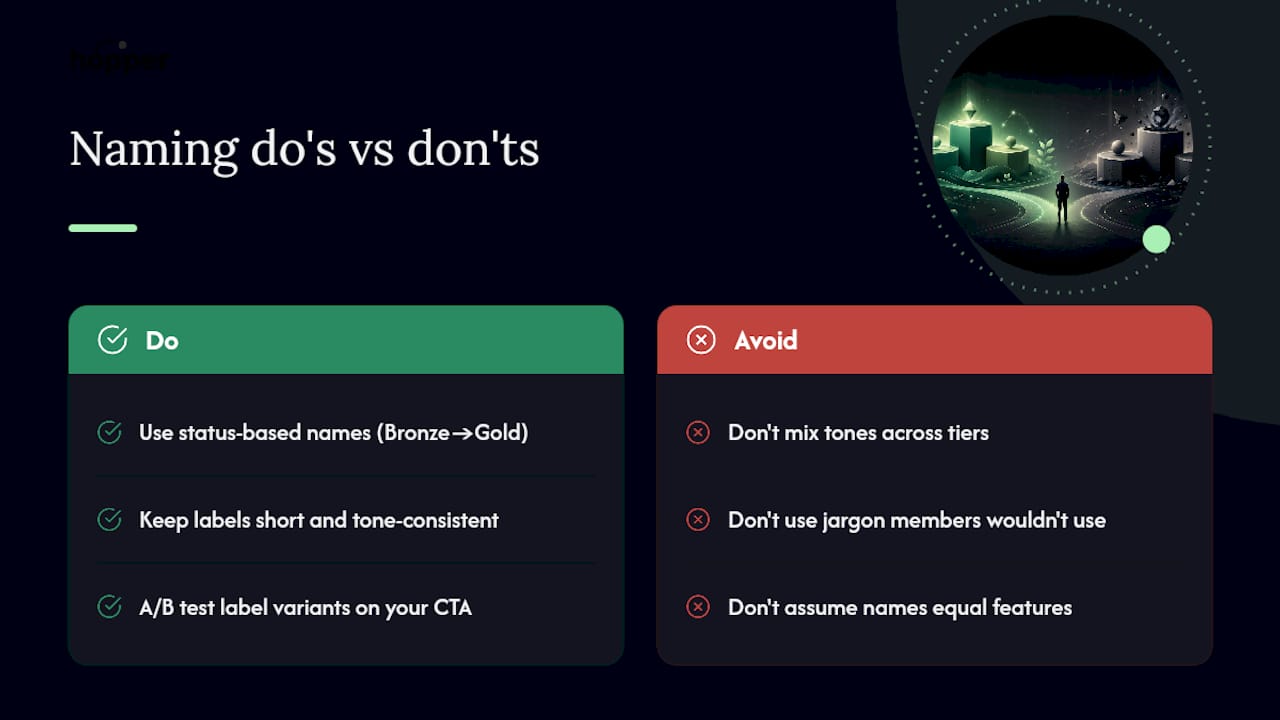
That's part of why classic status-signaling structures like Bronze/Silver/Gold or Beginner/Pro/Master persist across industries. Paddle's research on tiered pricing shows these patterns are widely recognized precisely because they communicate increasing value on sight, with no explanation needed.
Do keep labels short and the progression consistent in tone (don't jump from "Bronze" to "Ultra Elite Superstar" for tier two). Don't reach for jargon your members wouldn't use in conversation.
If you're unsure which name performs better, test it. MemberPress's naming guide points to A/B testing label variants, Pro versus Premium, Insider versus VIP, as a lightweight way to validate member perception before committing brand-wide. Swap the label on your checkout CTA for two weeks and watch which version members actually click.
How Hopper Customers Map Tier Names To Real Features
A tier name only works if it maps to something concrete. On Hopper, a "Starter" tier commonly unlocks the content library and community feed, while a "Pro" tier layers in async coaching, storefront discounts, and native app access.
- Starter: library access + community discussions
- Pro: everything in Starter, plus async coaching and app-based delivery
Because Hopper supports unlimited hubs and flat pricing with no per-member caps, you can use different tier names per program without redesigning your whole account structure. Coaches migrating from other platforms can review the free migration option to see how existing tiers carry over.
Membership Models That Work Beyond Just Naming
A great tier name still fails if the underlying model doesn't hold up. The strongest membership programs pair naming with structural decisions that make the ladder feel earned.
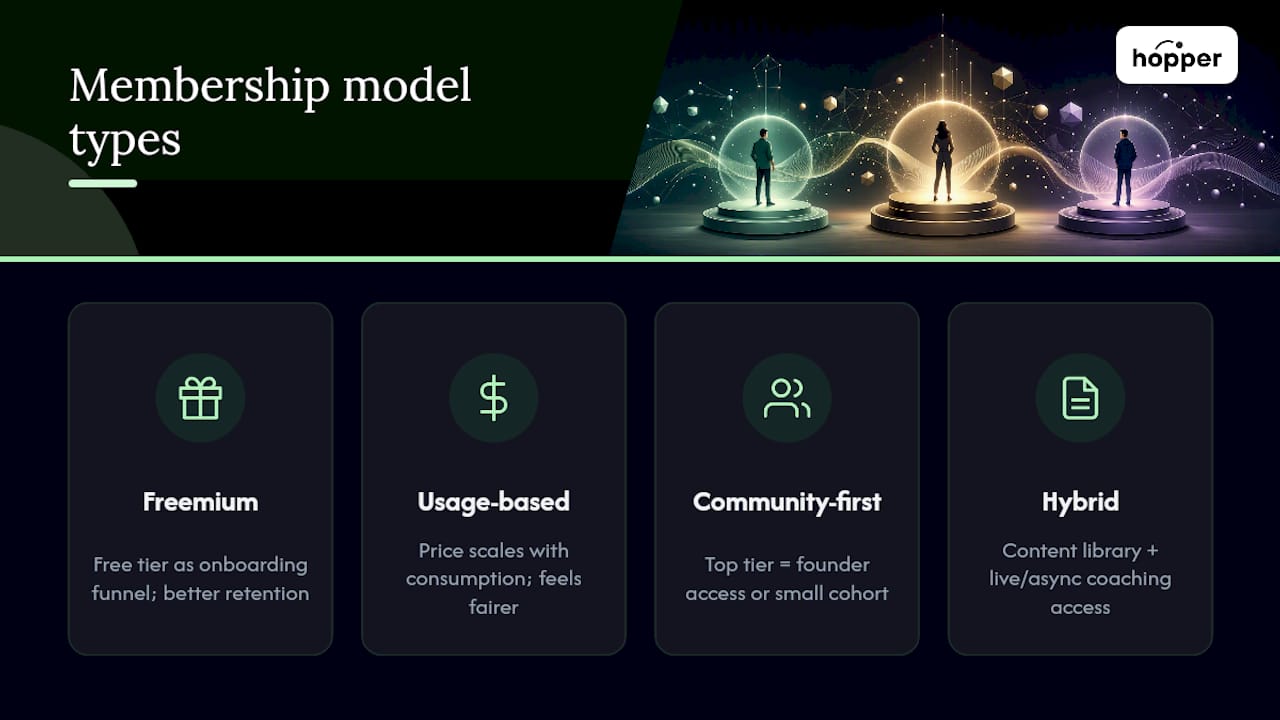
Freemium-to-paid models, where a free tier acts as a genuine onboarding funnel rather than a bait-and-switch, tend to retain better than paywalled-from-day-one models, because members already understand the value before they're asked to pay. Usage-based tiers, common in SaaS, scale price with actual consumption instead of arbitrary feature gates, which feels fairer to growing accounts.
Community-first models, where the top tier unlocks direct access to the founder or a smaller cohort rather than just "more content," work especially well for coaching and course businesses. The tier isn't selling more videos, it's selling closer proximity. Hybrid models that combine a content library with live or async coaching access at the top tier follow the same logic: the jump between tiers should feel like a jump in relationship, not just volume.
What separates a successful model from a mediocre one usually isn't the tier count. It's whether the gap between tiers reflects a real difference in outcome, not just a bigger folder of files.
Communicating Tier Value Without Confusing Members
The name gets someone's attention. The layout around it determines whether they understand what they're buying. Put your tier comparison in a table, not a paragraph, and let each row answer one question: what's different here?
Keep the most expensive tier visually distinct, but don't bury the mid-tier, since that's usually where most members land. Use consistent verb tense and formatting across every tier's benefit list; if Tier 1 says "Access the library" and Tier 2 says "Coaching sessions included," the inconsistency reads as sloppy even if the content is solid.
On mobile specifically, test how your tier names and benefit lists collapse. A three-column comparison table that looks clean on desktop often turns into an unreadable stack on a phone, and that's exactly the moment a potential member decides it's too much effort to figure out and leaves.
Structuring Benefits Across Your Membership Tiers
Separate the name from the benefits copy early, because they do different jobs. The name signals category and emotion. The benefit bullets do the actual explaining. According to MemberPress's naming framework, the strongest programs treat these as two distinct writing tasks, not one.
Structure benefits so each tier adds, rather than replaces. Members should never feel like upgrading costs them something they already had. A workable pattern: Tier 1 gets core access, Tier 2 gets everything in Tier 1 plus a defined new capability (live coaching, discounts, premium content), Tier 3 gets everything in Tier 2 plus either unlimited access or direct relationship access (1:1 time, priority support).
Cap the visible benefit list at five or six bullets per tier. Longer lists don't read as more valuable, they read as harder to compare, and that friction is what makes people abandon a pricing page instead of choosing a tier.
Pricing Your Membership Tiers Without Guessing
Price the middle tier first, not the cheapest one. Most membership programs make more money from the middle tier than either extreme, so it needs to feel like the obvious choice, priced close enough to the top tier that upgrading feels natural, and far enough from the bottom tier that the extra value is obvious.
Watch your transaction and platform fees as closely as your sticker price. A $30 monthly tier that loses a chunk to per-transaction fees on every sale behaves very differently from the same price point on a flat-fee platform. This is one area where the platform you build on shapes your actual margin, not just your listed price.
Consider loyalty or tenure-based pricing as a fourth lever alongside your tier structure, rewarding members who stay longer with a lower effective rate rather than only new-member discounts. It's a quieter form of retention than adding another tier, and it doesn't require touching your naming ladder at all.
Getting Members To Move Up A Tier
Upgrades happen when a member hits the edge of their current tier and feels it, not when you email them a discount code. Build visible friction into the free or entry tier: a locked piece of content, a capped number of sessions, a "join the conversation" prompt that requires the next tier up.
Show the next tier inside the product, not just on the pricing page. A member scrolling your content library who sees a clearly labeled Pro-only session gets a concrete reason to upgrade, right at the moment they want it.
Time-limited upgrade offers work better tied to a milestone (finishing a course, hitting a streak) than tied to a calendar date, because they connect the upgrade to something the member just accomplished. And don't underestimate simple social proof: showing how many members are in each tier, or what the top tier includes that most people don't know about, nudges people who assumed the entry tier was "enough."
What I've Learned Naming Tiers For Real Communities
Start with two or three tiers, not five. Every extra tier is another decision a new member has to make before they'll pay you anything, and most programs don't have enough real differentiation to justify a fourth.
Keep names short enough to survive a receipt. Test that before you test anything else.
Resist the pull toward clever names before you've proven the ladder itself works. Clarity converts; cleverness can wait until you've got enough member behavior data to know which names people actually click, share, and brag about. Names aren't permanent. Treat the first version as a draft you'll revise once real usage tells you what's working.
— Cedrik
Try Your Tier Names On A Platform Built To Test Them
Once you've picked a naming pattern, the platform you launch it on matters almost as much as the name itself. Hopper is built for coaches and creators who want to test tier names without redesigning their whole tech stack every time they change one. Flat pricing starts at $58 a month with unlimited members and unlimited hubs, so you can run different tier names across separate programs under one account, something a single-community tool simply won't let you do.

Because Hopper combines the community feed, content library, async coaching, and storefront in one hub, a tier name like "Pro" or "Insider" maps directly to a real feature bundle instead of a vague promise. If you're currently juggling a course host, a separate community tool, and a checkout link, the free migration option moves your existing structure over without a rebuild. Take a look at Hopper's platform and see how your next tier ladder would actually look inside it.
Sources
- Paddle blog - tiered pricing
- 200 Catchy membership level names — Join It
- Tiered membership categories for associations — Member365
FAQ
What are some good ideas for 3-tier membership names?
Strong options include Member/Plus/Premier, Basic/Standard/Premium, Bronze/Silver/Gold, and Explorer/Achiever/Mentor. The best choice matches your brand voice and signals clear progression from one tier to the next.
What are some creative ideas for membership benefits?
Structure benefits so each tier adds rather than replaces, such as library access at the entry level, adding live or async coaching at the middle tier, and unlimited or 1:1 access at the top. Keep each tier's list to five or six bullets so comparison stays easy.
What should I name my subscription tiers?
Pick one naming strategy, price-based, audience-based, access-based, theme-based, or outcome-based, and apply it consistently across all tiers rather than mixing approaches. Test how each name reads on a receipt or mobile screen before finalizing it.
What are the different types of membership tiers?
Common types include value-based tiers (more content or features per level), audience-based tiers (individual versus team versus enterprise), access-based tiers (gated content levels), and outcome-based tiers (tied to skill progression or transformation). Platforms like Hopper let you run different tier types across separate hubs under one flat-priced account.
Recommended
On our list and want off? .