
Coaches: Redesign First to Move Your Course Online and Retain Students
A coach’s playbook for moving courses online: set objectives first, run a 7-day on-ramp, and migrate to a single platform with migration help — plus a...
By the Hopper team
Move your course online by redesigning around learning objectives first, then auditing your content, choosing an integrated platform with real migration support, and running a hybrid on-ramp with a 7-day welcome flow. Don't just re-upload your old material. Migration services can handle the technical transfer while you focus on the redesign.
TL;DR:
- Moving online requires redesigning around clear learning objectives before auditing content and choosing a platform with comprehensive migration support.
- Content should be cut or revised if it does not align with specific, measurable objectives, with long lectures broken into shorter, task-backed segments.
- Using platform's migration services reduces downtime and avoids losing purchase or member history when transferring files and data.
- Confirm the new platform supports delivery needs, offers loyalty pricing, and ensures mobile accessibility through full testing before launch.
- Personalized communication and a hybrid transition help retain existing clients, with steady pricing and detailed onboarding during the first week post-launch.
Table of Contents
- Your Move Online Course Checklist
- How Do You Redesign a Course for Online Delivery?
- What Should You Reuse, Recreate, or Retire?
- What Should You Check Before Launching on a New Platform?
- How Do You Keep Existing Clients During the Move?
- What Happens in the First 7 Days After Launch?
- How Long Does It Take to Move a Course Online?
- What Coaches Get Wrong About Moving Online
- How Hopper Makes the Move Easier
- Sources
- FAQ
Your Move Online Course Checklist
Here's the order that actually works, based on how instructional designers approach this problem:
- Set your learning objectives first. Decide what students should walk away knowing, then build modules around that.
- Audit every lesson. Sort each piece into reuse, revise, or retire.
- Chunk your lectures. Break long sessions into short videos, each paired with a task.
- Choose your platform. Confirm it handles payments, mobile access, and community in one place.
- Assign migration tasks and set a timeline. Decide who moves what, and by when.
- Talk to your existing clients one-on-one. Then run a hybrid on-ramp before you fully launch.
Each step builds on the last. Skip the objectives step and you'll spend weeks moving content nobody needs.
How Do You Redesign a Course for Online Delivery?
Start at the end, not the beginning. Before you touch a single video file, review and often rewrite your learning objectives. Instructional designers agree on this almost universally: the technology matters less than whether your objectives, activities, and assessments actually line up with each other.
That means asking what a student needs to do by the end of each module, not just what they need to hear. Utrecht University's conversion framework puts it plainly: decide objectives first, then pick the activities and assessments that support them, and only then choose your tools and format.
A few decisions to make before you move anything:
- Set a target time-on-task for each module. A duration that holds attention better than an extended session is recommended.
- Choose assessments that work asynchronously: quizzes, short submissions, peer feedback threads.
- Cut anything that doesn't serve the objective, even if it took you hours to build originally.
Pro Tip: If a lesson doesn't map to a clear objective, don't move it. Archive it instead. You can always bring it back once your new structure is live.
What Should You Reuse, Recreate, or Retire?
Run a four-column audit before you migrate a single file: keep, revise, recreate, retire. This is the difference between a smooth move and a slog. Most coaches try to transfer everything, and it costs them weeks they didn't need to spend.
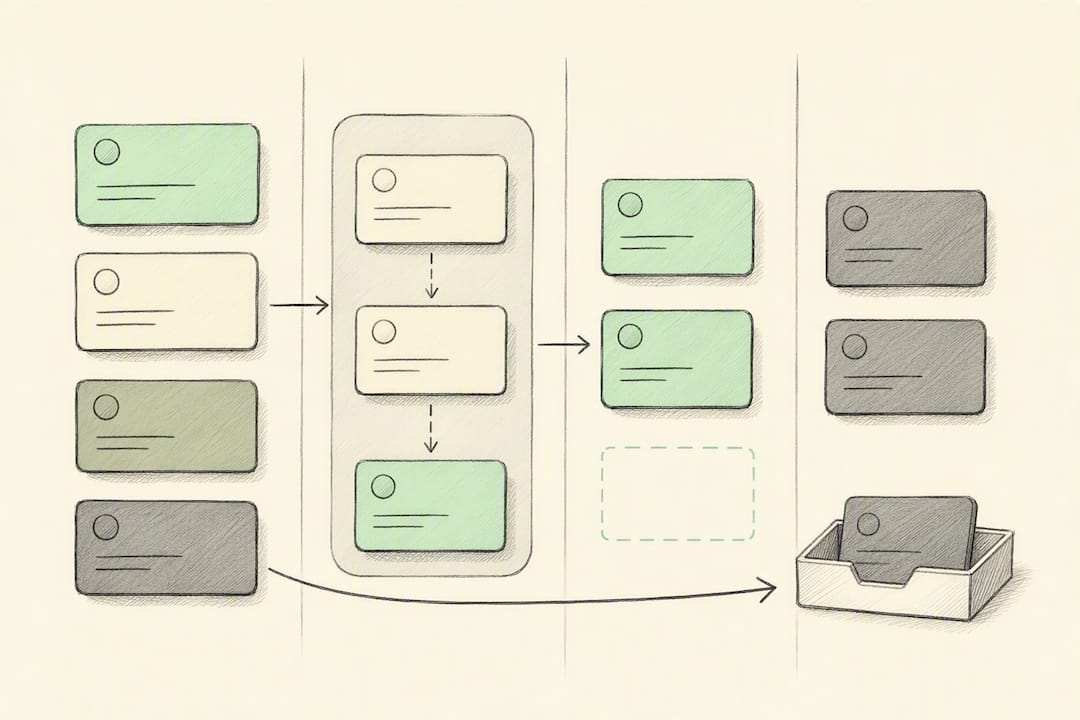
Build a simple spreadsheet with the file name, its column assignment, an owner, and a status. It sounds basic. It's also the single best way to avoid losing track of what's done and what isn't.
From there:
- Chunk any long lecture into segments of 5 to 10 minutes, and attach one short activity to each chunk.
- Add captions, clean titles, and standardized filenames before import; loose files with vague names slow every step after this one.
- Set metadata and access permissions as you upload, not after, so nothing sits unprotected during the transfer.
- If you're converting long recordings into shorter clips, a tool like AmmarAI's video script generator speeds up the rewrite work considerably.
When possible, use a platform's migration service to move content, member records, and purchase history together. Manual transfers introduce more downtime and more risk of losing a paying member's history than most coaches expect.
What Should You Check Before Launching on a New Platform?
Confirm the platform actually supports the delivery model you're building, not just the one you're leaving. That means checking for a real content library, a community space, some form of async coaching, and a built-in storefront, not four separate tools bolted together.
Before you commit:
- Decide your pricing shape: subscription versus one-time purchase, and whether the platform charges a transaction fee on top of your subscription.
- Check whether the platform offers loyalty pricing for long-term members. Almost none do, and it matters for retention math over a year or two.
- Set up your integrations: email, analytics, calendar syncing, and automatic backups.
- Test the entire flow yourself, on mobile, as if you were a paying student: signup, payment, first login, first video.
Skipping the mobile test is the most common miss. If your students can't comfortably watch on a phone, you'll hear about it in week one.
How Do You Keep Existing Clients During the Move?
Group emails don't cut it here. Executive coaching research on change communication is consistent on this point: individual conversations retain trust in a way mass announcements never do, especially when someone's paying you monthly.
- Talk to each client one-to-one about what's changing and what stays exactly the same.
- Run a hybrid phase first. Keep in-person sessions where they matter, and layer the online structure on top rather than replacing everything at once.
- Hold pricing steady for existing clients through the transition window. Nobody wants a price hike attached to a system they haven't tested yet.
- Write a short FAQ and a segment-specific onboarding checklist, so each client type gets guidance that actually applies to them.
This is slower than a mass announcement. It's also why clients stay.
What Happens in the First 7 Days After Launch?
The first week decides whether people finish your course or quietly disappear. Before launch, check playback, links, payment flow, and mobile access yourself, from a student account, not your admin view.
- Send a welcome sequence: an orientation checklist, the first module, an estimated time commitment, and one quick win they can complete same day.
- Schedule a live or recorded kickoff session, with reminders sent 48 and 2 hours ahead.
- Collect feedback after day 3, while the experience is still fresh.
- Track first-week completion and login frequency, then fix whatever's causing drop-off immediately, not next month.
Pro Tip: A quick win on day one, something they can finish in under ten minutes, does more for week-one retention than a polished welcome video.
How Long Does It Take to Move a Course Online?
A quick republish, moving existing files onto a new platform without redesigning them, takes about 1 to 2 weeks. A full redesign with real migration, new module structure, and a client on-ramp typically runs 4 to 12 weeks depending on how much content needs reworking.
Costs scale with scope too: your platform subscription, any paid migration support, and hours spent editing or hiring a contractor for video work. Treat these as ranges, not fixed quotes, since scope shifts once you start the audit.
The Savings Example: Coach Daniel Lim consolidated his tool stack onto Hopper and cut $6,000 a year in software costs. That's the kind of number that shows up when you stop paying for four separate tools to do what one platform can handle.
What Coaches Get Wrong About Moving Online
Most coaches treat this as a technical problem: which platform, which video host, which checkout tool. It isn't. It's a redesign problem wearing a technical costume.
The coaches who keep their students are the ones who protect the relationship first and the feature list second. Simplify ruthlessly, launch with real students, and adjust based on what they actually do, not what your syllabus assumed they'd do. Everything else, including the platform, should get out of the way of that.
— Cedrik
How Hopper Makes the Move Easier
Hopper combines your content library, community hub, async coaching, and storefront into one hub, so you're not stitching together four subscriptions to run one program. If you're migrating off Kajabi or Circle, Hopper's migration process is built to move your content, members, and purchase history without the manual rebuild that usually eats your first month.

Plans often include native iOS and Android apps, support for many members and products, and loyalty pricing that rewards students the longer they stay. Coaches like Daniel Lim have already cut real costs this way. If your course is ready to move, start your migration with Hopper and see what a single hub actually saves you.
Sources
For the redesign framework behind this checklist, see Columbia CTL's course adaptation guide and Utrecht University's conversion process. For faster video scripting, try AmmarAI's script generator.
FAQ
How Long Does It Take to Move a Course Online?
A simple republish takes about one or two weeks, while a full redesign with migration and client onboarding typically requires several weeks, varying based on content rework needed.
Should I Redesign My Course or Just Upload It As Is?
Redesign it. Instructional design guidance consistently shows that aligning objectives, activities, and assessments first produces better engagement than simply transferring existing material.
What Platform Features Actually Matter for Moving a Course Online?
Look for a content library, community space, async coaching, a built-in storefront, and a native mobile app in one place. Hopper bundles all of these into a single hub with migration support included.
How Do I Keep My Existing Clients From Leaving During the Move?
Talk to them individually, run a hybrid transition rather than an abrupt switch, and hold pricing steady during the transition window to preserve trust.
Does Moving Platforms Actually Save Money?
It can. Coach Daniel Lim saved $6,000 a year after consolidating his separate tools onto Hopper's single platform.
Recommended
On our list and want off? .