
Coaches: Reduce Software Costs and Save $6,000 by Consolidating
Audit subscriptions, cancel unused licenses, and consolidate course, community, and storefront into one flat-priced hub. See how one coach cut $6,000 a year.
By the Hopper team
The fastest way to reduce software costs is to audit your stack, cancel what nobody uses, and consolidate overlapping tools into one flat-priced platform once the math shows it lowers your true cost. Most coaches start by canceling one or two dead subscriptions immediately, then find the bigger win waiting in course hosting, community, and storefront tools that all charge separately for pieces of the same job. A flat-priced all-in-one, Hopper included, is often where that consolidation lands.
TL;DR:
- Conduct a thorough audit by reviewing bank statements and usage data, then flag tools for cancellation, consolidation, or retention based on active user rates.
- Overlapping tools in course hosting, community, storefront, and scheduling often lead to redundant expenses, with hidden costs like integrations and onboarding adding up to two to four times the subscription fees.
- The recommended consolidation sequence starts with canceling unused licenses, replacing duplicates, then merging community and course tools, and finally handling integrations last.
- Using an all-in-one platform like Hopper can simplify management, reduce operational costs, and save around $33,000 annually for a typical 10-person team, with the added benefit of streamlined migration and ongoing support.
Table of Contents
- How Do You Audit Your Coaching Software Stack?
- Why Does Overlapping Software Cost More Than It Looks Like?
- What's the Right Order to Consolidate Your Tools?
- How Much Can Coaches Actually Save by Consolidating?
- Why an All-in-One Platform Like Hopper Simplifies Consolidation
- Change Management Rules That Make Consolidation Stick
- Ready to Consolidate? Start With Hopper
- Sources
- FAQ
How Do You Audit Your Coaching Software Stack?
Start with your bank statement, not your memory — a smart first step in any software audit is to consider modern dance studio software options that help track and manage subscriptions seamlessly. Pull every recurring charge from recent months across cards, PayPal, and any team member's expense account, since coaches often forget the tool a former assistant signed up for. Cross-reference against billing emails and ask any team member with purchasing power to list what they've subscribed to on the business's behalf.
Build a simple spreadsheet with these columns:
- Tool name and primary function
- Monthly cost and billing cadence (monthly vs. annual)
- Owner (who actually uses it)
- Active users vs. licensed seats
- Renewal date
- Integrations it depends on or feeds
Usage is the number that matters most. Check login frequency and seats actually used against seats paid for. Industry guidance puts the danger threshold at 40% active usage: if less than 40% of paid seats log in regularly, that tool is a cancellation or consolidation candidate. The same research suggests most small teams carry closer to 1.5 tools per person than they realize, which is usually more than the business needs.
Tag every row with one of three flags: cancel immediately, consolidate into something else, or keep as is. That single column turns a messy spreadsheet into a decision document.
Why Does Overlapping Software Cost More Than It Looks Like?
Coaches typically run six functional buckets: course hosting, community, storefront, scheduling, email or CRM, and automation. Map every tool in your audit to one of those buckets, and overlap becomes obvious fast. A course host with a clunky community tab, a separate community platform, a link-in-bio storefront, and a scheduling app are four subscriptions doing three jobs.
The subscription total is never the real cost. Companies with just 100 employees lose around $420,000 a year to miscommunication and disconnected tools, and a two-person coaching team feels a scaled-down version of that same tax.
Hidden costs worth adding to your total:
- Integration platforms (Zapier, Make) and the per-task fees they rack up
- Context-switching time lost jumping between four logins to do one job
- Onboarding and offboarding hours every time a tool changes or a team member joins
- Security overhead of managing passwords and permissions across separate systems
A workable formula: True cost = (sum of subscription fees) × a multiplier of 2 to 4, depending on how many tools you run and how tangled the integrations are. Research on tool sprawl backs that 2 to 4x range for hidden operational costs alone. The decision rule is simple: if consolidating two or more tools into one platform cuts your multiplier-adjusted total by more than the migration effort costs in time, consolidate. Run the sensitivity check both ways, since a coach with three tools and clean integrations may see a smaller multiplier than a coach juggling eight.
What's the Right Order to Consolidate Your Tools?
Sequence matters more than most coaches think. Consolidating out of order means redoing migration work twice.
-
Cancel unused licenses first. Anything flagged in your audit as dead weight gets canceled this week, no migration needed.
-
Replace duplicated point tools next. Email, scheduling, and storefront apps that overlap with a bigger platform's built-in features go second.
-
Consolidate community and course hosting together. These two buckets have the most functional overlap and the biggest combined subscription cost, so merging them delivers the largest single win.
-
Handle integrations last. Once your core stack is smaller, rebuild only the automations you still need.
For the migration itself: export your data (members, content, transaction history), map fields to the new platform's structure, import into a staging hub, and test it before anyone else sees it. Train your team on the new workflow, then schedule a sunset date for the old tool.
Run the new and old systems in parallel for two to four weeks. That staged overlap window reduces risk to revenue-facing funnels during the switch, and it gives you a fallback if something breaks. Assign one person as the software owner accountable for the whole move, loop in anyone whose daily work touches the tool, and do at least one dry run with real (not sample) data before the live cutover.
Pro Tip: Migrate your lowest-stakes hub first if you run multiple businesses or programs. Work out the kinks on a small audience before you touch your primary revenue stream.
How Much Can Coaches Actually Save by Consolidating?
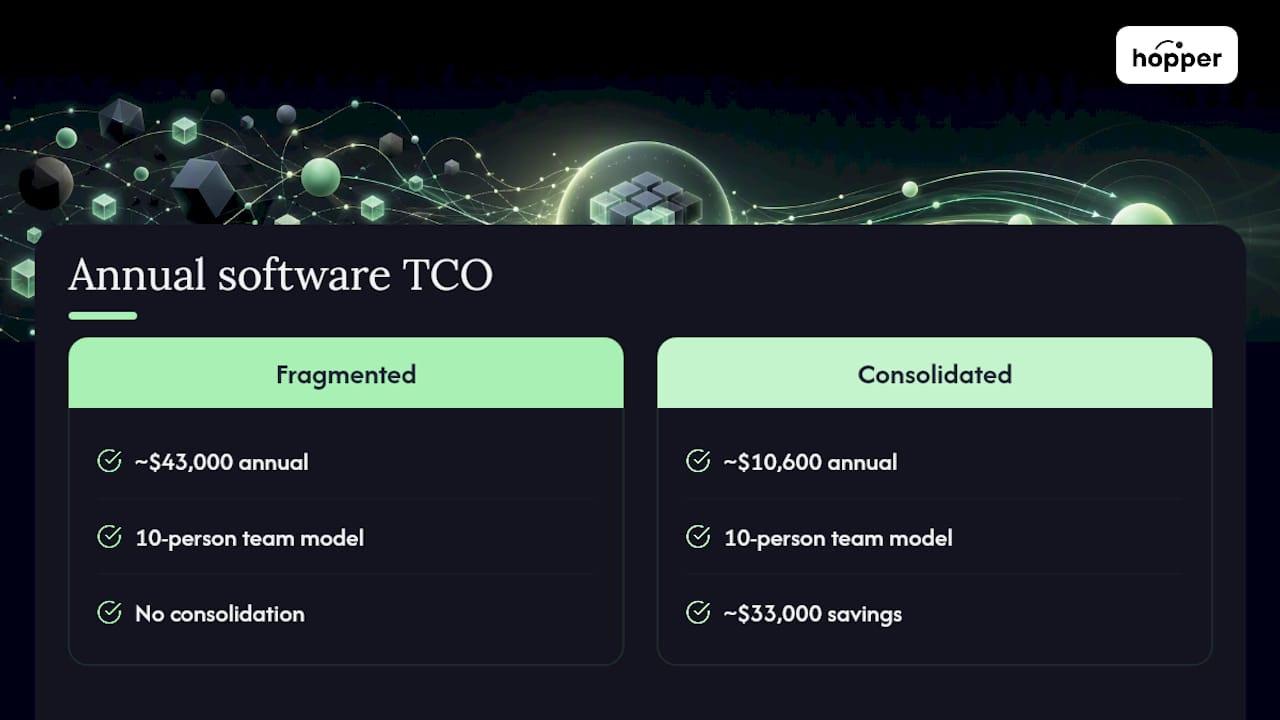
The math is straightforward once you have your audit numbers. Here's what a typical fragmented stack looks like against a consolidated one:
Those figures come from modeling of a 10-person team's software TCO, which found fragmented stacks running north of $43,000 a year against roughly $10,600 for a consolidated platform, a gap near $33,000 annually. A solo coach's numbers will be smaller in absolute terms, but the ratio tends to hold.
On a smaller scale, one Hopper user, Daniel Lim, cut $6,000 a year by folding his course host, community tool, and storefront into a single flat-priced hub.
The micro-calculator: (current monthly subscriptions × 12) − (new platform monthly cost × 12) + (transaction fee savings) = annual savings. Transaction fees deserve their own line, since a 2% checkout fee on $10,000 in monthly sales costs $200 a month that a 0% or 1% plan would save outright.
Why an All-in-One Platform Like Hopper Simplifies Consolidation
Once the audit is done and the overlap is mapped, the practical question is what to consolidate into.
What that buys you:
- Unlimited members, moderators, and products available
- Ability to create multiple hubs for different businesses or programs under one account
- Includes a built-in storefront to replace separate checkout tools
- Access to native iOS and Android apps included
- Pricing that offers incentives for member retention
- Support for migrating content and community from other platforms without rebuilding from scratch
The trade-off is breadth versus depth: an all-in-one won't out-specialize a tool built for exactly one job, like advanced email segmentation. What it buys back is the hidden cost this whole guide has been pricing out, the integration tax and context switching that come from running four logins instead of one. The i40pilot analysis modeling a $33,000 gap between fragmented and consolidated stacks is worth testing against your own spreadsheet before you commit. Run your numbers, not just Daniel Lim's.
Change Management Rules That Make Consolidation Stick
Cutting costs once is easy. Keeping them cut is the hard part, and it's a discipline problem, not a tooling problem.
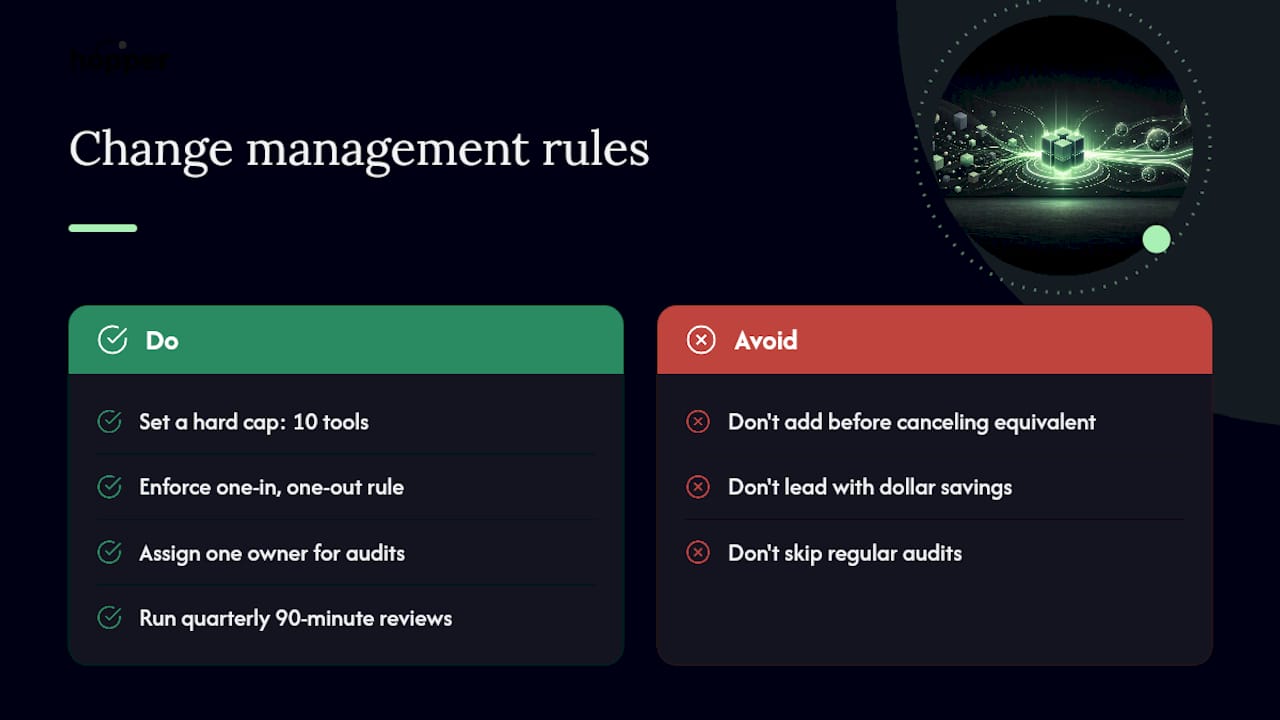
Set a hard cap: no more than 10 tools in the business at any time, and enforce a one-in-one-out rule. Nobody adds a new subscription without canceling an equivalent one first. Put one person in charge of a quarterly 90-minute review where the whole stack gets re-audited against the spreadsheet columns above.
When you present savings to a team, lead with time, not dollars. "This cuts your login count from six to two" lands better than a spreadsheet number, and it's the reason people actually stop resisting the switch.
— Cedrik
Ready to Consolidate? Start With Hopper
Hopper gives coaches a single flat-priced home for community, content, coaching, and sales, so the consolidation math in this guide has somewhere concrete to land.

Instead of stitching together a course host, a community app, and a checkout tool, and paying separately for each, some all-in-one platforms put all these functions in one hub for a flat monthly fee starting around $58 with unlimited members and products. If you're migrating off a larger platform, Hopper's team can help you move your content and community without a rebuild from scratch. Before you commit to anything, run your own audit spreadsheet from this guide against Hopper's pricing and see where the gap lands. You can check real migration and savings stories from coaches who've already made the switch, or go straight to Hopper's platform overview to start a trial and test the payback math yourself.
Sources
- The Hidden Cost of Tool Sprawl for Small Businesses (ClickUp)
- I40pilot
- The True Cost of Software Sprawl: How Many SaaS Tools Is Too Many? (Deelo Blog)
FAQ
How long does it take to see savings from consolidation?
Most coaches see savings quickly after canceling unused licenses, and full payback on a platform migration generally occurs within a few months once migration and training are complete.
Should I cancel tools before or after migrating?
Cancel confirmed unused licenses immediately, but keep active tools running in parallel with your new platform for two to four weeks before fully sunsetting them.
What's a reasonable number of software tools for a small coaching business?
Aim for well under 10 total tools, and treat anything approaching 1.5 tools per team member as a signal to re-audit for overlap.
How do I calculate my true software cost, not just subscriptions?
Add your direct subscription totals, then multiply by 2 to 4 to account for integration overhead, context switching, and onboarding time, based on how tangled your current stack is.
Recommended
On our list and want off? .