
How to Sell Digital Products Without Building a Tech Stack
Learn how to effectively sell digital products without a complex tech setup. Discover simple strategies to reach buyers and maximize profits.
By the Hopper team
Sell one small, validated product where buyers already search, then run checkout and delivery through a single platform instead of stitching five tools together. That's the whole playbook. Start with a template, mini-course, or guide priced under $50, list it on a marketplace or your own storefront, and use an all-in-one platform like Hopper to handle checkout, delivery, and the community that keeps buyers coming back.
This works because digital products carry no inventory, no shipping, and almost no per-sale cost once they're built, a structural advantage Salesforce highlights as the reason margins stay high even at low prices. The category itself is expanding fast: the global digital goods market is projected to hit $331 billion in 2026, which means the buyers are already out there searching. Your job is finding them, not creating demand from nothing.
Before you touch a checkout page, confirm three things:
- Someone will pay for this exact outcome, not just find it "interesting"
- You can deliver it in under two weeks
- You have one channel, owned or borrowed, where your buyer already spends time
Key Takeaways
Selling digital products successfully comes down to validating demand first, matching your product to the right distribution channel, and running checkout and delivery through one reliable system.
| Point | Details |
|---|---|
| Validate before building | Pre-sell, run a waitlist, or test a small paid offer before investing time in a full product. |
| Start narrow | Launch one MVP product solving one outcome for one buyer type, priced $9 to $29. |
| Match channel to stage | Use marketplaces for early discovery, owned storefronts for margin and control as you grow. |
| Test the full funnel | Buy your own product on mobile to confirm checkout, delivery, and access links work before launch. |
| Consolidate your stack | Hopper combines storefront, content library, and community access in one flat-rate platform, avoiding the checkout-plus-community-plus-course-host stack most creators assemble by default. |
Table of Contents
- What to Sell First: Product Types and Validation
- Where Should You Sell Digital Downloads: Platform Tradeoffs
- How Should You Price and Package a Digital Product?
- Set Up Checkout, Delivery, and Access Without Losing Sales
- Which Marketing Channels Actually Drive First Sales?
- Common Launch Mistakes and How to Scale Past Your First Product
- How an All-in-One Platform Cuts Setup Time for Creators
- Publishing Your First Product: Step-by-Step on Popular Platforms
- Building a Marketing Funnel That Runs Without You
- Handling International Sales, Currency, and Payment Methods
- What Do Digital Product Buyers Expect From Support?
- What Actually Determines Whether You Sell Anything
- Sell Courses and Community Together Without the Tool Stack
- Sources
- FAQ
What to Sell First: Product Types and Validation
Pick a format that matches a specific buyer problem, not a format you feel like making. Templates solve a "save me time" problem. Mini-courses solve a "walk me through this" problem. Ebooks and guides solve a "teach me the framework" problem. Printables and asset packs solve a "give me a finished thing I can use today" problem. Memberships solve an ongoing "keep me accountable" problem. According to Wix's roundup of top-selling formats, templates and printables tend to perform especially well on marketplaces because they're fast to browse and instantly understandable from a thumbnail.
Validation matters more than polish. The Drews Review guide on selling digital products treats pre-selling, waitlists, and direct audience signals as the highest-leverage steps you can take, because they tell you whether anyone wants the thing before you spend a weekend building it.
- Post the concept in a forum or community where your buyer hangs out and gauge reaction.
- Open a waitlist or pre-sell page and set a real deadline.
- Run a $20 test buy with five people before building the full version.
- Only build the full product once someone has paid for the promise of it.
Keep the first version narrow: one buyer type, one outcome, nothing extra. A checklist or short template can launch as an impulse buy, a mini-course or toolkit fits a moderate price range, and a full framework or multi-week program can command a premium fee once you have proof it works.
Pro Tip: Price your first version lower than feels comfortable. A $19 product that sells 40 copies in a week tells you more about real demand than a $200 product that sells two.
Where Should You Sell Digital Downloads: Platform Tradeoffs
Every distribution option trades discoverability for control, and picking the wrong one for your stage wastes months. Marketplaces like Etsy or Creative Market bring built-in search traffic but take a cut and limit your branding. Standalone storefronts give you full pricing and design control but you supply all the traffic yourself. Self-hosted setups (your own site plus a checkout plugin) offer maximum ownership but require you to manage hosting, security, and integrations. All-in-one platforms combine checkout, delivery, and often a community or content library in one subscription, trading some marketplace-style discovery for lower operational overhead.

Buyers browsing a marketplace behave differently than buyers landing on your storefront from an email link, Wix notes, which is why the same product often needs different thumbnails, previews, and copy depending on where it's listed.
Here's how the tradeoff actually breaks down:
- Marketplaces: high discoverability, low control, fees typically range 3.5% to 20% depending on the platform, fastest route to a first sale.
- Standalone storefronts: high control, zero built-in discovery, you own the customer relationship and email list from day one.
- Self-hosted: maximum control and lowest long-term fees, but the highest setup time and technical maintenance burden.
- All-in-one platforms: moderate setup time, built-in checkout and delivery, often bundled with community or content tools so you're not paying for five separate subscriptions.
For your very first sale, a marketplace or a simple storefront gets you live fastest. Once you have repeat buyers and want to build a list, an owned storefront pays off. A common growth pattern among creators is starting on a marketplace for early discovery, then migrating best-sellers to an owned platform once margins matter more than reach. If your offer includes any kind of ongoing access, coaching, or community, that's the moment to move to an all-in-one platform rather than adding a separate membership tool on top of your checkout tool.
How Should You Price and Package a Digital Product?
Price based on the outcome your product delivers, not the hours it took you to make it. A template that saves someone six hours of work is worth more than its production time suggests, which is the core logic behind value-based pricing: what would the buyer pay a freelancer or agency to solve this same problem?
Three practical price bands work for most first-time launches:
- Impulse tier ($9 to $29): single-purpose templates, checklists, short guides. Low friction, high volume.
- Mid tier ($29 to $149): mini-courses, toolkits, multi-part templates with support material.
- Premium tier ($150 and up): full frameworks, cohort-based programs, or anything bundled with direct coaching access.
Packaging decisions come next. Bundle related products together once you have three or more that solve adjacent problems. Offer tiered access (basic download vs. download plus a walkthrough call) when your buyer base splits between DIY and hands-on preferences. Consider a subscription only once you have proof that people want ongoing content, not just a one-time download.
Test price sensitivity in small, safe ways: launch with an early-bird discount for the first 48 hours, run a limited-quantity offer at a lower price to gauge urgency response, or split your email list and show two price points to see which converts better before committing to one number long term.
Set Up Checkout, Delivery, and Access Without Losing Sales
A confusing checkout or a delivery email that lands in spam costs you sales you already earned. Kartra's guide to selling digital products treats the sequence from sales page to checkout to delivery to follow-up as one continuous system, not five separate problems, and that framing holds up in practice.
- Confirm your checkout accepts at least two payment types (card plus a wallet option like PayPal or Apple Pay).
- Set up instant delivery, either a direct download link or gated access to a members area, triggered the moment payment clears.
- Send an automatic receipt plus a "start here" email that tells the buyer exactly what to do first.
- Test the entire path yourself on mobile: buy, receive the email, click the link, open the file or the access area.
- Check download integrity (file opens correctly) and confirm access links don't expire prematurely.
Tax handling varies by platform. Some handle VAT and sales tax automatically, others leave it to you, so confirm this before your first sale rather than after a tax notice arrives.
Pro Tip: Buy your own product with a real card before launch. It's the fastest way to catch a broken delivery link before a customer does.
Which Marketing Channels Actually Drive First Sales?
Owned channels beat borrowed ones for your first ten sales, every time. An email list you control, or content you've published that already ranks, converts better than a cold ad because the person already trusts you a little. Marketplaces and paid ads work best as amplifiers once you know your offer converts, not as the starting point.
Build in this order:
- Write one strong product landing page that states the outcome, the price, and what's included in plain language.
- Publish one piece of pillar content (a guide, a comparison, a how-to) that ranks for the problem your product solves.
- Attach a small lead magnet, a free checklist or short template, to capture emails from people not ready to buy yet.
- Email that list consistently, not just at launch, with useful content plus occasional offers.
- Once you have a converting landing page, layer in one simple paid ad funnel pointing directly at it.
An end-to-end experience, sales page into checkout into access into a welcome sequence, converts better and generates fewer refund requests than a bare download link, according to Kartra's analysis of digital product funnels. That's worth building before you spend a dollar on ads.
For partnerships, affiliate arrangements work well once you have a proven offer: give a trusted creator in your niche a commission for every sale they send. On marketplaces, invest time in your listing's thumbnail and first two lines of description since that's what determines whether a browser clicks through at all.
If you're building toward a recurring content or education business rather than a single download, automating your funnel earlier pays off. The AI Orchestrators' guide to evergreen education systems walks through building automated sequences that keep selling after the initial launch window closes.
- Quick wins: one landing page, one piece of ranking content, one lead magnet, one email sequence.
- Scaling later: paid ads, affiliate partners, marketplace SEO optimization.
Common Launch Mistakes and How to Scale Past Your First Product
Most first launches fail for the same three reasons: skipping validation and building something nobody asked for, a checkout or delivery flow so clunky that buyers abandon it, or a license and usage policy so vague that buyers don't know what they're allowed to do with what they bought. Fix each with the steps already covered above: pre-sell before building, test your funnel end to end, and write one clear paragraph about usage rights on every sales page.
A simple refund policy, clearly stated before purchase, reduces disputes more than a generous one applied inconsistently after the fact.
Once your first product sells consistently, scale by:
- Bundling complementary products into a package priced below buying separately
- Adding a membership tier for buyers who want ongoing access instead of one-time downloads
- Licensing your content for B2B use (teams, agencies, resellers)
- Watching conversion rate, customer lifetime value, and churn as your three core health metrics
How an All-in-One Platform Cuts Setup Time for Creators
Most creators don't lose momentum from lack of ideas. They lose it stitching together a course host, a community app, a checkout tool, and a link-in-bio page, then paying separately for each one while contact caps and feature-gated tiers quietly limit growth.
Hopper consolidates that stack into one hub: a community feed, a content library for courses and replays, async coaching, and a public storefront that lists every product in one place.
The real cost of tool sprawl isn't just the subscription total. It's the hours spent reconciling data across four dashboards that were never designed to talk to each other.
Hopper fits creators in a few specific situations:
- Coaches running a paid community who currently pay for a checkout tool, a community tool, and a link-in-bio page separately
- Course creators who've hit a contact cap on their current platform and don't want to jump to the next expensive tier
- Membership operators who want content, coaching, and checkout under one login instead of three
Hopper also offers free migration support for creators moving off platforms like Kajabi, so switching doesn't mean rebuilding your content library from scratch.
Publishing Your First Product: Step-by-Step on Popular Platforms
The exact steps vary by platform, but the sequence is nearly identical everywhere: create a product listing, attach your file or content, set a price, connect payment processing, and publish.
On Shopify, you'll add a digital product app (since Shopify doesn't natively host downloads), upload your file to that app, set it as a digital product type so it skips shipping calculations, then publish it to your storefront like any other item.
On Gumroad, the process is more direct: create a product, upload the file directly to the platform, set your price, and publish. Gumroad handles delivery automatically the moment payment clears, which makes it a fast option for a first test launch.
On Etsy, you list under "digital download" as the item type, upload up to five files per listing, write SEO-friendly titles and tags since Etsy's internal search drives most traffic, and Etsy auto-delivers the file after purchase.
On an all-in-one platform like Hopper, the sequence collapses further: you add your course, template, or content to your library, set pricing (individual or bundled into a membership), and it appears automatically on your public hub page, so there's no separate "connect a checkout tool" step.
Whichever platform you choose, a clear start-to-launch checklist covering product, sales page, checkout, delivery, and follow-up keeps you from missing a step that costs you a sale later.
Building a Marketing Funnel That Runs Without You
A funnel, at its simplest, is the automated sequence between someone discovering your product and someone buying it again. For digital products, that usually means a lead magnet, a welcome email sequence, and a handful of follow-up emails tied to specific triggers: cart abandonment, post-purchase onboarding, and a re-engagement email for anyone who downloaded a freebie but never bought.
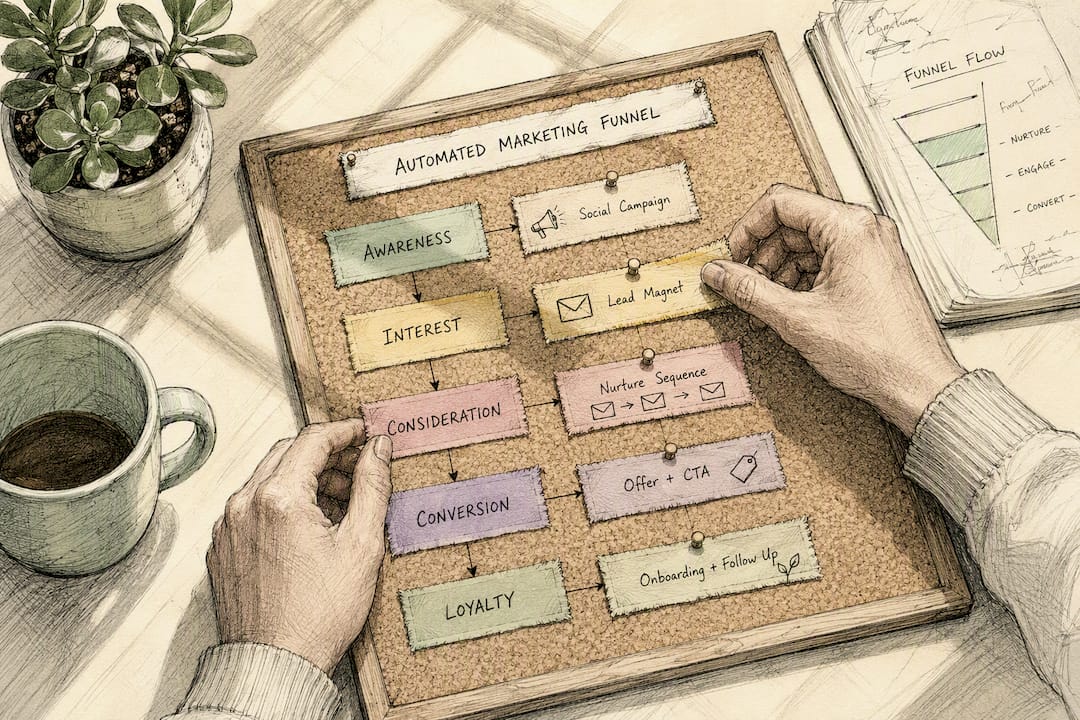
Start with three emails: one delivering the lead magnet immediately, one sharing a quick win related to your paid product three days later, and one making a direct offer five to seven days after that. Resist the urge to build ten emails before you've tested three.
Automation tools vary by platform. Some all-in-one platforms include email or notification sequences natively; standalone setups typically require connecting a separate email service provider to your checkout tool, which is one more integration point that can break silently if either tool updates its API.
Tag buyers based on what they purchased so future offers stay relevant. Someone who bought your $19 checklist is a different audience than someone who bought your $150 program, and treating them the same in your emails wastes both their attention and your open rates.
Review your funnel monthly, not daily. Look at where people drop off: if most abandon at checkout, that's a friction problem; if most abandon after the lead magnet and never open a follow-up, that's a subject-line or timing problem.
Handling International Sales, Currency, and Payment Methods
Digital products sell globally by default the moment your listing goes live, which means currency and payment method decisions matter earlier than most first-time sellers expect. Buyers in different regions favor different payment rails: credit cards dominate in the United States, but wallets like PayPal, and region-specific methods common across parts of Europe and Asia, can be the deciding factor in whether a browser completes a purchase.
Display pricing in the buyer's local currency where your platform supports it. A price that shows correctly in euros or pounds removes a mental conversion step that otherwise costs you conversions.
Tax obligations differ sharply by country and by whether you're selling B2C or B2B, and platform tax handling isn't universal: some platforms calculate and remit VAT or sales tax automatically across supported regions, others leave that responsibility entirely to the seller. Confirm exactly what your platform handles before you assume you're covered, and consult a tax professional for your specific situation since rules vary by jurisdiction and change frequently.
Keep checkout language simple regardless of buyer location: state the price clearly, show any tax that applies before the final charge, and avoid currency ambiguity like an unlabeled "$" symbol that could mean US, Canadian, or Australian dollars depending on the buyer.
What Do Digital Product Buyers Expect From Support?
Support for digital products looks different than support for physical goods because there's no shipping delay to manage, but there's a different kind of friction: access problems, download confusion, and license questions.
Handle the most common issues before they become tickets:
- Publish a short FAQ addressing "where's my download," "can I access this on multiple devices," and "what does my license allow"
- Set expectations for response time clearly, even a simple "we reply within 24 hours" reduces anxious follow-up messages
- Offer a self-service way to re-download or regain access without needing to email you directly
When refund requests come in, a policy applied consistently, whether that's a strict no-refund stance with a clear reason or a 14-day window, builds more trust than a generous policy applied inconsistently case by case. State it plainly on the sales page before purchase, not buried in fine print discovered after a complaint.
For anything involving ongoing access, like a membership or community, support becomes retention work as much as troubleshooting. A quick welcome message and a clear "start here" post inside the community reduces the silent churn that happens when new members join and don't know what to do next.
What Actually Determines Whether You Sell Anything
Most advice on selling digital products spends its energy on tools and barely any on the one variable that decides everything: whether you validated demand before you built. The research bears this out repeatedly. Pre-selling and waitlists aren't a "nice extra step," they're the difference between a product that sells itself in week one and one that sits untouched for months while you wonder if your marketing is broken.
The conventional wisdom oversells platform choice. Creators agonize over Shopify versus Gumroad versus Etsy when the platform rarely determines whether a product sells. It determines how much friction exists once someone's already decided to buy. That's a real factor, but it's downstream of validation, not a substitute for it.
What I'd prioritize differently: spend your first week on a waitlist and five direct conversations with potential buyers, not on comparing checkout tools. Then, once you know the product works, pick one platform that removes complexity rather than adding to it. A community platform for coaches that bundles storefront and delivery in one place saves you from re-solving the same integration problem every time you add a new product line.
Sell Courses and Community Together Without the Tool Stack
There are other routes to selling digital products: a marketplace listing, a standalone checkout tool, a separate community app bolted onto a course host. Each works in isolation, but combined they mean four logins, four bills, and four places for something to quietly break.

Hopper is the alternative to that stack for creators who sell courses, coaching, or community access together. Members, products, and moderators are unlimited, and you can run more than one hub under a single account, unlike platforms that cap you at one community per business. If you're currently on Kajabi or Circle and finding the costs climbing every time you add features, Hopper's free migration support moves your content over without a rebuild. See what creators who've made the switch say about the transition, or start exploring Hopper to see if it fits your setup.
Sources
- Digital Goods Market — Mordor Intelligence
- Sell Digital Products Online: The Complete 2026 Guide — Drews Review
- How to sell digital products online — Salesforce
- How to Sell Digital Products Online — Kartra blog
- 18 best digital products to sell (and where to sell them) — Wix blog
FAQ
What Is the Best Way to Sell Digital Products?
Validate demand with a waitlist or pre-sell before building, then launch through a channel your buyer already uses, a marketplace for discovery or your own storefront for control, using a platform that handles checkout and delivery instantly.
Is It Profitable to Sell Digital Products?
Digital products carry no inventory, shipping, or warehousing costs, so margins stay high once the product is built, and the global market is projected to reach $331 billion in 2026.
How Do I Start Selling Digital Downloads?
Pick one narrow product tied to a specific buyer outcome, validate it with a small pre-sell or waitlist, then publish it on a marketplace or all-in-one platform that handles checkout and instant delivery for you.
What Is the Most Profitable Digital Product to Sell?
There's no single most profitable type. Templates and printables sell fast on marketplaces due to built-in discovery, while mini-courses and memberships often carry higher margins over time because they support repeat and recurring revenue.
Can I Sell Digital Products Without My Own Website?
Yes. Marketplaces let you list and sell without building a site, and all-in-one platforms like Hopper provide a public storefront page automatically, so you don't need separate web design or hosting.
Recommended
On our list and want off? .