
Engineers: Run 50–500 Parity Tests for Stripe Subscription Migrations
Engineer first checklist for migrating subscriptions to Stripe. Map CSV fields, run a reconciliation harness to prove invoice parity (50–500 tests), and...
By the Hopper team
Use the Stripe Billing migration toolkit for standard bulk imports, and reach for the Subscriptions or Subscription Schedules API when you need phased, backdated, or custom billing behavior. Either way, the rule that saves you from a support inbox fire is the same: confirm customers and payment tokens exist in the destination account before you create a single subscription, and set proration_behavior and billing_cycle_anchor deliberately, or you will double bill someone.
TL;DR:
- Migration success depends on ensuring all customer and payment method data exist in the destination account before creating subscriptions.
- Use the bulk toolkit for straightforward, single-price, monthly or annual subscriptions, but switch to API or subscription schedules for complex, phased, or long-term setups.
- Validate the entire CSV file at once, focusing on key fields like
customer,price,start_date, andbilling_cycle_anchor; fix all errors before reuploading.- Match
proration_behaviortononeand setbilling_cycle_anchoraccurately to avoid double billing or proration issues during migration.- For high-volume or complicated migrations, seek professional services or support from providers like Hopper to prevent common pitfalls and ensure invoice parity.
Table of Contents
- Prerequisites for a Clean Stripe Subscription Migration
- Toolkit, API, or Professional Services: How Do You Choose?
- What CSV Fields Does the Migration Toolkit Require?
- When Should You Use the Subscription Schedules API Instead?
- How Do You Prove Invoice Parity Before Cutover?
- What Does a Production Migration Day Actually Look Like?
- What Happens to Paused or Canceled Subscriptions?
- How Should Trial Periods and Free Tiers Migrate?
- How Do You Troubleshoot Common Migration Failures?
- Will Migrating to Stripe Break My Billing History?
- How Should You Talk to Customers About the Migration?
- When Does a Stripe Migration Need Outside Help?
- Get Migration Support Built Into Your Platform Switch
- Sources
- FAQ
Prerequisites for a Clean Stripe Subscription Migration
Before you touch the toolkit or write a line of migration code, your destination Stripe account needs a few things in place. Skipping any of these is the fastest way to fail validation or, worse, pass validation and still break billing on day one.
- Billing setup first. Your products and prices need to exist in the destination account with IDs you control, since Stripe's migration guide treats Billing configuration as stage one, before any customer or subscription data moves.
- Customers on file, or a PAN import scheduled. Every subscription row needs a matching
customerID. If you're moving off another processor, budget for a card data (PAN) import rather than asking every customer to re-enter a card, as explained in Moving from Excel to Cloud Accounting | Kent Bookkeeper Tips. - Default payment methods attached for any subscription using
charge_automatically. - A collection method decision. Pick
charge_automaticallyorsend_invoice, and setdays_until_duenow if you're using invoicing. - A volume estimate. If you're moving more than a few hundred thousand subscriptions, or your processor import is unusually complex, contact Stripe about professional services before you start building.
Toolkit, API, or Professional Services: How Do You Choose?
Most teams over-engineer this decision. If your source pricing maps cleanly to Stripe price IDs, one price per subscription, standard monthly or annual cycles, no exotic proration logic, the no-code migration toolkit is the right tool. It's built exactly for that case.
Reach for the API and Subscription Schedules when your migration involves multiple phases: an intro price that rolls into a standard price, a coupon that expires mid-cycle, or metered billing that doesn't map to a flat price ID. The toolkit doesn't handle multi-phase logic; the Subscription Schedules API does.
Professional services enter the picture when the mapping itself is the hard part: marketplace revenue splits, custom fraud or authorization rules you can't drop, or legacy pricing so tangled that no CSV template captures it. If you find yourself building special-case logic for more than a handful of subscriptions, that's your signal.
What CSV Fields Does the Migration Toolkit Require?
The toolkit ships three CSV templates: Basic, Multi-price, and Ad-hoc, and each accepts files up to 120MB, with larger volumes processed in batches. Stripe's toolkit has moved 100,000 subscriptions in roughly 30 minutes when the file is clean, which tells you the bottleneck is almost never Stripe's processing speed. It's your data.
Four fields decide whether your migration goes smoothly or generates a support ticket queue:
| Field | What it controls | Safe default |
|---|---|---|
customer | Which destination customer owns the subscription | Must already exist in destination account |
items.0.price | The destination price ID being billed | Must be a real price ID, not a source-system placeholder |
start_date | When the new subscription becomes active | Set in the future, with buffer for review |
backdate_start_date | Preserves the original start date for history | Use when invoice history matters |
billing_cycle_anchor | The date the next renewal charge fires | Must match the customer's actual next renewal |
proration_behavior | Whether Stripe prorates on creation | none, unless you intend a prorated charge |
The most common failure mode isn't a rejected row. It's a row that passes validation and still charges someone twice, because proration_behavior was left on its default instead of set to none, a mistake documented as one of the leading causes of accidental charges during migration.
- Upload validates the entire file at once and returns every error together, so you fix and reupload once instead of chasing row-by-row failures.
- Successful imports land in a scheduled state with roughly a 24-hour review window before subscriptions go live, your last chance to catch a mapping error before it becomes a charge.
- If something looks wrong during that window, you can cancel the scheduled import; nothing has billed yet.
When Should You Use the Subscription Schedules API Instead?
Some migrations simply don't fit a spreadsheet. If a subscription needs to start more than 30 days out, the toolkit can't schedule that far ahead, but Subscription Schedules can. That's the one case where the API isn't just an alternative path, it's the only path.
- Model each pricing phase (intro rate, standard rate, any coupon window) as its own schedule phase rather than trying to flatten it into one price.
- For legacy prices that don't have a clean Stripe equivalent, use
items.price_datato define the price inline instead of pointing at a placeholder price ID that doesn't reflect the real amount. - Attach idempotency keys to every creation call so a retried request doesn't create a duplicate subscription.
- Map source metadata (legacy plan name, original signup date, referral source) into Stripe's
metadatafield so nothing gets lost in translation. - Test every phase transition in sandbox mode before touching production data.
Pro Tip: Build your API migration script so it refuses to run against anything but a test key (sk_test_) until you explicitly flip an environment flag. That one guardrail has saved more than one team from a live migration triggered by a copy-pasted script.
How Do You Prove Invoice Parity Before Cutover?
You don't take Stripe's word for it that your mapping is correct. You prove it with a harness. Practitioner-built reconciliation runbooks migrate a sample batch of synthetic subscriptions into a test-mode Stripe account, then compare the resulting upcoming invoices against what your source system says should be charged, field by field.
The comparison needs to check price and amount, any coupon applied, tax calculated, quantity, the billing_cycle_anchor, and the date of the next invoice. Miss one of those fields and you'll find out about the gap from a customer, not from your tests.
One runbook example reconciles 50 synthetic subscriptions to the cent and exits with a non-zero status if anything drifts out of parity, which makes it usable as a CI gate rather than a manual, one-time check.
Run 50 to 500 subscriptions through the harness depending on how varied your pricing is. A single flat-price product might need only 50. A catalog with coupons, tiered pricing, and multiple currencies needs closer to 500 before you can trust the result. If the harness fails, stop. Fix the mapping logic, not the individual subscription, since a systemic error caught in 50 test cases is about to repeat itself across your entire customer base.
What Does a Production Migration Day Actually Look Like?
The teams that migrate without incident follow roughly the same sequence, whether they're moving 200 subscriptions or 70,000.
- Export source data and map every field to its destination equivalent, customer IDs, price IDs, and dates included.
- Run a sandbox import against a test-mode Stripe account using the same file structure you plan to use in production.
- Run the reconciliation harness and don't proceed until parity checks pass cleanly.
- Schedule the production import with a buffer, using the toolkit's scheduled state or your own review gate, rather than firing directly into a live billing cycle.
- Monitor the first billing cycle closely, watching for payment failures and unexpected proration charges.
- Communicate the cutover to customers when the migration is customer-visible, and keep a documented rollback plan ready in case something breaks.
Fender's team used exactly this discipline when they moved roughly a large number of subscribers in a few hours, including preparation and validation, not just the upload itself. That number is possible because the validation work happened before the import ran, not during a fire drill after it.
Once live, check three numbers against your old system: total monthly recurring revenue, invoice count, and payment failure rate. If those three match within a reasonable tolerance, your migration worked.
What Happens to Paused or Canceled Subscriptions?
Not every subscription in your export is active, and treating a paused subscription like an active one is a fast way to bill someone who explicitly stopped paying.
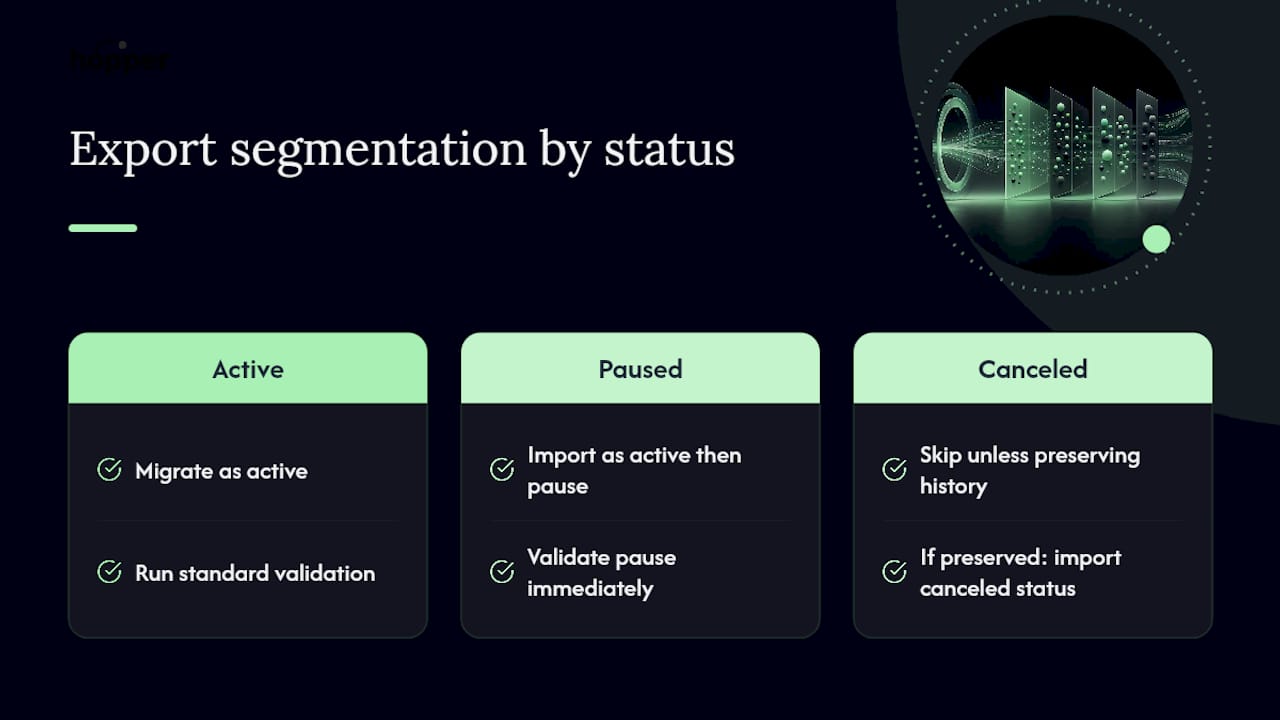
Canceled subscriptions generally don't need to migrate at all unless you want their billing history preserved for reporting or tax purposes. If you do want that history, import them with backdate_start_date set to the original start and a status that reflects their canceled state, never as a fresh active subscription.
Paused subscriptions need more care. Stripe's pause behavior (via pause_collection) stops invoicing without canceling the subscription outright, and your migration needs to replicate that state exactly. Import the subscription as active, then immediately apply the pause, rather than skipping the subscription and hoping to reactivate it manually later. That gap between import and pause is exactly where a paused customer could get an unwanted charge if your script runs even one billing check before the pause takes effect.
A practical approach: segment your export into three buckets before you map anything, active, paused, and canceled, and run each bucket through a different validation path. Trying to handle all three with one generic CSV template is where teams introduce the kind of error that a reconciliation harness would catch, if you ran one specifically against the paused segment.
How Should Trial Periods and Free Tiers Migrate?
Trials are where migrations quietly go wrong, because a customer mid-trial has different expectations than one who's already been billed, and the toolkit's default behavior doesn't automatically know which one you're importing.
If a customer is mid-trial in your source system, set trial_end on the destination subscription to the exact date the trial actually ends there, not a new trial period starting from the migration date. Resetting the clock on a trial is a common and avoidable customer complaint, since it either extends a free period unfairly or, worse, looks like you're trying to squeeze an extra billing cycle out of someone.
Free tiers need a different decision entirely: are they a $0 price object in Stripe, or are they simply the absence of a subscription? If your source system tracks free-tier users as inactive accounts rather than $0 subscriptions, don't force them into your migration file at all. Importing a $0 subscription just to have a record creates noise in your Stripe dashboard and complicates your MRR reporting for no real benefit.
For any free tier that does need to exist as a real subscription object, for feature-gating purposes, for instance, set proration_behavior to none and confirm the price is genuinely $0.00 in the correct currency before the row goes into your file. A currency mismatch on a $0 price won't cause a charge, but it will cause validation confusion that wastes your review window.
How Do You Troubleshoot Common Migration Failures?
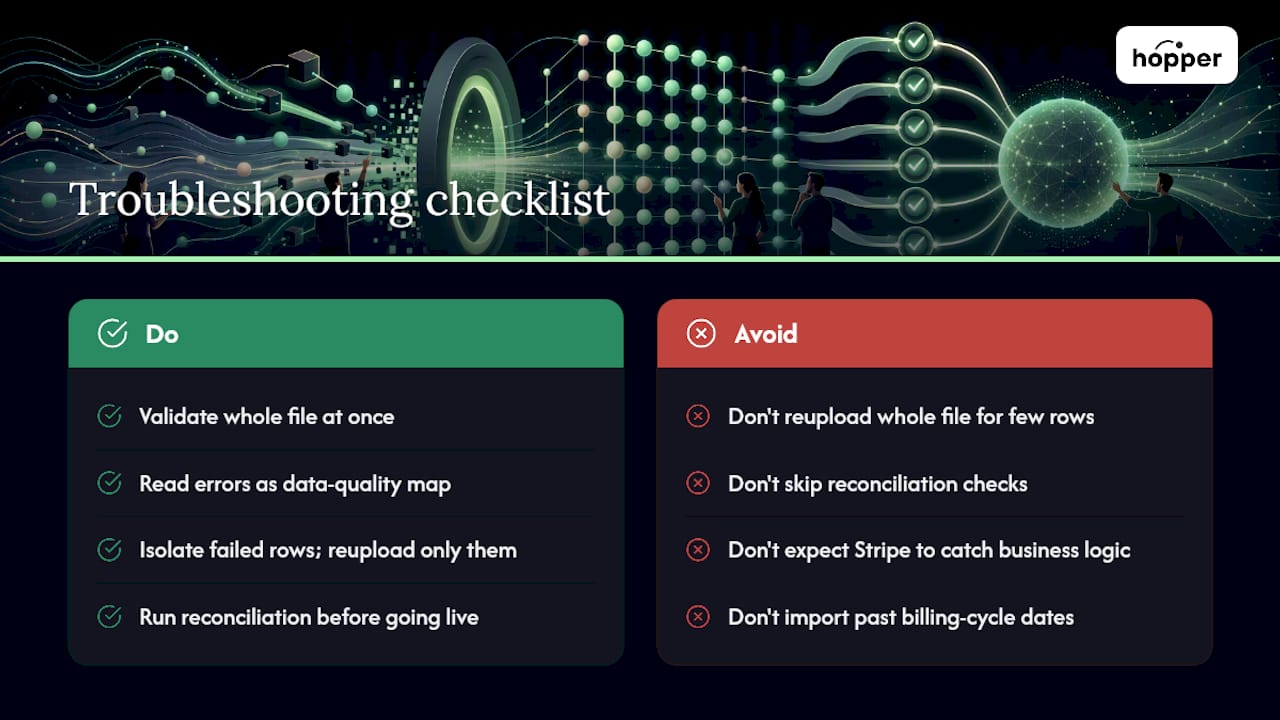
The toolkit's biggest usability win is that it validates the entire file at once and shows you every error in one pass, rather than failing on row 400 after you've already waited through rows 1 through 399. Read that error output as a map of your data quality problems, not just a to-do list.
Most validation failures fall into a small number of buckets. A price ID that doesn't exist in the destination account, usually because it was copied from the source system by mistake. A customer ID with the same problem. A start_date set in the past, which the toolkit rejects outright since it isn't designed to backfill an active billing cycle. A currency code that doesn't match ISO 4217 formatting, three uppercase letters, nothing else.
The trickier failures happen after validation passes. A subscription imports cleanly, sits in scheduled state, goes live, and then charges the wrong amount, because billing_cycle_anchor didn't actually match the customer's real next renewal date. That's not a validation error Stripe can catch for you; it's a logic error only your reconciliation harness will surface, which is exactly why skipping that step to save a day of work tends to cost several days of refund tickets instead.
When a batch fails partway through processing, don't just reupload the whole file. Isolate the failed rows, fix the specific field, and reupload only those, since reprocessing an entire 100,000 row file to fix twelve bad rows wastes the review window you have before the scheduled import goes live.
Will Migrating to Stripe Break My Billing History?
Migrating subscriptions doesn't have to erase the paper trail your customers and your accounting team rely on. The tool that prevents that loss is backdate_start_date.
Set start_date to a point in the future so Stripe knows when the subscription becomes active for billing purposes, and set backdate_start_date to the original start date so Stripe's records reflect how long the customer has actually been subscribed. Pair both with proration_behavior=none, and Stripe records the historical relationship without generating a retroactive charge for time already paid for elsewhere.
What doesn't carry over automatically is your old invoice history itself. Stripe's migration creates new subscription objects; it doesn't import your old system's invoice PDFs or line-item history. If invoice continuity matters for tax records or customer support, export your old invoice history separately and archive it before you decommission the source system. Customers who open a support ticket asking about a six-month-old charge need that record to exist somewhere, even if it's no longer inside Stripe.
This is also where the migration decision matters again: an API migration using Subscription Schedules gives you more granular control over how historical phases appear, useful if a customer's billing history includes multiple price changes you want reflected accurately rather than flattened into a single current price.
How Should You Talk to Customers About the Migration?
The best subscription migrations are the ones your customers never notice, and the way you get there is by deciding in advance what's actually visible to them.
If pricing, billing dates, and payment methods stay identical, most teams don't send a dedicated migration announcement at all, a silent, successful cutover is the goal, not a marketing moment. But if anything customer-facing changes, a new receipt format, a slightly different renewal date, a card re-entry requirement, tell people before it happens, not after they notice a discrepancy.
For any migration requiring a customer action (re-entering a card because a PAN import wasn't possible, confirming a new billing date), send that request with a specific deadline and a direct link, days before the cutover, not the morning of. And keep a support-facing document ready for your team describing exactly what changed, so the first support ticket doesn't turn into a scramble to figure out what happened.
When Does a Stripe Migration Need Outside Help?
An in-house team with a solid engineer and a weekend to spare can handle most standard migrations, especially anything the toolkit covers cleanly. Where I'd stop and bring in professional services is when the mapping problem is genuinely ambiguous: marketplace splits, legacy pricing nobody fully understands anymore, or authorization rules you can't afford to get wrong once.
At Hopper, migrations get framed the same way for coaches and creators moving their community and content business over: preserve the member experience first, get the billing mechanics right second, because a member who gets double charged during a platform switch doesn't care how clean your CSV was.
The KPIs that actually matter are simple: zero double charges, invoice parity with the old system, and a payment failure rate that doesn't spike after cutover. Everything else is implementation detail.
— Cedrik
Get Migration Support Built Into Your Platform Switch
If you're running a coaching or course business and the idea of mapping CSV fields and building a reconciliation harness sounds like a distraction from actually running your business, that's a fair reaction. Migrations are exactly the kind of technical work that eats a week you don't have.

Hopper offers direct migration support for creators moving off other platforms, so you're not the one staring at validation errors at midnight. It comes bundled into a flat-rate plan, Base at $58 a month with a 1% transaction fee, or Pro at $108 with 0% fees, that also replaces the separate course host, community tool, and storefront most coaches are currently juggling. Three coaches have already moved their full businesses off Kajabi onto Hopper without rebuilding from scratch. If you want to see what a managed switch actually looks like for your subscribers, start with the free migration assessment and get a straight answer on timeline and scope before you commit to anything.
Sources
- Introducing no-code migrations to Stripe Billing
- Migrate subscriptions to Stripe Billing
- stripe-migration-runbook
FAQ
What Is a Stripe Subscription Migration?
It's the process of moving recurring billing customers, payment methods, and subscription records into Stripe Billing, either from another processor or between Stripe accounts, using the no-code migration toolkit or the Subscriptions and Subscription Schedules APIs.
How Long Does a Stripe Billing Migration Take?
The toolkit can process about 100,000 subscriptions in roughly 30 minutes once your file is clean, while a full processor data import typically takes about about ten business days depending on data quality and cooperation from your source provider.
Do I Need to Use the API, or Is the Toolkit Enough?
The toolkit handles standard bulk migrations with clean price mapping; you need the API and Subscription Schedules only for multi-phase pricing, metered billing, or subscriptions starting more than 30 days in the future.
How Do I Avoid Double Billing During Migration?
Set proration_behavior to none unless a prorated charge is intentional, and make sure billing_cycle_anchor matches the customer's actual next renewal date exactly.
What Happens if My Migration File Fails Validation?
The toolkit validates the entire file and returns all errors at once, so you can fix every flagged row (wrong price IDs, invalid dates, bad currency codes) and reupload in a single pass rather than troubleshooting row by row.
Can Hopper Help With a Subscription Migration?
Hopper provides direct migration support for coaches and creators switching platforms, including moving subscription and community data without requiring a rebuild, through its free migration assessment.
Recommended
On our list and want off? .