
Category First: Thinkific Alternatives for Course Creators from $58/mo
Compare Thinkific alternatives with a category first checklist for course creators. See flat-rate picks from $58/mo and what to test in a demo before you...
By the Hopper team
Hopper is the strongest all-in-one pick for creators who want courses, community, and predictable pricing under one roof, no migration headaches. If you need deeper engagement tools, look at community-first platforms; if you need total control, WordPress LMS plugins fit; if you run corporate training, enterprise LMS vendors are the right call. The trade-off almost always comes down to pricing structure versus how much community depth you actually need.
TL;DR:
- Flat-rate all-in-one platforms like Hopper include unlimited members, hubs, and products, avoiding common scaling traps where features are locked behind higher tiers.
- Transitioning from another platform requires prepared exports of content, member data, and automations, with migration services starting at $588 for a seamless switch.
- Community-first platforms prioritize discussion, engagement, and mobile-native features over structured courses, making them ideal for member retention through interaction rather than curriculum.
- WordPress LMS plugins offer full data ownership and customization but demand ongoing maintenance, hosting management, security, and manual content migration.
- Enterprise LMS systems suit internal corporate training with compliance and reporting needs, often requiring weeks for setup, custom pricing, and vendor-managed onboarding.
Table of Contents
- Which Thinkific Alternative Category Fits Your Business?
- Why All-In-One Flat-Rate Platforms Solve Tool Sprawl
- What Makes Community-First Platforms Different
- Are WordPress LMS Plugins Worth the Setup Work?
- When Does an Enterprise LMS Make Sense?
- How to Evaluate Thinkific Alternatives Before You Switch
- What Hopper's Own Migration Data Shows
- Refund and Cancellation Policies Across Alternatives
- Trial Limits and Money-Back Guarantees Worth Checking
- What Reviews Actually Tell You About These Platforms
- Comparing Content Types: Video, Audio, Text, and Live Sessions
- Consolidation vs. the Best-of-Breed Stack
- Try Hopper Before You Rebuild Your Tool Stack
- Sources
- FAQ
Which Thinkific Alternative Category Fits Your Business?
Before you fall down a rabbit hole comparing feature lists, decide which category you're actually shopping in. Most creators looking at alternatives to Thinkific fall into one of four buckets, and the category matters more than any single feature.
The first bucket is all-in-one, flat-rate platforms, where Hopper lives. These combine course hosting, community, and a storefront so you stop paying for four subscriptions to run one business. The second bucket is community-first platforms like Skool, Circle, and Mighty Networks, built around discussion and engagement rather than structured curriculum. The third is WordPress LMS territory, where plugins like LearnDash and MemberPress give you total ownership of your site and data in exchange for technical upkeep. The fourth is enterprise LMS, where tools like Absorb and TalentLMS handle compliance training and corporate reporting that a creator platform was never designed to do.
| Category | Pricing shape | Transaction fees | Mobile app | Scalability limits | Migration support | Core features |
|---|---|---|---|---|---|---|
| All-in-one flat-rate (Hopper) | Flat monthly, tiered by feature set | 1% on entry tier, 0% on top tier | Native iOS and Android included | Unlimited members and hubs | Dedicated migration service | Courses, community, storefront, async coaching |
| Community-first | Flat or per-seat monthly | Typically none on membership dues | Native or app-store listed | Often one community per account | Manual export of posts and members | Discussion spaces, live rooms, member profiles |
| WordPress LMS/plugins | One-time or annual license fee | None built in, gateway fees apply separately | Third-party wrapper apps only | Limited by your hosting plan | Manual database and content export | Drip content, quizzes, certificates, plugin add-ons |
| Enterprise LMS | Custom quote, often per-seat | None, usually invoiced | Varies by vendor, often enterprise-only | Built for thousands of seats | Vendor-managed onboarding team | SSO, SCORM/xAPI, compliance reporting |
Here's who actually belongs in each category:
- All-in-one flat-rate: Solo coaches and small teams who are tired of paying for a course host, a community tool, and a checkout page separately.
- Community-first: Creators whose business lives or dies on daily engagement, cohort energy, and recurring conversation rather than a linear curriculum.
- WordPress LMS: Technically comfortable creators who already run a WordPress site and want full data ownership with no platform fees.
- Enterprise LMS: HR teams, compliance officers, and B2B trainers who need SCORM compatibility and audit trails, not a creator brand.
Why All-In-One Flat-Rate Platforms Solve Tool Sprawl
Most creators who outgrow Thinkific don't actually need a "better LMS." They need to stop paying five different vendors to run one business. That's the entire premise behind flat-rate, all-in-one platforms, and it's the category Hopper is built for.
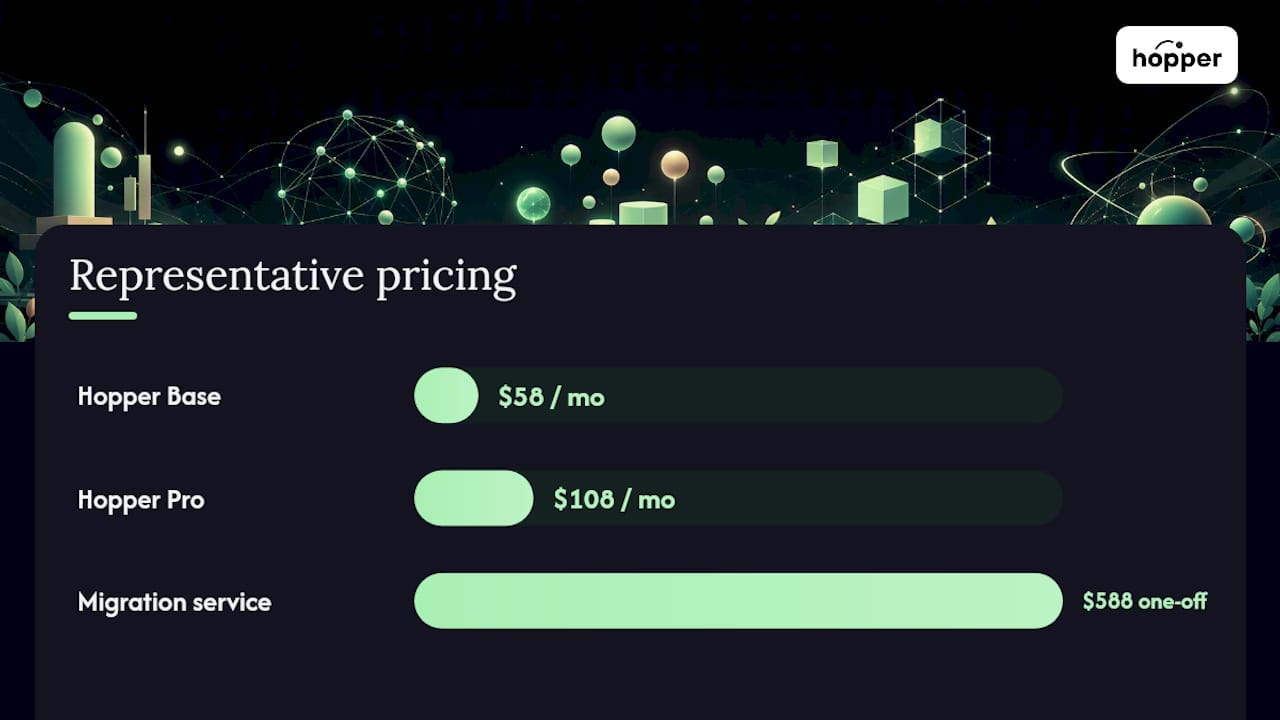
A genuine all-in-one platform should give you a course builder with drip scheduling and quizzes, a real community hub (not a bolted-on forum widget), a built-in storefront so you're not also paying for a separate cart tool, and a native mobile app included at every paid tier. Hopper checks each of those boxes: Hopper Base runs $58 per month with a 1% transaction fee, and Hopper Pro runs $108 per month with 0% transaction fees, both including unlimited hubs, members, and products.
That unlimited detail matters more than it sounds like on paper. Plenty of platforms that look affordable at launch quietly cap your member count or lock advanced features behind a pricier tier once your list grows, which is a common scaling trap creators often underestimate when they first sign up. A flat pricing structure that avoids scaling caps and includes loyalty pricing to reduce costs over time can sidestep that trap entirely.
What a flat-rate all-in-one platform should include:
- Course builder with drip content, quizzes, and completion certificates
- A community space with discussion threads and native video, not an embedded third-party widget
- A storefront that handles checkout without a separate cart tool
- Async coaching or a way to deliver 1:1 or small-group support without a scheduling app
- Native iOS and Android apps included at every paid tier
- No hard cap on members, hubs, or products as you scale
Migration support: what to expect and what to prepare
Switching platforms is the single biggest reason creators stay put even when they're unhappy. Hopper's migration service exists specifically to remove that friction, handling course migrations and payment migrations as one-off services starting from $588. Before you start a migration conversation with any vendor, have three things ready: an export of your course content in whatever format your current host allows (usually a CSV of members and a ZIP of media), your Stripe or payment processor account details so subscriptions can transfer without members re-entering cards, and a list of any webhooks or Zapier automations tied to your old platform that will need to be rebuilt.
Pro Tip: Run a pilot migration with one course and a small subset of members before you move your whole business. It surfaces broken automations and formatting issues while the stakes are still low.
What Makes Community-First Platforms Different
Community-first platforms treat discussion as the product, not a bonus feature. Spaces, threads, native video posts, and a mobile-first feed are the backbone, and courses often sit inside the community rather than the other way around. Skool, Circle, and Mighty Networks all follow this logic, betting that recurring conversation, not a linear curriculum, is what actually keeps members paying month after month.
This approach earns its keep with cohort-based programs, membership communities built on daily check-ins, and coaches whose value is mostly the group energy rather than a set of pre-recorded modules. If your renewals depend on people feeling like they belong somewhere, a platform that treats the feed as the main event will usually outperform one that treats it as an afterthought.
The trade-off shows up in structure. Course sequencing, certificates, and drip logic tend to be thinner in community-first tools, because the roadmap prioritizes engagement mechanics over instructional design. Retention research suggests creators focused on member retention should weigh a platform's community architecture and mobile experience above a long feature list, which is exactly the calculus community-first tools are betting on.
What to check before committing to a community-first platform:
- How notifications work: push alerts, digest emails, or both, and whether members can tune frequency
- Moderation tools: can you assign moderators, mute members, or set posting rules per space
- Analytics depth: do you get real engagement data or just member counts
- Whether the mobile app is native or a rebadged web wrapper
- Whether one account limits you to a single community, which affects anyone running more than one brand
Migrating out of a community-first tool has its own wrinkle: discussion threads, member handles, and moderation history rarely export cleanly. Ask any vendor directly whether they support a structured export of posts and comments, not just a member list, before you build months of conversation history you can't move later.
Are WordPress LMS Plugins Worth the Setup Work?
WordPress LMS plugins make sense when you want total control and you're willing to trade convenience for it. Tools like LearnDash and membership plugins like MemberPress give you full ownership of your data on your own hosting, with no platform gatekeeping your design or your customer list.
The appeal is real: unlimited customization through the WordPress plugin ecosystem, no vendor deciding what your checkout page can look like, and the peace of mind that your content lives on infrastructure you control. The cost is equally real, and it's not just financial.
Here's what actually goes into running a WordPress-based course business:
- Hosting and uptime. You're responsible for choosing a host that can handle video delivery and traffic spikes, and for keeping it running.
- Security and backups. WordPress sites are common targets for attacks, so you need a backup routine and security plugin, not an assumption that "someone else" handles it.
- Plugin compatibility. Every WordPress update carries a risk that your LMS plugin, membership plugin, and payment gateway plugin stop playing nicely together.
- Stack assembly. You'll typically need separate plugins for video hosting, certificates, membership gating, and payment processing, each with its own license fee.
- Ongoing maintenance. Someone, you or a hired developer, needs to apply updates and troubleshoot conflicts on a recurring basis.
Migrating into WordPress is usually more work than migrating out. Course content exports as CSV or XML depending on your prior platform, but video files, quiz logic, and certificate templates often need to be rebuilt by hand rather than imported cleanly. Budget real time for this, not just a license fee.
When Does an Enterprise LMS Make Sense?
Enterprise LMS platforms exist for a different job entirely: internal staff training, regulatory compliance, and B2B contracts where a creator-branded course site would look and function all wrong. Absorb and TalentLMS are built around SSO integration, SCORM and xAPI compliance for tracking standardized training content, and reporting detailed enough to satisfy an auditor.
If you're training your own employees on safety procedures, delivering certification courses a regulator requires, or selling training as part of a B2B contract with reporting obligations baked in, this is the category to shop in. A creator platform, however good its community features are, was never built to generate the compliance reports a corporate buyer expects.
Before signing with any enterprise LMS vendor, ask about service-level agreements and guaranteed uptime, how long they retain your training data and whether you own it outright after a contract ends, and how deeply the platform integrates with your existing HR or single sign-on systems.
What to weigh before choosing enterprise LMS:
- Implementation timelines are typically measured in weeks, not the same-day signup you'd get with a creator platform
- Pricing is usually a custom quote per seat, not a public flat rate
- You're often assigned an onboarding team rather than a self-serve setup flow
- Switching away later can be harder, since compliance data formats aren't standardized across vendors
How to Evaluate Thinkific Alternatives Before You Switch
The safest way to compare online course tools is to build a short scoring checklist and run it against every platform on your shortlist during a live demo or trial, rather than trusting a features page. A vendor's marketing site will tell you everything works. A fifteen-minute test drive tells you what actually happens when you try to publish a course or invite a hundred members.
Ask these questions during any demo or trial:
- What export formats do you support if I ever need to leave, and does that include community discussions—not just course content?
- Is your transaction fee charged on every sale, or only below a certain plan tier?
- Is the mobile app native, or is it a wrapped version of your website?
- What's included in your migration service, and is there an added cost beyond the subscription?
- What's your support response time, and which channels (chat, email, phone) are actually staffed?
Red flags worth walking away from:
- Member or contact caps that aren't disclosed until you're already signed up
- Core features like certificates or drip content gated behind the top pricing tier
- A "mobile app" that's really just your site rendered in a wrapper, with none of the push notification or offline features a native app provides
- Vague or nonexistent answers about migration support when you ask directly
A simple decision table, scored honestly, removes most of the guesswork:
| Priority | Must-have | Nice-to-have | Deal-breaker |
|---|---|---|---|
| Pricing | Flat monthly cost with clear transaction fee | Discount for annual billing | Fees that scale unpredictably with revenue |
| Community | Native discussion space | Live video rooms | No community feature at all |
| Mobile | Native iOS/Android app | Push notification customization | Web-only wrapper labeled as an "app" |
| Migration | Documented export/import process | White-glove migration service | No support moving existing content |
Reviewing what larger platforms don't advertise upfront is worth doing before you sign anything, since pricing and feature gating in bigger platforms tend to hide real costs until you're already committed.
What Hopper's Own Migration Data Shows
That last detail is easy to skim past, but it changes the math for anyone who's been quoted an "app add-on" fee elsewhere, as explained in this AI Agents for Educators resource that explores advanced automation and engagement tools for creators. Loyalty pricing, where longtime members pay less the longer they stay, is built into Hopper's model rather than sold as a premium feature.
What Hopper actually offers, by name:
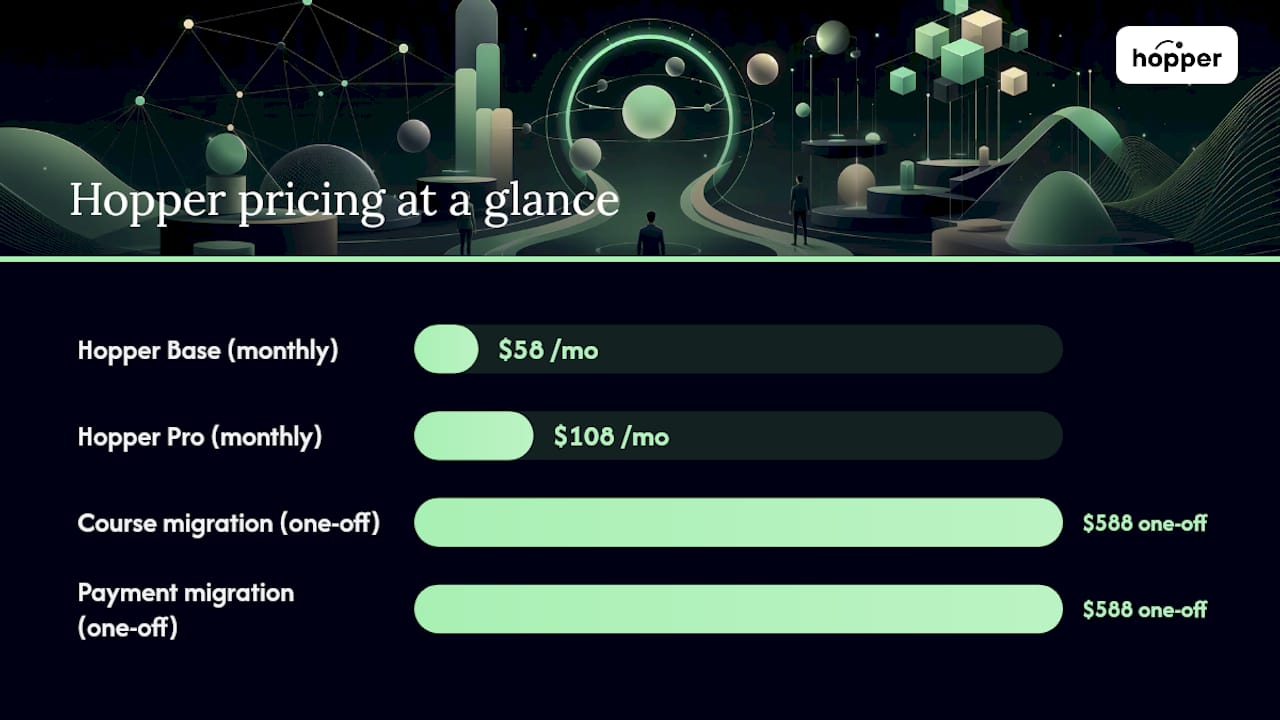
- Hopper Base, at $58 per month with a 1% commission on sales
- Hopper Pro, at $108 per month with 0% commission on sales
Anyone weighing a switch should build a short internal checklist before reaching out for migration help: a full member list with payment status, an inventory of every course and its media files, and a note of any automations tied to your current platform that need rebuilding on the new one.
Pro Tip: Ask any migration team, Hopper's included, whether payment migrations preserve existing billing dates. A clean content migration that accidentally resets everyone's renewal date creates a support nightmare you didn't need.
Hopper's blog also documents migration stories from creators who've made the jump, which is worth a read if you want a sense of what the process actually looks like week to week rather than in a sales pitch.
Refund and Cancellation Policies Across Alternatives
Refund policies vary widely across course platforms, and the differences matter more once real money is on the line. Most subscription-based platforms, Hopper included, bill monthly or annually and let you cancel your subscription without a long-term contract, though the specifics of prorated refunds differ by vendor and should always be confirmed on the pricing page before you commit a full year upfront.
Platforms with free trials generally don't require a card until the trial ends, but some marketplace-style tools bundle in revenue-share arrangements that change the refund calculus entirely, since a "free" plan may simply mean the platform takes a larger cut of every sale instead of charging a subscription. That structure can look appealing at first glance and get expensive fast once your sales volume grows, which is exactly the kind of scaling cost creators tend to underestimate early on.
Annual plans across the industry often carry stricter cancellation terms than monthly ones, sometimes with no refund for unused months once you're past an initial window. Before committing to annual billing anywhere, confirm in writing what happens if you cancel in month three, not just what the marketing page promises about savings. The safest approach is always to read the actual terms page, not the pricing page, since that's where cancellation windows and refund exceptions actually live.
Trial Limits and Money-Back Guarantees Worth Checking
Free trials across the course-platform market range from a simple fourteen-day window to feature-limited free tiers that never technically expire but withhold your most important tools. Neither structure is inherently better, but each demands a different kind of due diligence before you build your course library inside it.
A time-limited trial forces a decision fast, which is useful if you're disciplined about testing core workflows (publishing a course, inviting a test member, processing a real payment) in the first week rather than the last day. A feature-limited free tier can feel safer, but it often hides the exact caps, contact limits, gated certificates, no mobile app access, that only become obvious once you've already invested weeks building content around it.
Money-back guarantees are less common in this category than in consumer software generally, since most vendors treat the trial period itself as the refund mechanism: you're not charged until you decide to stay. That makes it worth testing the parts of a platform you can't fully evaluate from a features page, migration tools, community responsiveness, mobile app performance, during the trial window itself rather than assuming they'll work as advertised once you're a paying customer.
Whatever platform you're testing, get in writing what happens to your uploaded content if you cancel during or immediately after a trial. Some platforms delete everything on cancellation; others retain it for a grace period.
What Reviews Actually Tell You About These Platforms
Public reviews are useful, but only as one input alongside a real trial. Thinkific's own Trustpilot page shows the pattern common across this entire category: strong average ratings sitting alongside a consistent minority of complaints about pricing changes or support response times as accounts scale. That pattern holds across most course platforms, not just Thinkific, because review volume tends to reward early-stage satisfaction more than long-term scaling experience.
The more useful signal is often what specific complaints repeat. A platform with scattered one-off complaints about UI preferences is different from one with a recurring pattern of complaints about member caps appearing after signup, or support tickets going unanswered for days. Read reviews filtered by rating, not just the average, and pay closest attention to the one- and two-star reviews from accounts that mention scaling past their first few hundred members, since that's usually where hidden costs surface.
Comparator databases that map dozens of Thinkific alternatives by category are a reasonable starting point for narrowing your list, but treat any single review score as a data point, not a verdict. The only way to know how a platform actually handles your specific content, your community style, and your growth trajectory is to run a real trial with real content, however small.
Comparing Content Types: Video, Audio, Text, and Live Sessions
Not every platform handles every content format equally well, and this is where a lot of creators get surprised after they've already committed. Course platforms, community platforms, and WordPress plugins each have different native strengths here.
Video hosting is table stakes across nearly every platform in this category, but quality varies: some platforms host video natively with adaptive streaming, while others (particularly WordPress setups) require a separate video hosting service bolted on through a plugin. Audio-only content, useful for podcast-style lessons or async coaching replies, is well supported in all-in-one and community-first tools but often an afterthought in traditional LMS platforms built around video-first course structures.
Text-based content, articles, PDFs, downloadable worksheets, is universally supported, though the presentation quality (inline reading experience versus a bare download link) differs meaningfully between platforms. Live sessions are the biggest differentiator: community-first platforms and all-in-one platforms tend to build live video rooms or scheduled events directly into the product, while WordPress LMS setups typically require a third-party webinar tool integration, and enterprise LMS platforms may not prioritize live sessions at all, since their core use case is self-paced compliance training.
If your business depends on a mix of formats, drip video lessons, async audio coaching replies, and live group calls, confirm each format is natively supported rather than bolted on through a separate subscription before you commit.
Consolidation vs. the Best-of-Breed Stack
The pitch for stitching together five specialized tools always sounds reasonable in isolation: the "best" community tool, the "best" course host, the "best" checkout page. In practice, that stack rarely works as smoothly as the sales pages promise, because every integration point between tools is a place where data gets lost, automations break, or members hit a login wall they didn't expect.
Consolidation wins clearly for solo founders and small teams who don't have a developer on staff to babysit integrations. If you're the only person responsible for your tech stack, every extra tool is a maintenance job you didn't sign up for. A larger team with dedicated technical support and highly specific requirements, deep SCORM compliance, a custom-built community experience, might genuinely be better served picking best-of-breed tools and accepting the integration overhead as a cost of doing business.
My honest read: most creators overestimate how much they need the "best" individual tool and underestimate how much they'll pay, in money and in hours, gluing tools together. If you're under a few thousand members and running one core offer, start with one platform that does most things well before you build a stack that needs its own maintenance schedule.
— Cedrik
Try Hopper Before You Rebuild Your Tool Stack
Hopper replaces the course host, community tool, and checkout page you're currently paying for separately, at a flat rate instead of a rising bill as you grow. Hopper Base starts at $58 per month with a 1% transaction fee, and Hopper Pro runs $108 per month with 0% transaction fees, both including unlimited hubs, members, and products with native iOS and Android apps at every tier.

If you're moving off an existing platform, Hopper's migration service handles course migrations and payment migrations as one-off engagements starting from $588 each, built to move your content and existing Stripe subscriptions without disrupting member billing. You can read how other creators describe the switch on Hopper's customer stories page before you commit to anything.
The most useful next step is a direct one: visit Hopper's pricing page, pick the plan that matches your current member count, and start with a single course or hub migrated as a test before you move your whole business over.
Sources
- 7 Thinkific Competitors for Course Platforms | TechStromy
- 10 Best Thinkific Alternatives Reviewed in 2026 | PeopleManagingPeople
FAQ
What Are the Disadvantages of Thinkific?
Thinkific's community and engagement tools are thinner than dedicated community platforms, and pricing can climb quickly once you add marketing features or scale past its lower tiers. Creators also report needing separate tools for checkout flows and member engagement, which reintroduces the tool sprawl problem Thinkific was supposed to solve, according to TechStromy's comparison.
What Are the Top LMS Platforms Creators Compare Against Thinkific?
Creators most often compare Thinkific against Hopper, Kajabi, Teachable, LearnWorlds, and Podia for course hosting, alongside Skool, Circle, and Mighty Networks for community-first alternatives. WordPress users typically compare it against LearnDash and MemberPress, while enterprise buyers look at Absorb and TalentLMS instead.
Is Skool Better Than Thinkific?
Skool wins for creators whose business depends on daily community engagement and simple gamification, while Thinkific wins for structured, drip-based curriculum with more advanced course-building tools. Neither replaces the other's core strength, which is why many creators end up paying for both until they consolidate onto a single all-in-one platform like Hopper.
Is Thinkific Better Than Kajabi?
Thinkific is generally more affordable for creators focused purely on course hosting, while Kajabi bundles in more marketing automation at a noticeably higher price point with contact caps that can force an upgrade as your list grows. Creators who want courses and community without either platform's pricing ceiling often look at flat-rate alternatives like Hopper instead.
Does Hopper Offer Migration Support From Thinkific?
Yes, Hopper offers dedicated course migrations and payment migrations as one-off services starting from $588 each, designed to move existing content and Stripe subscriptions without disrupting member billing.
Recommended
On our list and want off? .