
Community Onboarding Checklist for Coaches: Your First-Week Plan
A practical community onboarding checklist for coaches: what to prepare before members join, a day-by-day first week, a welcome message template and how to measure it.
By the Hopper team

A good community onboarding checklist does three jobs in a new member's first week: it tells them what the place is for, gets them to take one small action, and lets them feel noticed by a real person. Everything below is built around those three jobs, in the order you would actually do them: before anyone joins, on the day they arrive, through days 1 to 7, and when you check whether it worked.
It is written for coaches and educators who already have paying clients, cohorts or memberships. You have done the hard part of getting someone to pay. Onboarding is what keeps that decision from turning into a quiet cancellation.
TL;DR
- Onboarding is a journey, not an event. The World Bank's Connect4Impact guide describes it as the process you design to welcome new members, and says it sets the tone for every later interaction.
- Test the whole path as a brand-new member before real people arrive: join link, access, first activity, instructions.
- Send a personal welcome from a real name, and name one small first action. A named person inviting newcomers measurably improved retention in a controlled Wikipedia experiment.
- Follow a simple seven-day rhythm: greet, invite a tiny contribution, reply specifically, point to a ritual, check in once.
- Judge it weekly by sorting last week's joiners into started, not yet and stuck.
Table of Contents
- Why the first week decides so much
- Before anyone joins: the pre-launch checks
- Day 0: the welcome message
- Days 1 to 7: a first-week rhythm
- Explaining guidelines, support and expectations
- Does it work? Measuring onboarding
- The copy-and-paste community onboarding checklist
- Where your platform helps or gets in the way
- Putting this checklist on Hopper
- Our perspective
- FAQ
- Sources
Why the first week decides so much
The World Bank's guide uses a simple test: picture a room full of strangers. If nobody greets you or acknowledges you, you may not feel safe or recognized, and you may decide not to engage. The same page notes that poor onboarding makes it very difficult to get members back later.
For a coach, that room is your community feed, your course library or your cohort space. Members arrive with a promise from your sales page in their heads. The first week is where that promise either becomes real or quietly fades.
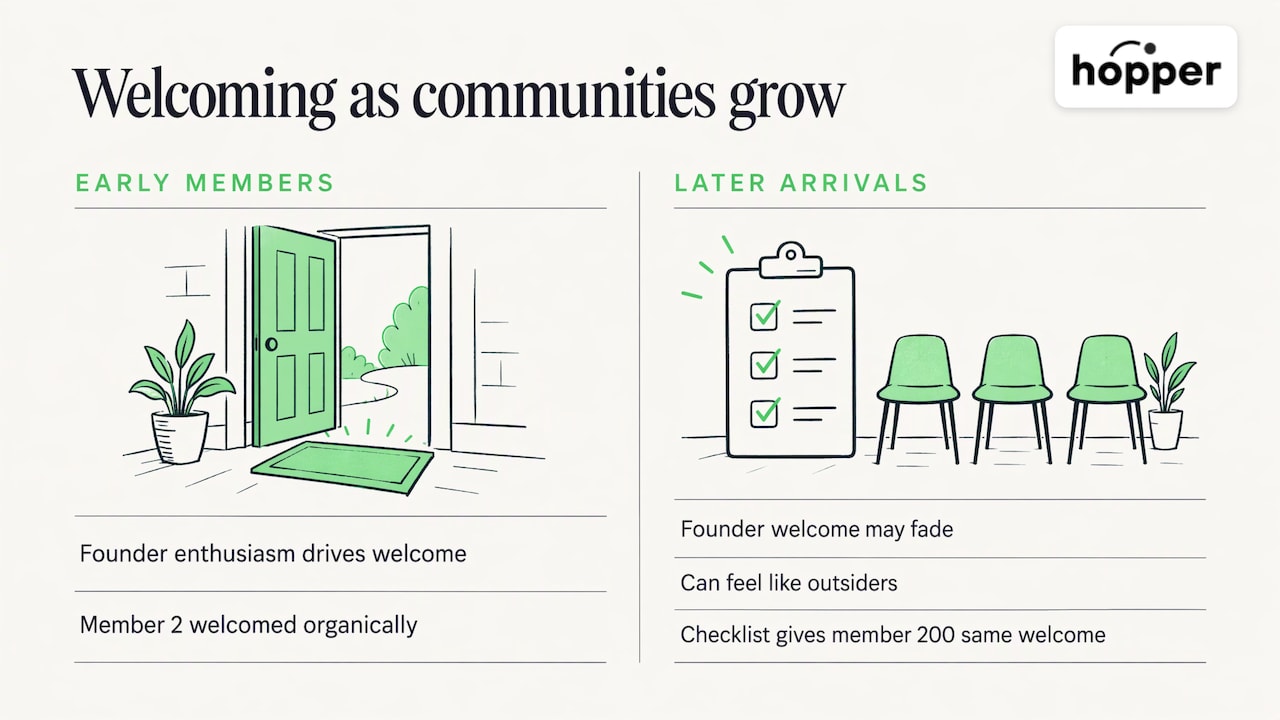
There is a second reason to put this in writing. Together By Design observes that early members are usually welcomed organically, through the founder's own enthusiasm, but that this fades as the community grows, and later arrivals can feel like outsiders. A checklist is how you give member 200 the same welcome member 2 got.
Before anyone joins: the pre-launch checks
Most onboarding failures are plumbing, not psychology. A member who cannot log in on day 0 never reaches your lovely welcome post. Run these checks from a test account, with a total-newbie mindset, before you invite anyone.
- Walk the join path end to end. Start at your landing page or checkout, buy or sign up, create the account, and land inside. Note every spot where you hesitated.
- Check access. Does the new member see the spaces, library modules and sessions they paid for, and nothing they shouldn't?
- Open it on a phone. Many members will live in the mobile app or a mobile browser, not at a desk.
- Confirm the welcome email arrives and its link works. Ask for at least a name and email at sign-up so you can follow up personally.
- Read your own welcome as a stranger. Is the purpose of the community clear in one line? Is there exactly one obvious first action?
- Prepare your first post and your intro thread so the space is never empty when the first person walks in.
- Decide who is responsible for what. Who greets, who replies to first posts, who handles access problems? Together By Design recommends spelling out what happens when and who owns it.
If you are opening a new programme, the World Bank guide suggests inviting people in waves of 10 to 25, with three to six weeks between waves, and using beta testers to try the journey first. A small first wave lets you personally greet everyone and fix the rough edges before the next group arrives.
Day 0: the welcome message
Send the welcome the moment someone joins, from a real name, in a place they will actually see. Keep it short. A structure that works:
- A warm one-line greeting using their name.
- Two or three lines on what members do here.
- One specific, easy first step.
- A pointer to the two or three spaces that matter most.
- A sign-off from you personally, with an invitation to reply.
Leave out the long rulebook, the feature tour and the stack of competing calls to action. Guidelines matter, but pin them as a separate post and link to it with one sentence that explains why they exist.
A template you can adapt
Welcome, [Name]. I'm [Your name], and I'm glad you're here. This is a space where [who it's for] work on [what they're working on], together and at their own pace.
Your first step takes about ten minutes: [one specific action, such as answering the intro prompt in the Start Here space].
After that, look around [Space A] and [Space B]. Our next live session is [day, time, timezone]. If anything is confusing, reply to this message and it comes straight to me.
That last line carries more weight than it looks. In the Wikipedia Teahouse experiment, reported by Morgan and Halfaker at OpenSym 2018, the invitation was personalized and signed by a real editor, and the authors argue that this human "come ask us" gesture, rather than software-only changes like milestones or gamified tutorials, is what likely made the difference.
Days 1 to 7: a first-week rhythm
Pick the version that suits your format. A cohort has a fixed start date and pre-work. A membership has a library and an open feed. A 1:1 programme has a private space and a first session. The rhythm is the same.
| Day | What you do | What the member does |
|---|---|---|
| 0 | Greet them publicly by name; share one thing to read and one thing to do | Logs in, reads the welcome |
| 1 | Invite a tiny first contribution with a low-effort prompt | Introduces themselves or answers one question |
| 2 to 3 | Reply to what they posted, specifically. If they're silent, don't nag | Reads replies, maybe responds |
| 4 to 5 | Point to a recurring ritual: a weekly thread, a live call, a check-in | Sees what a normal week looks like |
| 6 to 7 | Share the next live moment or a replay with a "what to do with this" note | Attends or watches |
| End of week | If they are still quiet, send one warm, no-pressure check-in | Replies, or doesn't, and that is fine |
Define a first win
A first win is a task a member can finish in 10 to 20 minutes that proves the membership is for them. Examples by format:
- Course or library: watch lesson one and fill in the first section of the worksheet.
- Community: answer one specific prompt, such as "What are you trying to finish this month?"
- Cohort: complete the pre-work worksheet before session one.
If the first win needs three new tools, an hour of setup or a personality quiz, it is not a first win. This is where a patchwork stack hurts: every extra login between purchase and first action is a place where someone drops off.
Make observing a legitimate start
Some members will read for a week before they post. That is normal. Joining is a decision about access; participating is a separate decision. Give lurkers something low-pressure to do, like reacting to a post or saving a lesson, and avoid manufactured urgency. A message that says "post in the next 24 hours or you'll miss out" pushes people away instead of in.
Reply fast to the first post
The first reply is the most valuable thing you will write all week. Respond to the actual content, with their name and one specific detail. A generic "Welcome!" tells them nobody read it. A coach with a hundred new members can share this job with moderators, which is why deciding who replies, before launch, belongs on the checklist.
For more prompts to keep the feed alive after week one, see our guide to community engagement ideas that retain paying members.
Explaining guidelines, support and expectations
New members need to know three things: how to behave, how to get help, and what you do and do not promise. Say them plainly and briefly.
- Guidelines: three to five short rules, each with a one-line reason. Pin them in one place.
- Support: tell them exactly where to ask, who answers and how quickly you usually reply.
- Expectations: if you do not offer unlimited 1:1 access, say so kindly now, not in week three.
There is a line to watch. Together By Design warns that welcoming someone into a culture can slide into pressuring them to conform before they have decided they want to belong, and that onboarding can become bureaucratic. If your welcome feels like paperwork, cut it down. The goal is a member who feels invited, not processed.
Does it work? Measuring onboarding
Two pieces of research show why a personal touch is worth the effort.
In the Teahouse experiment, 11,674 new Wikipedia editors were invited by a named host. At three to four weeks, 9.1% were still editing, against 8.0% of a 3,092-member control group. Between two and six months, 14.1% made five or more edits, against 12.8%. Small gaps, but they came from a single personal invitation.
A study in MIS Quarterly on a large deal-sharing platform found that a nudge toward newcomers led their posts to receive 54% more comments, with more positive sentiment, and made newcomers 10% more likely to post again within 12 months. Being answered makes people come back.
For your own community, keep measuring simple:
- Define a "started member." For example: finished the first win, attended session one, or posted an intro.
- Once a week, list everyone who joined in the last seven days and mark each as started, not yet, or stuck.
- Treat stuck and not yet differently. Stuck means they tried and hit a wall: login, timezone, an unclear next step. Fix the wall. Not yet means silence: send one useful nudge, then leave them be.
- If half of new members never start, look first at access, a bloated welcome, or a mismatch between your sales page and what members find inside, before concluding they need more nurturing.
- Write down what you learn and change one thing per wave.
Onboarding reduces drop-off. It does not eliminate it, and some people will always join on impulse. The aim is to stop losing the members who would have stayed if you had simply met them at the door.
The copy-and-paste community onboarding checklist
Before launch
- Test the join path, access and welcome email from a fresh account, on desktop and phone
- Purpose of the community stated in one line, visible on arrival
- Start Here space and intro thread ready, with your own post already in it
- Guidelines pinned separately (3 to 5 rules, with reasons)
- Roles assigned: who greets, who replies, who fixes access
- First wave of 10 to 25 members, if you can stage it
Day 0
- Personal welcome from a real name, within 24 hours at most
- One thing to read, one thing to do
- Next live moment with timezone, and where to get help
Days 1 to 7
- Invite a tiny first contribution
- Reply specifically to the first post, ideally within hours
- Point to a weekly ritual
- Share a live session or replay with a short note on what to do with it
- One warm check-in at the end of the week if they are silent
Week 2 and on
- Sort new joiners into started, not yet and stuck
- Fix whatever caused the stuck ones
- Adjust the welcome, then repeat
Where your platform helps or gets in the way
A checklist is only as smooth as the tools beneath it. When the course lives in one product, the community in another, checkout in a third and the app is a separate purchase, your "one clear first action" turns into three logins and a hunt for a password. If you are weighing options, our comparison of LMS platforms with community built in shows what to look for, and our walkthrough on building a coaching community members stay in goes deeper on the long game. For the course side of onboarding, the student onboarding template breaks the journey into phases.
Putting this checklist on Hopper
Hopper is an all-in-one platform for coaches, healers and educators who already sell their teaching online. Each hub, the self-contained space for one business or programme, comes with Discussions (a community feed with spaces, threads, reactions and native video), a Library with drip content, quizzes and certificates, and a Landing Page where people join or buy in one place. Pro adds Async Sessions for asynchronous coaching. Both plans include a native iOS and Android app for members, so your welcome lands where members already are.
Sprout, our built-in AI twin, answers students from your own lessons and escalates the rest to you, which helps with the "how do I..." questions that crowd a first week. And if you are coming from another platform, migration and onboarding are free, done with you and led by the founder.
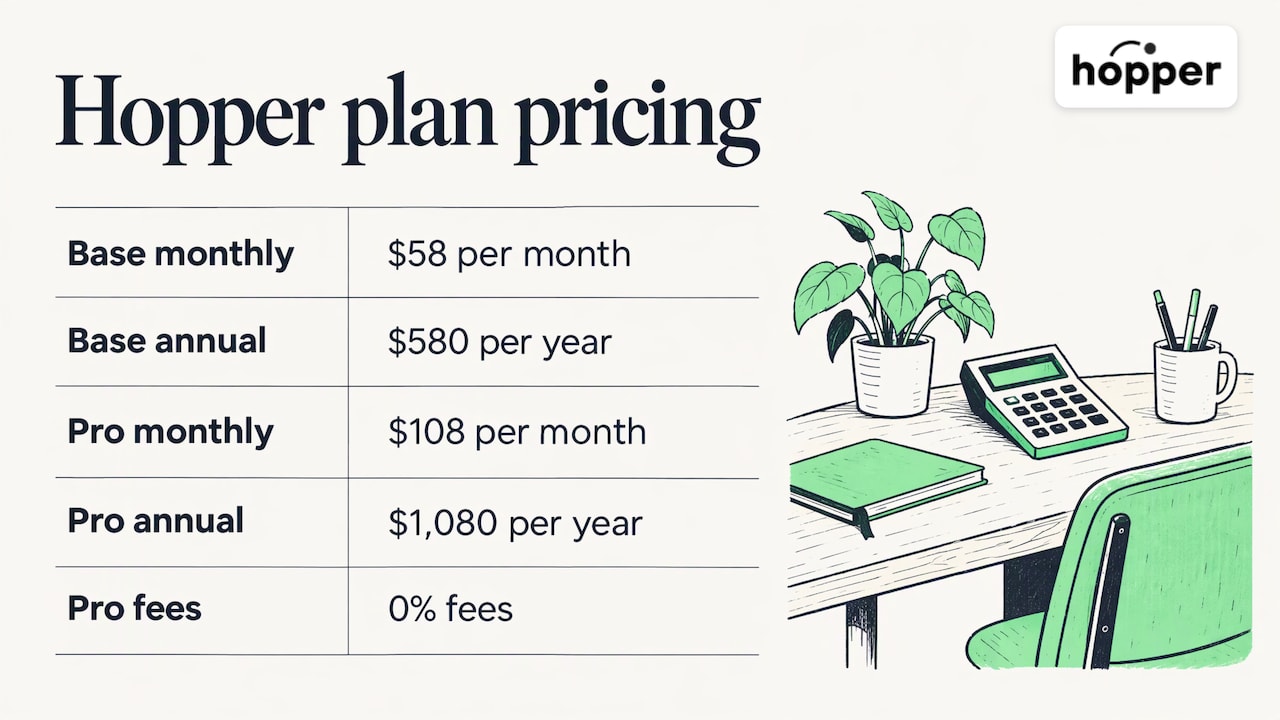
Plans start at $58 per month for Base or $108 per month for Pro, or $580 and $1,080 per year on annual billing. Pro carries 0% fees. You can see the details on the pricing section.

If you want your first-week plan running inside one space instead of five, join the Hopper waitlist.
Our perspective
We built Hopper because we watched coaches spend their first week with a new member apologizing for the tools. One login for the course, another for the community, a third for the app. By the time someone reached the welcome post, the warmth was gone.
Our view is simple: onboarding is a human act, and software should clear the path for it. That is why a hub holds the community, the library, the landing page and the app in one place, and why one account runs unlimited hubs on one flat plan. Nothing about a first week should change because you added another programme or another hundred members.
We also think a new member should feel like they belong somewhere, not that they were enrolled in something. The checklist above is how that feeling gets made: a real name, a small first step, a specific reply. Our job is to make those moments easy to repeat.
If you are moving from Kajabi, Circle, Skool or a stack of separate tools, we will do the migration with you, free, and help you set up your welcome the way you want it.
Cedrik, Founder at Hopper.so
FAQ
How long should a community onboarding process last?
Plan for the first seven days in detail, then one check-in at the end of week one. Think of it as a journey rather than a single event, with your regular rituals taking over after that. If you run waves, the World Bank guide suggests three to six weeks between them.
What should I put in a welcome message?
A warm one-line greeting, two or three lines on what members do here, one easy first step, a pointer to two or three main spaces, and a personal sign-off inviting a reply. Keep the rules in a separate pinned post.
When should I send the welcome?
As soon as the member joins or payment clears, and no later than 24 hours. Send it from a real name, in a channel they already check, so the first message from you feels personal.
How do I know if onboarding is working?
Define what a started member looks like, then sort each week's new joiners into started, not yet and stuck. Fix the barriers for stuck members and send one useful nudge to the quiet ones. Compare cohorts over time to see what changes.
What if new members never post?
Shrink the ask. Offer a prompt that takes a minute to answer, post first yourself, and let reading count as a legitimate start. Reply warmly to whatever they do share.
Sources
- Onboarding New Members, Connect4Impact (World Bank)
- Evaluating the impact of the Wikipedia Teahouse on newcomer socialization and retention, OpenSym 2018
- Consistent Onboarding, Together By Design
- Behavior Toward Newcomers and Contributions to Online Platforms, MIS Quarterly
Recommended
On our list and want off? .